Report
Malware Spotlight: Qilin Ransomware
Arete Analysis
Cybersecurity Trends
Threat Actors

Executive Summary
Over the past few years, Arete’s Incident Response (IR) team has responded to more than one hundred incidents attributed to the Qilin ransomware group. Active since October 2022 under a different name (Agenda), the group had an increase in activity at the beginning of 2025, especially during the second quarter, when it was the most active threat group. Notably, most of its activity came in June 2025, as the group exploited vulnerabilities in Fortinet’s FortiGate appliances and reportedly attempted to recruit ex-RansomHub affiliates. In the first quarter of 2026, the group remained the second most active extortion group behind Akira and actively targeted WatchGuard Firebox devices for initial access, particularly those vulnerable to CVE-2025-14733, a critical vulnerability in WatchGuard Fireware OS that allows a remote, unauthenticated threat actor to execute arbitrary code.
This spotlight explores the ransomware group’s observed behavior, background information on the threat actor, and statistics from Incident Response engagements, along with a technical analysis of Qilin’s ransomware executable. Finally, we discuss security recommendations to better defend against this evolving cyber threat and mitigate the risk of financial and reputational losses. For more insights and data on Qilin and other top threat groups, explore Arete’s Q1 2026 Crimeware Report.
Incident Response Data on the Qilin Ransomware Group
The information below is based on Arete engagements attributed to Qilin since August 2023. Our IR, Threat Intelligence, and Data Analytics teams work together to analyze key data points during every ransomware engagement and form real-time threat actor (TA) insights.
Impacted sectors include professional services, public services, healthcare, financial services, manufacturing, high technology, retail, and hospitality.
The median initial ransom demand is $400,000.
Tools observed during investigations include Mimikatz, Lazagne, FGDump, PsExec, Splashtop, Mesh Agent, Atera, ScreenConnect Client, AnyDesk, SoftPerfect Network Scanner (Netscan), Advanced Port Scanner, WinRAR, WinSCP, FileZilla, Putty, Rclone, and MEGAsync.
Qilin-affiliated actors often exploit edge device vulnerabilities or use legitimate credentials.
The group operates a TOR data leak site (DLS), where it self-identifies as Qilin and commonly threatens to release stolen data if a payment is not made.
The ransom note identifies the group as Qilin and contains links to its data leak and chat negotiation sites. To initiate negotiations, login credentials are included in the ransom note. Part of the ransom note filename matches the encrypted file extension as a naming convention.
In addition to encrypting files and creating a ransom note, the Qilin ransomware requires a password to execute properly, supports various command-line arguments, deletes volume shadow copies, clears the Windows Event Logs, and creates a desktop wallpaper displaying information about the encryption event.
Background
Arete first observed Qilin in incident response engagements in 2023. Over time, the group evolved into an increasingly sophisticated and notable ransomware operation, becoming the top threat group in Q2 of 2025 and the second-most active, after Akira, in Q3 and Q4 of 2025 and Q1 of 2026.
TOP THREAT GROUPS OBSERVED BY QUARTER

Figure 1: Top threat groups observed by Arete by quarter
Qilin impacts a broad range of organizations throughout North America and often lists victims that fail to reach a negotiation agreement on its data leak site. The group maintains Windows and Linux versions of its ransomware, and the most recently observed Windows-based version was developed in the Rust programming language. Qilin has been observed exploiting vulnerabilities in Fortinet appliances as an initial access vector.
In 2025, Qilin broadened its RaaS platform by introducing a “Call Lawyer” negotiation-support feature, through which affiliates can request assistance from individuals that Qilin portrays as an internal legal team when victims delay or resist negotiations. The goal is to provide affiliates with tactics that pressure victims into believing that non-compliance could lead to regulatory scrutiny, fines, or even criminal exposure. Additionally, the platform offers affiliates more aggressive coercion methods, such as launching distributed denial of service (DDoS) attacks against victim websites.
Technical Analysis
Malware analysis revealed that Qilin ransomware:
Supports multiple command-line arguments.
Requires the correct password to fully encrypt files.
Appends a file extension to all encrypted files; however, the extension is not static. Instead, it is randomly generated for each incident. As an example, this report uses the extension XXXXXXXXX (e.g., file.docx.XXXXXXXXX).
Generates a ransom note with a filename that incorporates the same randomized extension value used during encryption. Continuing the example above, the ransom note was named README-RECOVER-XXXXXXXXXX.txt, where XXXXXXXXXX corresponds to the unique extension assigned in this incident.
Self-identifies the group as Qilin in the ransom note.
References a data leak site in the ransom note that, when accessed, also self-identifies the group as Qilin.
Kills a list of processes and services.
Clears Windows event logs.
Maintains a list of whitelisted files and directories to ensure the system does not become unusable, preventing recovery when running a decryptor.
Attempts to prevent system recovery by deleting the system's volume shadow copies.
Creates a mutex during execution.
Creates an image file in the %Temp% directory and later modifies a registry key to change the desktop wallpaper.
Creates log files in a QLOG directory created in %TEMP% (e.g., ThreadId(1).LOG).
Has a well-defined ransomware configuration with various fields like company_id, accounts, note, password_hash, directory_black_list, file_ black_list, process_black_list, and file_pattern_black_list.
Execution Pattern/Arguments
Qilin ransomware will not execute in the system without the correct “--password” argument.
Example of the command to run the executable:
Qilin.exe --password XXXXXXXXXXXXX --no-admin |
Screenshot of the ransomware execution in the command prompt with the password argument redacted:
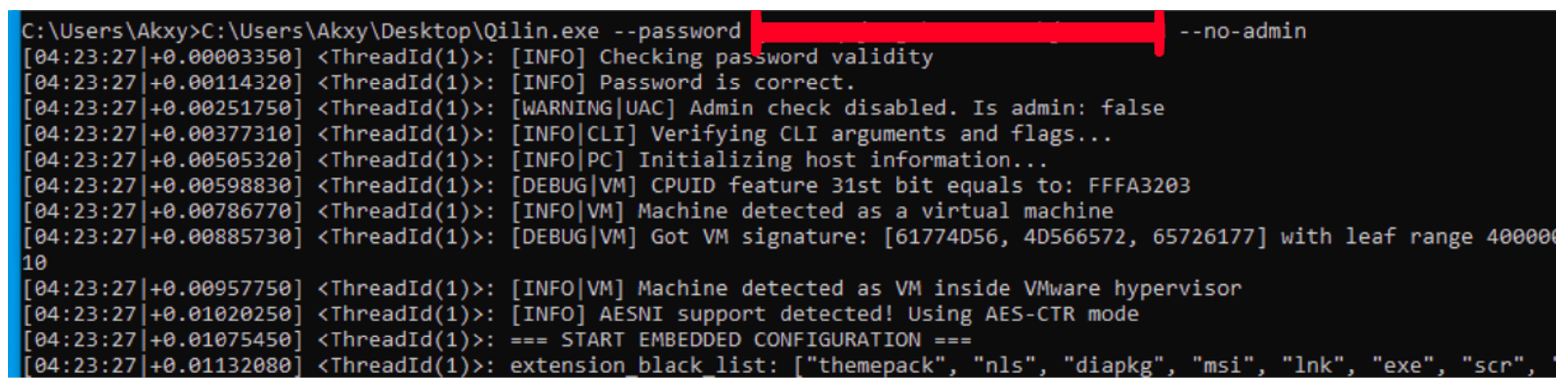
Figure 2. Ransomware execution in command prompt
List commands supported by the Qilin ransomware analyzed:
Command Line Parameters | Description |
|---|---|
--password | Required to start program. Reads password from password.txt. |
--spread | Spreads to Windows hosts using login credentials. Does not encrypt local machine. |
--spread-vcenter | Distributes payload to ESXi/vCenter hosts and installs modules. No local encryption. |
--no-admin | Disables admin rights check. |
--no-priority | Disables CPU and IO priority settings. |
--no-extension | Prevents file extension change during encryption. |
--no-note | Disables ransom note saving in folders. |
--timer | Delays execution by specified seconds. |
--paths | Encrypts only specified paths/directories. |
--ips | Encrypts only network resources on specified IPs or hosts. |
--no-ef | Disables file extension filtering. |
--no-ff | Disables file name/type filtering. |
--no-df | Disables directory filtering. |
--no-proc | Disables process killer functionality. |
--no-services | Disables service killer functionality. |
--no-vm | Disables virtual machine detection and related kills. |
--no-sandbox | Disables sandbox detection logic. |
--kill-cluster | Enables destruction of cluster environments. |
--safe | Reboots to safe mode, enables autologin, and begins encryption. |
--no-autostart | Prevents self-autostart configuration. |
--no-wallpaper | Prevents wallpaper or lockscreen changes. |
--no-destruct | Prevents self-destruction after execution. |
--no-zero | Disables wiping of free disk space post-encryption. |
--no-local | Skips encryption of local volumes. |
--no-mounted | Skips encryption of mounted shares and network shortcuts. |
--no-domain | Skips host discovery in domain networks. |
--no-network | Skips host discovery in the entire subnet. |
--exclude | Skips specified hosts/IPs from encryption and scanning. |
--print-image | Prints a message to all available printers post-encryption. |
--print-delay | Sets delay before printing with --print-image. |
--force | Allows multiple instances by skipping mutex creation. |
--no-logs | Disables writing of log files. |
--logs | Collects and archives logs to local directory. |
--dry-run | Runs encryption simulation without modifying files. |
Stop Services and Processes
Before file encryption, the ransomware terminates a pre-determined list of processes and services to encrypt as many files as possible.
Process names:
vmms, vmwp, vmcompute, agntsvc, dbeng50, dbsnmp, encsvc, excel, firefox, infopath, isqlplussvc, sql, msaccess, mspub, mydesktopqos, mydesktopservice, notepad, ocautoupds, ocomm, ocssd, onenote, oracle, outlook, powerpnt, sqbcoreservice, steam, synctime, tbirdconfig, thebat, thunderbird, visio, winword, wordpad, xfssvccon, bedbh, vxmon, benetns, bengien, pvlsvr, beserver, raw_agent_svc, vsnapvss, cagservice, qbidpservice, qbdbmgrn, qbcfmonitorservice, sap, teamviewer_service, teamviewer, tv_w32, tv_x64, cvmountd, cvd, cvfwd, cvods, saphostexec, saposcol, sapstartsrv, avagent, avscc, dellsystemdetect, enterpriseclient, veeamnfssvc, veeamtransportsvc, veeamdeploymentsvc, mvdesktopservice |
Service names:
vmms, mepocs, memtas, veeam, backup, vss, sql, msexchange, sophos, msexchange, msexchange\\$, wsbexchange, pdvfsservice, backupexecvssprovider, backupexecagentaccelerator, backupexecagentbrowser, backupexecdivecimediaservice, backupexecjobengine, backupexecmanagementservice, backupexecrpcservice, gxblr, gxvss, gxclmgrs, gxcvd, gxcimgr, gxmmm, gxvsshwprov, gxfwd, sapservice, sap, sap\\$, sapd\\$, saphostcontrol, saphostexec, qbcfmonitorservice, qbdbmgrn, qbidpservice, acronisagent, veeamnfssvc, veeamdeploymentservice, veeamtransportsvc, mvarmor, mvarmor64, vsnapvss, acrsch2svc, (.*?)sql(.*?) |
File and Directory Exclusions
The ransomware excludes system-related files and folders, ransomware-related files, and whitelisted extensions during encryption.
Excluded file extensions:
themepack, nls, diapkg, msi, lnk, exe, scr, bat, drv, rtp, msp, prf, msc, ico, key, ocx, diagcab, diagcfg, pdb, wpx, hlp, icns, rom, dll, msstyles, mod, ps1, ics, hta, bin, cmd, ani, 386, lock, cur, idx, sys, com, deskthemepack, shs, theme, mpa, nomedia, spl, cpl, adv, icl, msu, XXXXXXXXXX |
Excluded directories:
windows, system volume information, intel, admin$, ipc$, sysvol, netlogon, $windows.~ws, application data, mozilla, program files (x86), program files, $windows.~bt, msocache, tor browser, programdata, boot, config.msi, google, perflogs, appdata, windows.old, appdata, .., ., boot, windows, windows.old, $recycle.bin, admin$ |
Excluded files:
desktop.ini, autorun.ini, ntldr, bootsect.bak, thumbs.db, boot.ini, ntuser.dat, iconcache.db, bootfont.bin, ntuser.ini, ntuser.dat.log, autorun.inf, bootmgr, bootmgr.efi, bootmgfw.efi, #recycle, autorun.inf, boot.ini, bootfont.bin, bootmgr, bootmgr.efi, bootmgfw.efi, desktop.ini, iconcache.db, ntldr, ntuser.dat, ntuser.dat.log, ntuser.ini, thumbs.db, #recycle, bootsect.bak |
Inhibit System Recovery
Windows operating systems contain features that can help fix corrupted system files, including shadow copies, which are backups of files created by the Volume Shadow Copy Service (VSS). By deleting shadow copies, the ransomware can prevent victims from restoring files from backups, making it more difficult for them to recover their data without paying the ransom.
The ransomware deletes volume shadow copies and disables the Windows Volume Shadow Copy Service (VSS) before file encryption by starting the following processes:
wmic service where name='vss' call ChangeStartMode Manual |
System Network Connections Discovery
Qilin ransomware can enumerate network-mounted shares by scanning the network interfaces.
Data Encrypted for Impact
The ransomware initially finds available drives, then loads the files one by one using the Windows APIs “FindFirstFileW“ and “FindNextFileW”. The ransomware generates random AES keys to encrypt the files, then encrypts the AES keys using a public RSA key. The resulting key is placed at the end of the file.
The ransomware encrypts files, adds a randomized extension to the encrypted files, and appends the following bytes towards the end of each file.
-----END CIPHERTEXT BLOCK----- |
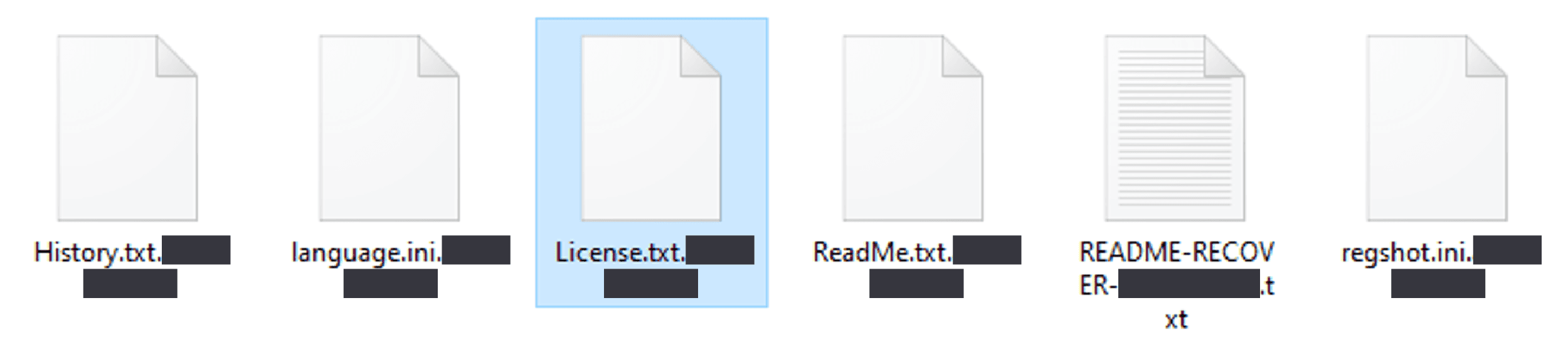
Figure 3. “.XXXXXXXXXX” extension added to the encrypted files
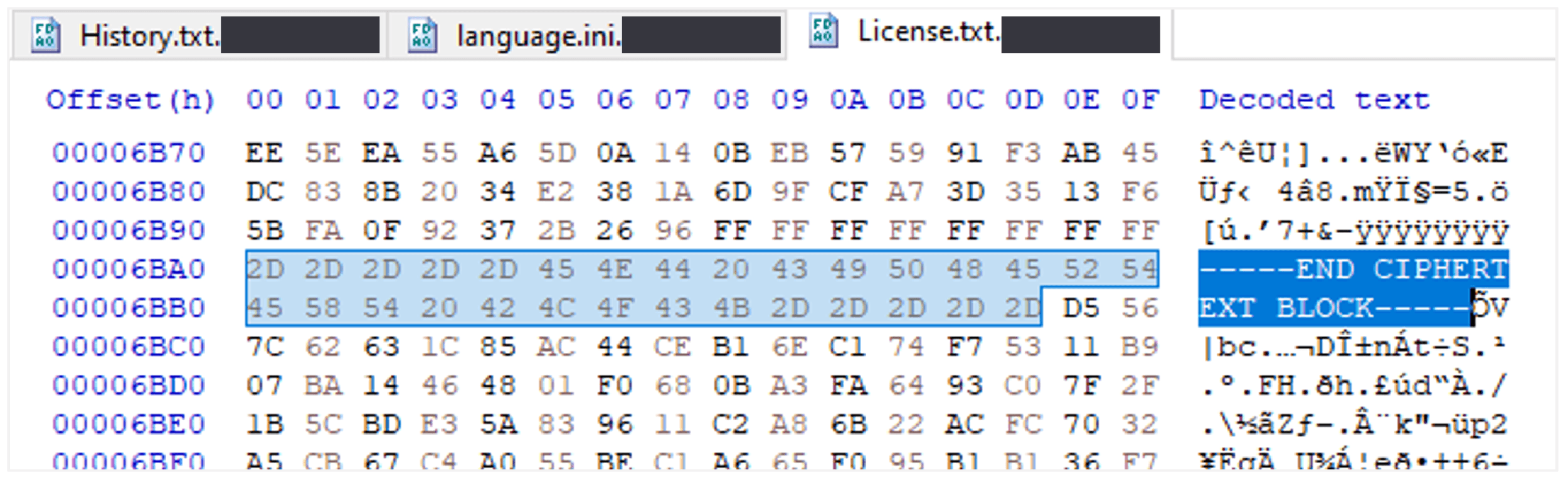
Figure 4. Encrypted file padding bytes followed by encrypted AES keys
Upon successful execution, the ransomware creates a ransom note with the file name README-XXXXXXX-XXXXXXXXXX.txt.
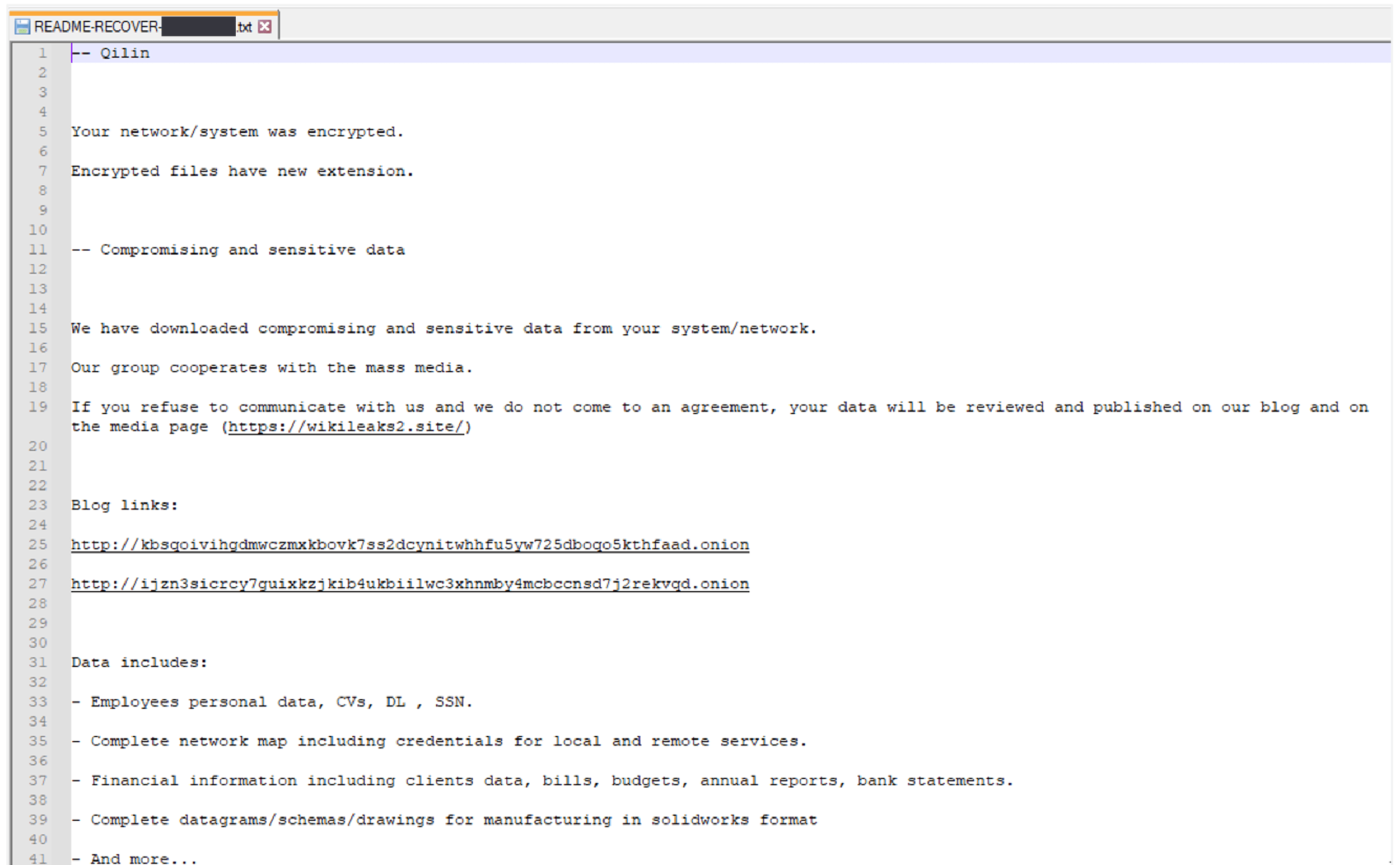
Figure 5. Screenshot showing a portion of the Qilin ransom note
Ransom note content:
-- Qilin Your network/system was encrypted. -- Compromising and sensitive data We have downloaded compromising and sensitive data from your system/network. Blog links: Data includes: -- Warning 1) If you modify files - our decrypt software won't able to recover data -- Recovery 1) Download tor browser: https://www.torproject[.]org/download/ Please note that communication with us is only possible via the website in the Tor browser, which is specified in this note. -- Credentials Extension: XXXXXXXXXX |
Modify Registry
The Windows registry is a database that stores configuration settings and values for the Windows operating system. It manages user preferences, installed software, system configurations, and more. Malware abuses the Windows registry to maintain persistence, hide its presence, disable security settings, and launch malicious scripts.
The QIlin ransomware performs a registry key modification to change the desktop wallpaper.
Registry Key | Value Name | Value Data |
|---|---|---|
Computer\HKEY_CURRENT_USER\SOFTWARE\Microsoft\Windows\CurrentVersion\Explorer\Wallpapers | BackgroundHistoryPath0 | C:\Users\Akxy\AppData\Local\Temp\jjAJrgQA.jpg |

Figure 6. Screenshot showing the registry modification
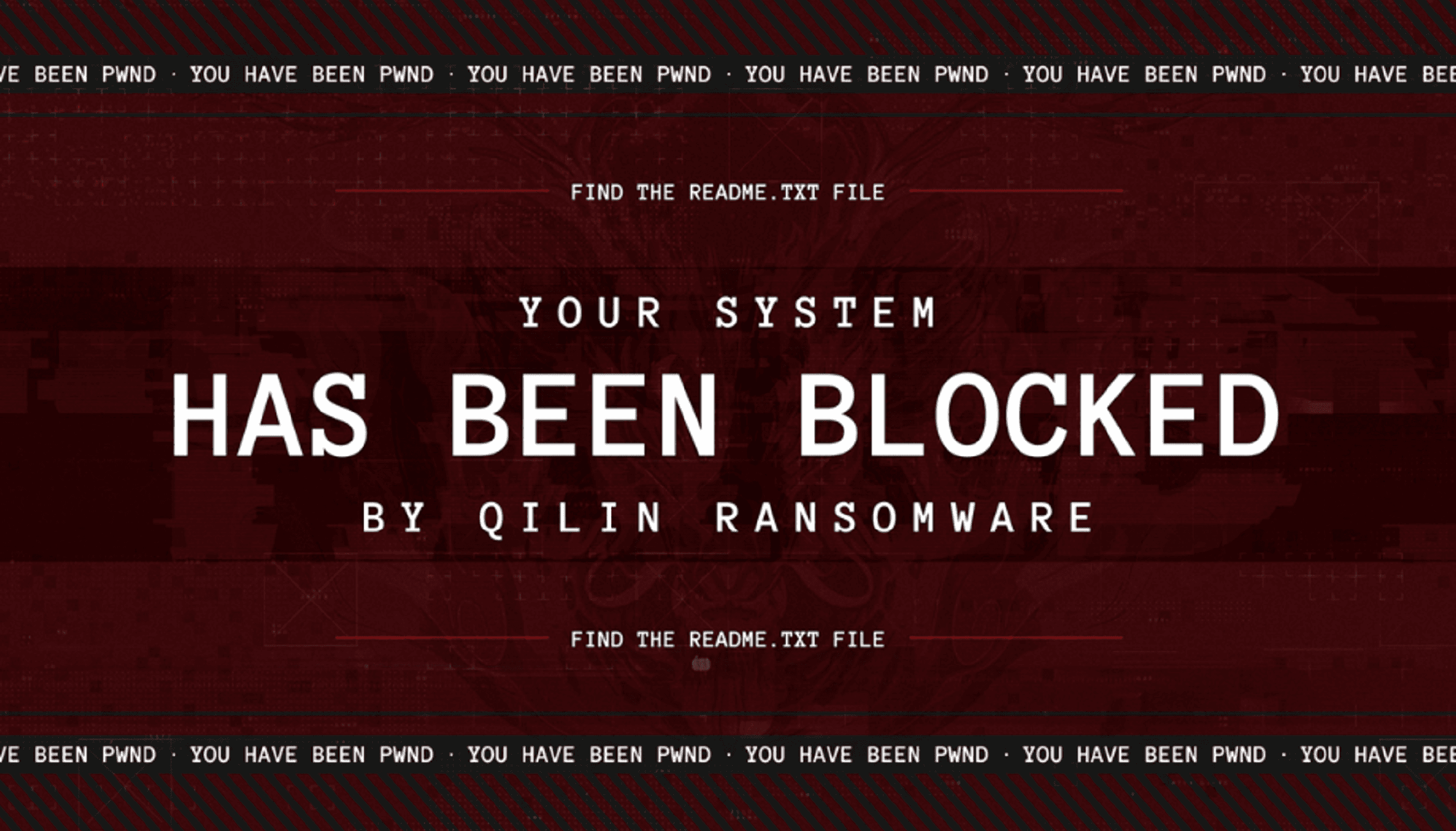
Figure 7. Wallpaper image content from the C:\Users\%USERNAME%\AppData\Local\Temp\jjAJrgQA.jpg file
The ransomware performs the following registry key modification to achieve persistence:
Registry Key | Value Name | Value Data |
|---|---|---|
Computer\HKEY_LOCAL_MACHINE\SOFTWARE\Microsoft\Windows\CurrentVersion\Run | *zgngnt | Qilin.exe --password XXXXXXXXXXXXX --no-admin --no-admin |

Figure 8. Screenshot showing the registry modification
Mutex
The mutex is the fundamental tool for managing shared resources between multiple threads or processes. Typically, malware uses a mutex to avoid reinfecting the victim system and causing multiple layers of encryption. The ransomware creates the following mutex value: c4eed3e3a7e1114c2864980024a9c68f88e647866a180835afafd5ef80da1afe

Figure 9. Screenshot of the mutex value created while debugging the ransomware
Network Activity
The ransomware did not try to communicate with a remote server other than encrypting data from mounted shares.
Indicator Removal
Windows Event Logs keep a record of a computer's alerts and notifications, and the ransomware clears these logs to hide its malicious activity. The following command was executed to clear the logs:
"powershell" $logs = Get-WinEvent -ListLog * | Where-Object {$_.RecordCount} | Select-Object -ExpandProperty LogName ; ForEach ( $l in $logs | Sort | Get-Unique ) {[System.Diagnostics.Eventing.Reader.EventLogSession]::GlobalSession.ClearLog($l)} |
File and Directory Modification
The ransomware uses the fsutil tool to redirect file system access to a different location after gaining access to compromised networks by executing the following commands:
"cmd" /C fsutil behavior set SymlinkEvaluation R2R:1 |
Indicators of Compromise
Indicator | Type | Context |
|---|---|---|
8d608d85e4785592857988c0cd749881a5e888e49e30b80ea90d214792547135 f910b2a6d84d0677cda9aefabfa4a45863ba51a8831588e3b527e8e1d3a9927c | SHA256 hash | Qilin ransomware |
C:\README-RECOVER-XXXXXXXXXX.txt | File path | Qilin ransom note |
.XXXXXXXXXX | Extension | Encrypted file extension example |
"cmd" /C vssadmin.exe delete shadows /all /quiet | Process | Volume Shadow Copy deletion and disabling of the Volume Shadow Copy (VSS) service |
"powershell" $logs = Get-WinEvent -ListLog * | Where-Object {$_.RecordCount} | Select-Object -ExpandProperty LogName ; ForEach ( $l in $logs | Sort | Get-Unique ) {[System.Diagnostics.Eventing.Reader.EventLogSession]::GlobalSession.ClearLog($l)} | Process | Clearing Windows event logs |
"cmd" /C fsutil behavior set SymlinkEvaluation R2R:1 | Process | File and directory permissions modification |
Key: Computer\HKEY_CURRENT_USER\SOFTWARE\Microsoft\Windows\CurrentVersion\Explorer\Wallpapers\ Name: BackgroundHistoryPath0 Data: C:\Users\%USERNAME%\AppData\Local\Temp\jjAJrgQA.jpg | Registry | Registry modification to display the Qilin ransomware desktop wallpaper image |
Key: Computer\HKEY_LOCAL_MACHINE\SOFTWARE\Microsoft\Windows\CurrentVersion\Run Name: *zgngnt Data: "C:\Users\%USERNAME%\Desktop\Qilin.exe" --password XXXXXXXXXXXXX --no-admin --no-admin | Registry | Registry modification to achieve persistence |
http://kbsqoivihgdmwczmxkbovk7ss2dcynitwhhfu5yw725dboqo5kthfaad[.]onion | URL | TA data leak site (DLS) |
Ransomware Configuration
=== START EMBEDDED CONFIGURATION === extension_black_list: ["themepack", "nls", "diapkg", "msi", "lnk", "exe", "scr", "bat", "drv", "rtp", "msp", "prf", "msc", "ico", "key", "ocx", "diagcab", "diagcfg", "pdb", "wpx", "hlp", "icns", "rom", "dll", "msstyles", "mod", "ps1", "ics", "hta", "bin", "cmd", "ani", "386", "lock", "cur", "idx", "sys", "com", "deskthemepack", "shs", "theme", "mpa", "nomedia", "spl", "cpl", "adv", "icl", "msu", "XXXXXXXXXX"] extension_white_list: ["mdf", "ldf", "bak", "vib", "vbk", "vbm", "vrb", "vmdk", "abk", "bkz", "sqb", "trn", "backup", "bkup", "old", "tibx", "pfi", "pvhd", "pbf", "dim", "gho", "vpcbackup", "arc", "mtf", "bkf", "dr"] filename_black_list: ["desktop.ini", "autorun.ini", "ntldr", "bootsect.bak", "thumbs.db", "boot.ini", "ntuser.dat", "iconcache.db", "bootfont.bin", "ntuser.ini", "ntuser.dat.log", "autorun.inf", "bootmgr", "bootmgr.efi", "bootmgfw.efi", "#recycle", "autorun.inf", "boot.ini", "bootfont.bin", "bootmgr", "bootmgr.efi", "bootmgfw.efi", "desktop.ini", "iconcache.db", "ntldr", "ntuser.dat", "ntuser.dat.log", "ntuser.ini", "thumbs.db", "#recycle", "bootsect.bak"] directory_black_list: ["windows", "system volume information", "intel", "admin$", "ipc$", "sysvol", "netlogon", "$windows.~ws", "application data", "mozilla", "program files (x86)", "program files", "$windows.~bt", "msocache", "tor browser", "programdata", "boot", "config.msi", "google", "perflogs", "appdata", "windows.old", "appdata", "..", ".", "boot", "windows", "windows.old", "$recycle.bin", "admin$"] win_services_black_list: ["vmms", "mepocs", "memtas", "veeam", "backup", "vss", "sql", "msexchange", "sophos", "msexchange", "msexchange\\$", "wsbexchange", "pdvfsservice", "backupexecvssprovider", "backupexecagentaccelerator", "backupexecagentbrowser", "backupexecdivecimediaservice", "backupexecjobengine", "backupexecmanagementservice", "backupexecrpcservice", "gxblr", "gxvss", "gxclmgrs", "gxcvd", "gxcimgr", "gxmmm", "gxvsshwprov", "gxfwd", "sapservice", "sap", "sap\\$", "sapd\\$", "saphostcontrol", "saphostexec", "qbcfmonitorservice", "qbdbmgrn", "qbidpservice", "acronisagent", "veeamnfssvc", "veeamdeploymentservice", "veeamtransportsvc", "mvarmor", "mvarmor64", "vsnapvss", "acrsch2svc", "(.*?)sql(.*?)"] |
Data Leak Site
The ransom note contains a data leak site (DLS) that, when accessed, displayed the following page, self-identifying the group as Qilin:
TOR DLS: ijzn3sicrcy7guixkzjkib4ukbiilwc3xhnmby4mcbccnsd7j2rekvqd[.]onion
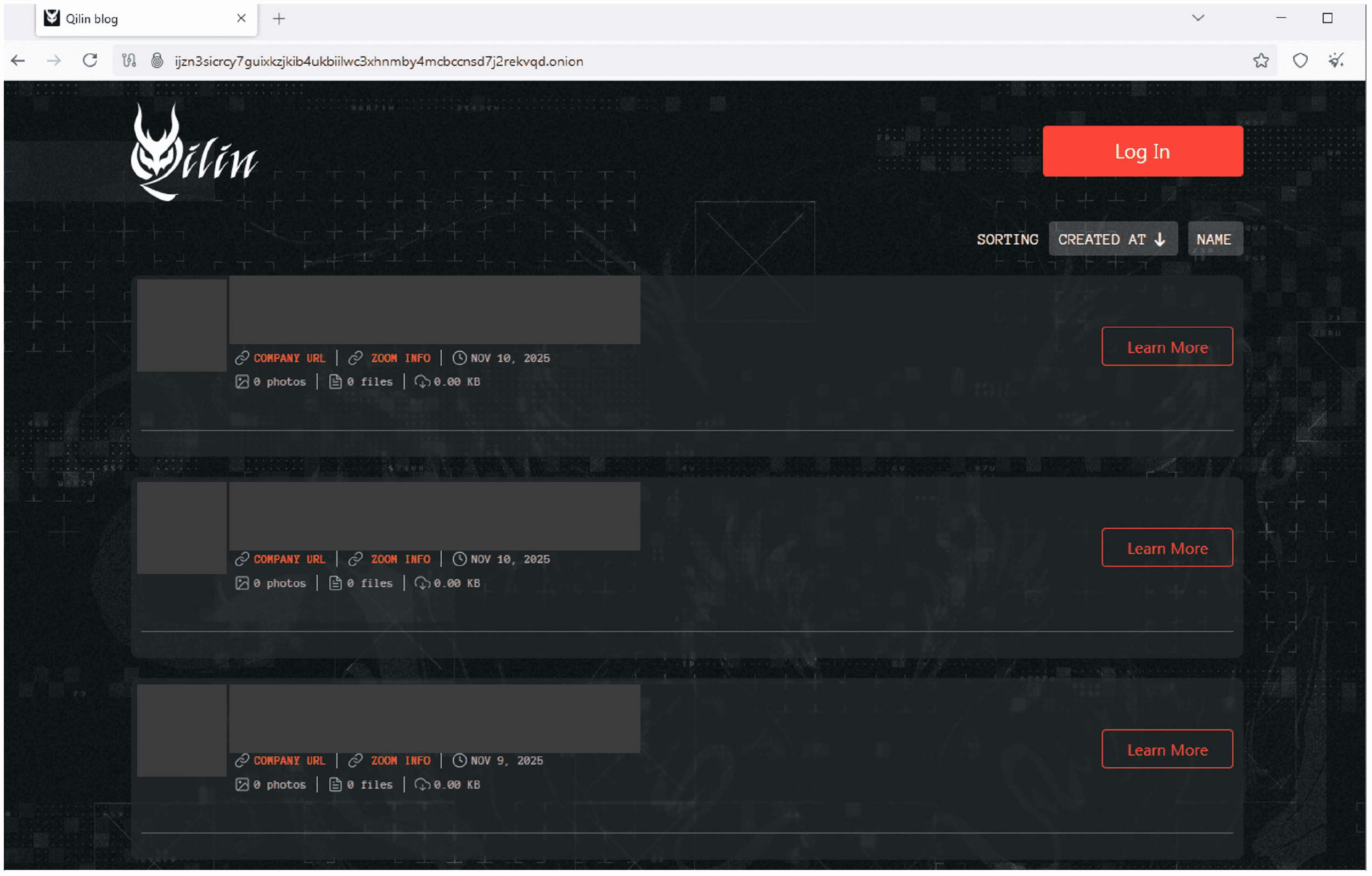
Figure 10. Tor DLS
Detection Mechanisms
Arete Bloktd℠ Rules
Arete Bloktd℠ includes expert threat analysis, crafted threat hunting queries, and active deployment of preventive rules for adversarial behaviors on SentinelOne® protected assets monitored by Arete.
SentinelOne® S1QL 2.0 Query Syntax
Qilin Ransomwareendpoint.os = 'windows' and event.category = 'process' and event.type = 'Process Creation' and src.process.cmdline matches '\\.exe {1,4}--password {1,4}[a-zA-Z0-9-]{32} {1,4}--no-admin' Note: This threat hunting query may need to be tuned for your specific network environment. |
|---|
Yara
rule Qilin_ransomware_executable strings: condition: |
|---|
Recommended Mitigations
Utilize an endpoint detection and response (EDR) solution with the capability to halt detected processes and isolate systems on the network based on identified conditions.
Block any known attacker C2s in the firewall.
Implement multi-factor authentication on RDP and VPN to restrict access to critical network resources.
Eliminate unnecessary RDP ports exposed to the internet.
Block a high number of SMB connection attempts from one system to others in the network over a short period of time.
Perform periodic dark web monitoring to verify if data is available for sale on the black market.
Perform penetration tests.
Periodically patch systems and update tools.
Monitor connections to the network from suspicious locations.
Monitor downloads and uploads of files to file-sharing services outside standard work hours.
Monitor file uploads from domain controllers to the internet.
Monitor network scans from uncommon servers (e.g., RDP server).
Organizations can find the full list of US government-recommended ransomware prevention and mitigation guidance here: https://www.cisa.gov/stopransomware/ransomware-guide.
Arete Advisors, LLC makes no claims, promises or guarantees about the accuracy, completeness, or adequacy of the contents of this report and expressly disclaims liability for errors and omissions in the content. Neither Arete Advisors, LLC, nor its employees and contractors make any warranty, express or implied or statutory, including but not limited to the warranties of non-infringement of third-party rights, title, and the warranties of merchantability and fitness for a particular purpose, with respect to content available from this report. Arete Advisors, LLC assumes no liability for any direct, indirect, or any other loss or damage of any kind for the accuracy, completely, or usefulness of any information, product, or process disclosed herein, and does not represent that the use of such information, product, or process would not infringe on privately owned rights. Information contained in this report is provided for educational purposes only and should not be considered as legal advice.
Back to Blog Posts

Article
Threat Actors Exploiting Critical FortiMail Zero-Day Vulnerability
Fortinet has disclosed a critical vulnerability in FortiMail, tracked as CVE-2026-104286, that is currently being exploited as a zero-day in the wild. The flaw, which carries a Critical CVSS score of 9.8, affects the FortiMail management interface and can allow unauthenticated attackers to write arbitrary files to affected systems, potentially leading to unauthorized code execution and full system compromise. Fortinet has confirmed active exploitation and urged customers to implement mitigations immediately while awaiting security updates.
What’s Notable and Unique
The vulnerability stems from improper restriction of file paths combined with improper neutralization of NULL byte characters. An unauthenticated attacker can exploit the flaw via specially crafted HTTP or HTTPS requests to write arbitrary files on the underlying operating system.
Organizations running FortiMail 7.2 can remediate the vulnerability by upgrading to 7.4 or newer. For customers using affected FortiMail 7.4, 7.6, and 8.0 versions, fixes have not yet been released. However, Fortinet has confirmed that the issue will be addressed in the upcoming 7.4.9, 7.6.7, and 8.0.2 releases.
Until the patched versions become available, Fortinet recommends mitigating risk by disabling the Identity-Based Encryption (IBE) feature. As an additional safeguard, administrators should restrict access to the FortiMail management interface, either by removing internet exposure altogether or limiting access to trusted internal networks only. The advisory also includes log entries that administrators can use to identify potentially compromised appliances.
The U.S. Cybersecurity and Infrastructure Security Agency (CISA) has added CVE-2026-104286 to its Known Exploited Vulnerabilities (KEV) catalog and directed federal agencies to perform forensic triage and mitigation by October 4th.
Analyst Comments
Impacted organizations should review their FortiMail instances to ensure there are no unauthorized logins, examine device settings, evaluate all configurations as potentially compromised, and carry out the necessary recovery procedures. Defenders should immediately implement Fortinet's recommended mitigations, review systems for IOC matches, and prepare to deploy the forthcoming security updates as soon as they become available. It is strongly advised that all enterprises assess their setups to reduce risk, as protecting publicly accessible management interfaces is a fundamental security best practice.
Sources
Improper limitation of a pathname to a restricted directory

Article
Ransomware Trends & Data Insights: September 2026
The Akira ransomware group re-emerged as the most active ransomware threat observed by Arete in September. Overall activity remained relatively distributed among multiple threat groups, with 29 unique groups observed throughout the month. Alongside Akira, INC Ransom and the relatively new Storm group were among the three most active threat actors observed in September. Several new threat groups also emerged during the month, including Hades Team, Shiba, and Vortex (which is suspected to be part of the cluster of threat actors affiliated with the former BlackFile group).

Throughout the month, analysts at Arete identified several trends behind the threat actors perpetrating cybercrime activities:
In September 2026, the ShinyHunters threat group escalated its extortion activity by publicly targeting both the Clop ransomware group and the FBI. The group claimed to have breached and defaced Clop’s infrastructure, demanding an eight-figure ransom, while separately alleging the theft of sensitive FBI-related data and demanding the retraction of statements made in a prior public advisory. In both incidents, ShinyHunters employed similar pressure tactics, including website defacements, repeated public postings, and threats of data disclosure.
ClickFix attacks remained prevalent in September 2026, with ransomware groups including Qilin, Helix, and The Gentlemen leveraging ClickFix lures to facilitate PowerShell-based payload execution and initial access. The technique continues to evolve, combining social engineering with legitimate tools and services to enable compromise and evade detection.
September 2026 saw continued activity from the former BlackFile extortion ecosystem. BlackFile, a data theft and extortion operation active since at least October 2025, rebranded as Redact in May 2026, and since appears to have broken off into several affiliated brands, including Pink, Helix, Falcon, Cinder, and potentially Vortex. During September, some affiliates publicly disputed these associations and claimed to operate independently. However, the coordinated timing, messaging, and near-identical nature of these statements support the assessment that these groups remain part of a broader interconnected ecosystem operating under shared objectives or coordination.

Article
Attack Patterns in Settra Incidents
Recent Settra ransomware incidents demonstrate a consistent operational pattern involving compromised credentials, VPN access, and the deployment of ransomware executables tailored to victim environments. Researchers have observed Settra naming ransomware executables after the targeted organization's domain while following similar attack sequences across multiple intrusions. Arete has also identified overlapping tactics, techniques, and tools in Settra engagements observed from June to August, including the use of MeshAgent for remote access and Bring Your Own Vulnerable Driver (BYOVD) techniques to weaken endpoint security controls.
What’s Notable and Unique
Settra operators have been observed naming ransomware executables after the victim organization's domain, creating a direct association between the payload and the targeted environment.
Initial access vectors have included targeting exposed VPN infrastructure and the use of compromised credentials, reducing the need for traditional exploitation of vulnerabilities.
Arete observed MeshAgent in multiple Settra engagements, which provides threat actors with a mechanism for remote access and continued activity within compromised environments.
Settra engagements have also included Bring Your Own Vulnerable Driver (BYOVD) activity, which can be used to bypass or impair security controls by abusing legitimate but vulnerable drivers.
Analyst Comments
Recent Settra activity demonstrates how ransomware operators can combine credential-based access, remote management tooling, and security control evasion techniques to establish and maintain access before ransomware deployment. The repeated use of similar tools and operational patterns across incidents provides useful detection opportunities for defenders. Organizations should closely monitor VPN authentication activity, unusual use of compromised credentials, unexpected MeshAgent deployment, ransomware executables with victim-specific naming conventions, and suspicious driver activity associated with attempts to disable or bypass endpoint security controls.
Arete’s MDR practice detects Settra’s full attack chain, with special attention to the staging of BYOVD activity for defense evasion. However, for us to detect it, SentinelOne needs to be fully deployed across an environment. To support organizations with full deployment, Arete offers SentinelOne Deployment Assistance. This service is designed to ensure that SentinelOne is deployed across all eligible endpoints, eliminating coverage gaps that could otherwise expose the organization to ransomware, malware, credential theft, and other advanced threats. Through endpoint discovery, inventory reconciliation, and deployment assistance, Arete helps organizations achieve comprehensive protection and maximize the effectiveness of their SentinelOne investment. Contact clientcares@areteir.com to learn more.
Sources
Ready, Settra, Go: New Settra Ransomware Variant Deploys MeshAgent RMM

Article
AI Agents Used in Campaign Against PaperCut
In late August, a threat actor used hundreds of AI agents to develop and launch a global exploitation campaign targeting vulnerable PaperCut NG and MF servers. PaperCut is print management software, and researchers determined that the operation compromised at least 440 PaperCut instances linked to 395 distinct organizations across 48 countries. The AI agents were tasked with building, testing, and refining exploits for CVE-2026-81578 and CVE-2026-82078 both security flaws affecting PaperCut software and flagged as actively exploited earlier this month. It is currently unclear if the threat actor is solely focused on access development to be handed off to other affiliated actors, or if they will directly leverage their access to achieve follow-on objectives such as data theft or ransomware deployment.
What’s Notable and Unique
Researchers observed three attack paths following the exploitation of vulnerable PaperCut servers. Threat actors would harvest credentials from LSASS memory and registry secrets to perform pass-the-hash attacks, leverage older unpatched Windows vulnerabilities (CVE-2021-42278 and CVE-2021-42287) to escalate privileges in unpatched environments, or, in some cases, directly add newly created accounts to the Domain Admins group when PaperCut was running with domain-level privileges.
Upon achieving remote code execution and credential harvesting within a self-hosted lab environment, the threat actor deployed hundreds of AI-powered agents that leveraged OpenAI Codex, DeepSeek models, and publicly available offensive security tools, including Mimikatz, SharpHound, Certipy, Rubeus, and Impacket, to automate reconnaissance, exploitation, and post-compromise activities. The attackers subsequently used a DCSync attack to obtain a database dump containing domain credentials.
Analyst Comments
The observed activity demonstrates how threat actors are increasingly leveraging AI and large language models (LLMs) to accelerate cyber operations at unprecedented speed and scale. In this campaign, the adversary progressed from exploit development to remote code execution within hours and, in some cases, achieved Domain Administrator privileges in as little as five minutes. The AI-assisted workflow enabled rapid reconnaissance, exploitation, credential theft, privilege escalation, and lateral movement, allowing the compromise of multiple organizations within seconds. This activity highlights the growing threat posed by AI-enabled adversaries capable of conducting large-scale intrusions with greater efficiency and operational velocity. Organizations affected by the PaperCut vulnerabilities are strongly advised to apply the latest security updates and implement the vendor's recommended mitigation measures to reduce the risk of compromise and unauthorized access.
Sources
Agents Gone Wild: An AI-Orchestrated Global Campaign Against PaperCut NG/MF
AI-powered attack exploited PaperCut flaws to hack 395 organizations
PaperCut Attacker Uses Hundreds of AI Agents to Compromise 440+ Instances